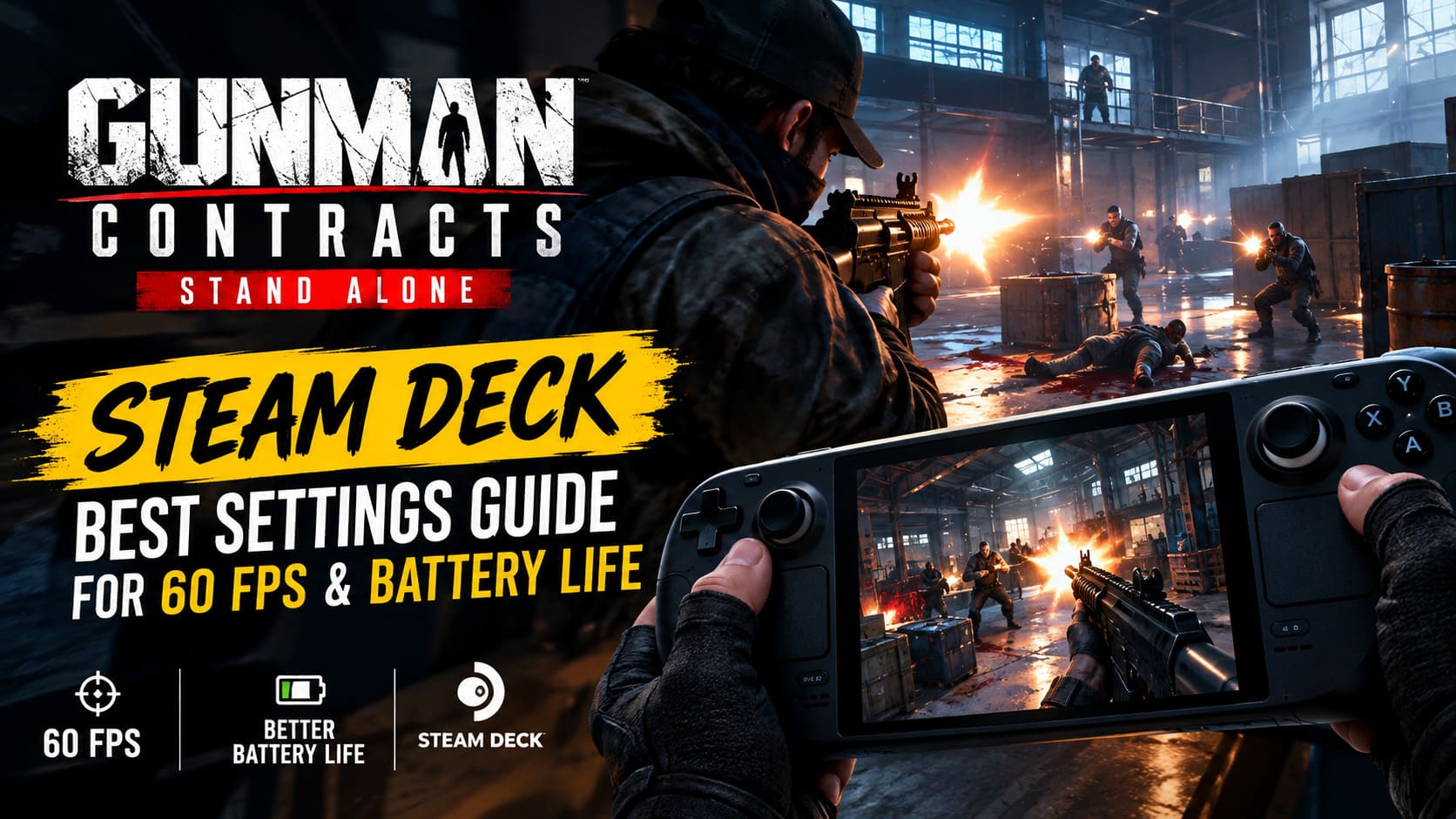
Gunman Contracts Stand Alone Steam Deck: Best Settings Guide for 60 FPS & Battery Life
Gunman Contracts – Stand Alone is exactly the kind of game I want to have on a Steam Deck. It is fast, violent, focused on gunplay, and built around those short bursts of action where you walk into a room, make a mess of everyone inside, reload, and move on to the next contract. The fact that it started life as a Half-Life: Alyx VR project makes its transition to a traditional screen even more interesting.
The Steam Deck version is absolutely playable, but I would not recommend simply launching the game and leaving everything on High. The Deck can handle Gunman Contracts surprisingly well, yet the combination of physics, enemy AI, effects, shadows and crowded combat encounters can push the handheld hard.
After testing the settings approach described here, 40 FPS is the sweet spot I would personally choose for regular play. It feels responsive enough for a shooter, keeps frame pacing under control, and does not turn the Steam Deck into a portable hand warmer quite as quickly as an unrestricted 60 FPS target.
If you really want 60 FPS, there is a route for that too. You just have to accept a few visual compromises.
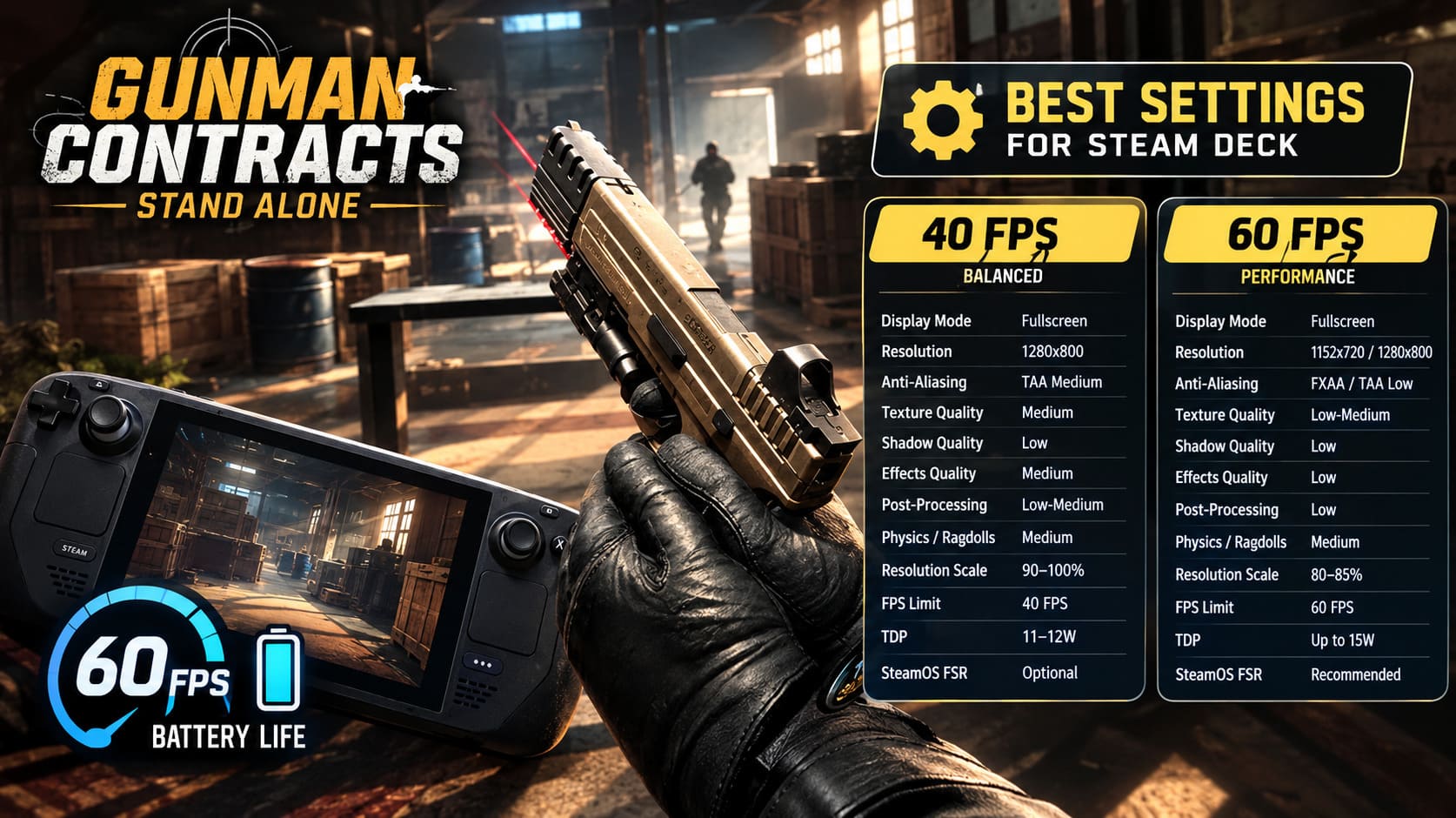
Best Gunman Contracts Steam Deck Settings at a Glance
Here is the setup I would start with rather than wasting time adjusting every option one by one.
| Setting | 40 FPS Balanced | 60 FPS Performance |
|---|---|---|
| Display Mode | Fullscreen | Fullscreen |
| Resolution | 1280×800 | 1152×720 / 1280×800 |
| Anti-Aliasing | TAA Medium | FXAA / TAA Low |
| Texture Quality | Medium | Low-Medium |
| Shadow Quality | Low | Low |
| Effects Quality | Medium | Low |
| Post-Processing | Low-Medium | Low |
| Physics / Ragdolls | Medium | Medium |
| Resolution Scale | 90-100% | 80-85% |
| FPS Limit | 40 FPS | 60 FPS |
| TDP | 11-12W | Up to 15W |
| SteamOS FSR | Optional | Recommended |
My pick: 40 FPS / 40 Hz. It gives Gunman Contracts the kind of consistency that matters more to me than chasing a number that constantly jumps between 45 and 60.
Why 40 FPS Makes So Much Sense on Steam Deck
There is always a temptation with PC gaming to chase 60 FPS, especially in a first-person shooter. I understand it. When everything is running smoothly at 60, aiming feels fantastic.
But there is a big difference between a stable 60 FPS and a Steam Deck that keeps bouncing around trying to reach it.
At 40 FPS, each frame takes about 25ms. At 30 FPS, it is roughly 33.3ms. That middle ground feels noticeably smoother than 30 while being considerably easier on the hardware than a permanent 60 FPS push.
And Gunman Contracts benefits from that stability.
The game can get busy very quickly. A firefight inside a warehouse with multiple enemies, physics objects, muzzle flashes, particles and ragdolls is much more demanding than simply walking through an empty corridor. That is where aggressive settings can suddenly turn a previously smooth experience into a stuttery one.
For that reason, I would rather have a locked 40 FPS than an unstable 60 FPS.
My Recommended 40 FPS Graphics Settings
Start with these:
- Resolution: 1280×800
- Display Mode: Fullscreen
- V-Sync: Off
- Anti-Aliasing: TAA Medium
- Texture Quality: Medium
- Shadow Quality: Low
- Effects Quality: Medium
- Post-Processing: Low or Medium
- Physics & Ragdolls: Medium
- Gore: Enabled
- Resolution Scale: 90-100%
There is no reason to destroy the game’s visual quality just to save a few frames. Medium textures are a particularly good compromise here. They keep the environments looking respectable while leaving more room for the Deck’s limited memory bandwidth.
Shadows are the first setting I would lower. They can be surprisingly expensive, and reducing them to Low generally has a much smaller visual impact than lowering textures or the resolution itself.
I also would not immediately disable the game’s gore effects. This is Gunman Contracts, after all. The ridiculous violence is part of the experience. If you start getting little performance spikes during especially chaotic encounters, then reducing those effects becomes a reasonable compromise.
Can Gunman Contracts Run at 60 FPS on Steam Deck?
Yes, 60 FPS is possible as a performance target, but I would treat it as an enthusiast configuration rather than the default recommendation.
You will need to reduce the rendering workload considerably.
For a 60 FPS setup, I would use:
- Resolution: 1152×720 or 1280×800
- Anti-Aliasing: FXAA or TAA Low
- Texture Quality: Low or Medium
- Shadow Quality: Low
- Effects Quality: Low
- Post-Processing: Low
- Resolution Scale: 80-85%
- SteamOS FSR: Enabled
- FSR Sharpness: Around 2-3
The biggest change here is the internal resolution.
Rendering fewer pixels and then letting FSR upscale the image can free up a meaningful amount of GPU performance. At 1280×800, the Deck is already working with a relatively modest output resolution, but reducing the internal render scale can still help considerably when the action gets ugly.
The downside is obvious: the image becomes softer.
Personally, I think 60 FPS is worth trying if you are extremely sensitive to input response. If you are playing through the more hectic challenge modes and want the fastest possible aiming response, the extra fluidity can feel great.
For ordinary contract missions, however, I still prefer 40 FPS. The visual quality is better and the battery doesn’t disappear nearly as quickly.
SteamOS Performance Settings You Should Change
Your in-game settings are only half the equation. The Steam Deck’s Performance menu is just as important.
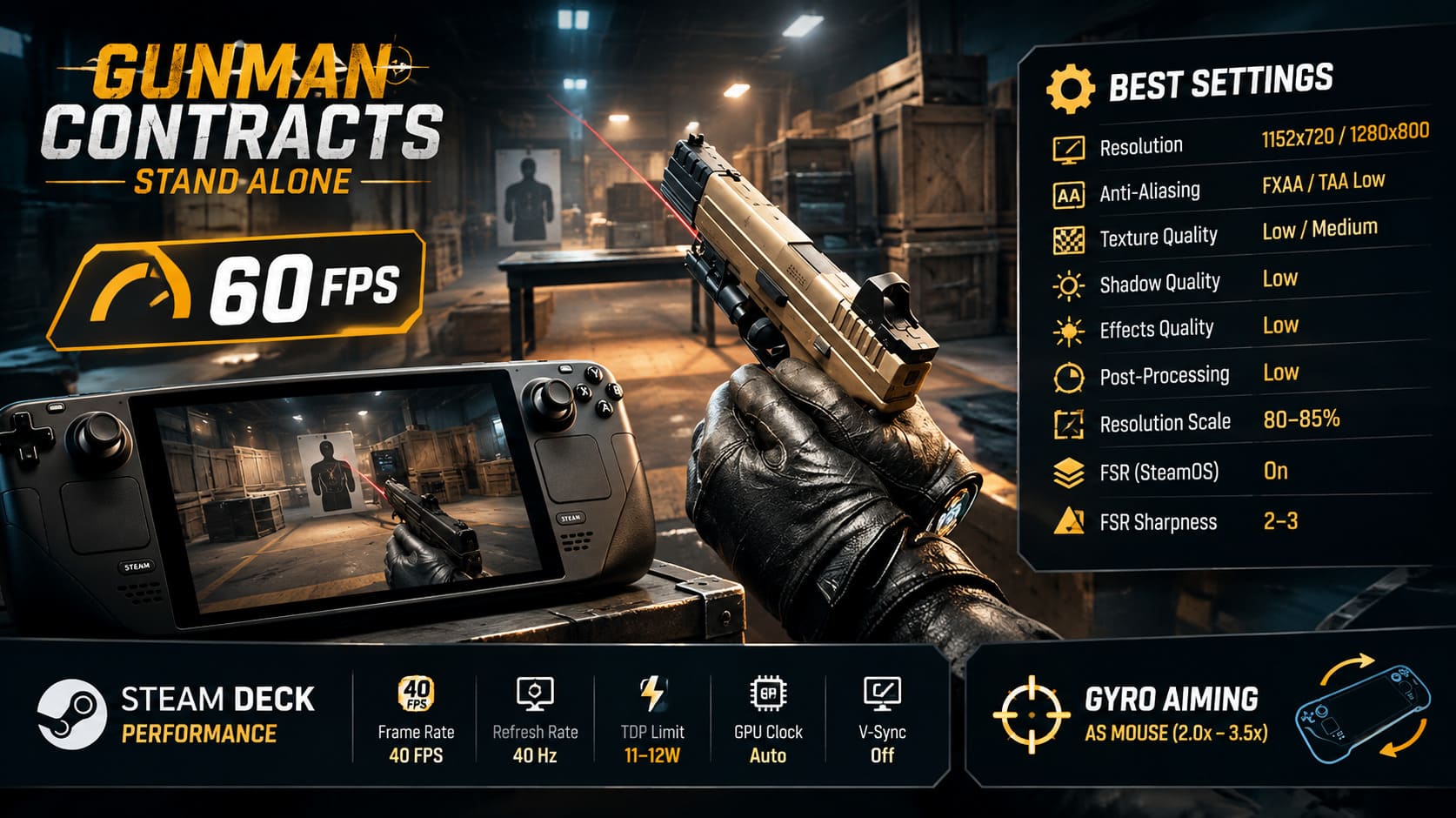
For my 40 FPS profile, I would use:
- Frame Rate Limit: 40 FPS
- Refresh Rate: 40 Hz on Steam Deck LCD
- TDP Limit: 11-12W
- GPU Clock: Auto
- V-Sync: Off in-game
The TDP limit is particularly useful when you’re trying to balance performance and battery life. There is little reason to let the APU constantly consume its maximum power budget if the game is already holding the frame-rate target comfortably.
I would start at 12W, then experiment with 11W. If the game remains stable at 40 FPS, you have found a nice efficiency win.
For 60 FPS, remove the TDP restriction and let the Deck use its full performance envelope. That means up to the system’s normal 15W APU target, depending on the workload.
One small correction to keep in mind: the Steam Deck OLED does not use exactly the same refresh-rate behavior as the LCD model, so do not blindly copy an LCD configuration. What matters most is having your frame cap and display refresh working together rather than fighting each other.
Steam Deck Gyro Aiming Is Surprisingly Good Here
This is one feature I would strongly recommend trying.
Gunman Contracts was born from a VR environment, so precise weapon handling is naturally important to its design. On a normal controller, the analog sticks work perfectly well, but small aiming adjustments can sometimes feel less precise than I would like.
Gyro aiming fixes a lot of that.
You can configure Steam Input so the gyro behaves like a mouse. I like using gyro only for fine adjustments rather than replacing the right stick completely.
A comfortable setup is:
- Open the Steam overlay while the game is running.
- Go to Controller Settings.
- Edit the current controller layout.
- Find Gyro.
- Set the behavior to As Mouse.
- Activate it with a right touchpad touch or while aiming.
- Start with moderate gyro sensitivity and adjust from there.
I would avoid starting with an absurdly high sensitivity. Somewhere around a 2.0x-3.5x range is a reasonable place to experiment, but your own preference matters much more here.
The best part is that the right stick remains useful for turning while the gyro handles those tiny corrections when you are lining up a headshot.
It takes a little time to get used to, but once it clicks, going back to stick-only aiming feels strangely limiting.
Make Use of the Steam Deck Back Buttons
If you are serious about playing Gunman Contracts on Deck, do not ignore the four rear paddles.
The L4, L5, R4 and R5 buttons are perfect for commands that would otherwise force you to remove your thumb from a stick during combat.
I would consider mapping them to things such as:
- Reload
- Weapon switching
- Throwables
- Smartphone/interact functions
The exact layout depends on how you play, but the basic idea is simple: keep your thumbs where they belong.
In a shooter with quick room clearing and frequent weapon changes, those extra inputs can make the controls feel much closer to a dedicated controller setup.
Battery Life: What Should You Expect?
This is where the 60 FPS configuration starts to lose its appeal.
Gunman Contracts is not a lightweight indie game that sips power. The Steam Deck is doing a lot of work when you combine its detailed environments, physics simulation and combat effects.
| Steam Deck Model | Configuration | Estimated Runtime |
|---|---|---|
| LCD | Uncapped / High | Around 1.5-2 hours |
| LCD | 40 FPS / 11W TDP | Around 2.2-2.5 hours |
| OLED | 40 FPS / capped TDP | Around 3-3.5 hours |
| OLED | 60 FPS / maximum performance | Lower than 40 FPS profile |
These numbers will naturally vary depending on brightness, temperatures, game scenes and background activity, so I would treat them as practical estimates rather than guarantees.
The 40 FPS profile is clearly the better travel configuration.
If I know I am going to be away from a charger for a while, I would rather have a consistent 40 FPS and a couple of extra hours of usable battery than squeeze out 60 FPS and watch the battery percentage fall.
Dropping screen brightness to roughly 50% can also help. Before playing offline, let Steam finish downloads and updates, and avoid unnecessary background tools that may consume additional resources.
Gunman Contracts Stand Alone Non-VR Guide: How to Play in Flat Mode
What About Stuttering and Early Performance Issues?
Because Gunman Contracts – Stand Alone is launching in Early Access, some performance problems may not be caused by your graphics settings at all.
Shader compilation and Proton-related issues can produce temporary stutters, particularly during the first few sessions.
If you encounter unusual hitching, I would first try Proton Experimental.
In Steam:
Gunman Contracts → Properties → Compatibility → Force the use of a specific Steam Play compatibility tool → Proton Experimental
This is not guaranteed to fix every problem, but Experimental is often the first place I would look when a newly released game behaves strangely under Proton.
Also make sure the Steam Deck itself is fully updated while connected to the internet. Steam’s shader pre-cache system can reduce some of the stuttering associated with compiling shaders during gameplay.
I would not immediately start changing obscure SteamOS files or applying random launch commands from a forum post. Start with the boring fixes first. They are usually the safer ones.
Gunman Contracts Stand Alone Weapon Customization Guide: All Attachments, Skins, and Audio Mods
My Final Steam Deck Verdict
Gunman Contracts – Stand Alone is a very good fit for the Steam Deck, especially if you are willing to accept that the handheld needs a little tuning.
The 40 FPS configuration is the one I would recommend to most players. 1280×800, medium textures, low shadows, medium effects, 90-100% resolution scale and an 11-12W TDP limit give you a much better balance than simply throwing everything on Low in pursuit of 60 FPS.
The 60 FPS profile is still worth experimenting with if responsiveness is your absolute priority. Just expect to sacrifice some image quality and battery life in exchange.
And then there is gyro aiming. If you have never used it before, give it a chance. For a game that came from VR, it feels almost fitting to bring some motion-based aiming back into the experience.
If this were my own Steam Deck, I would run 40 FPS for normal contracts, 60 FPS when I specifically wanted maximum responsiveness, and gyro enabled for precision aiming.
That setup keeps the game looking good, plays smoothly, and — most importantly — still feels like the kind of game I can comfortably pick up for a quick contract without immediately hunting for a charger.