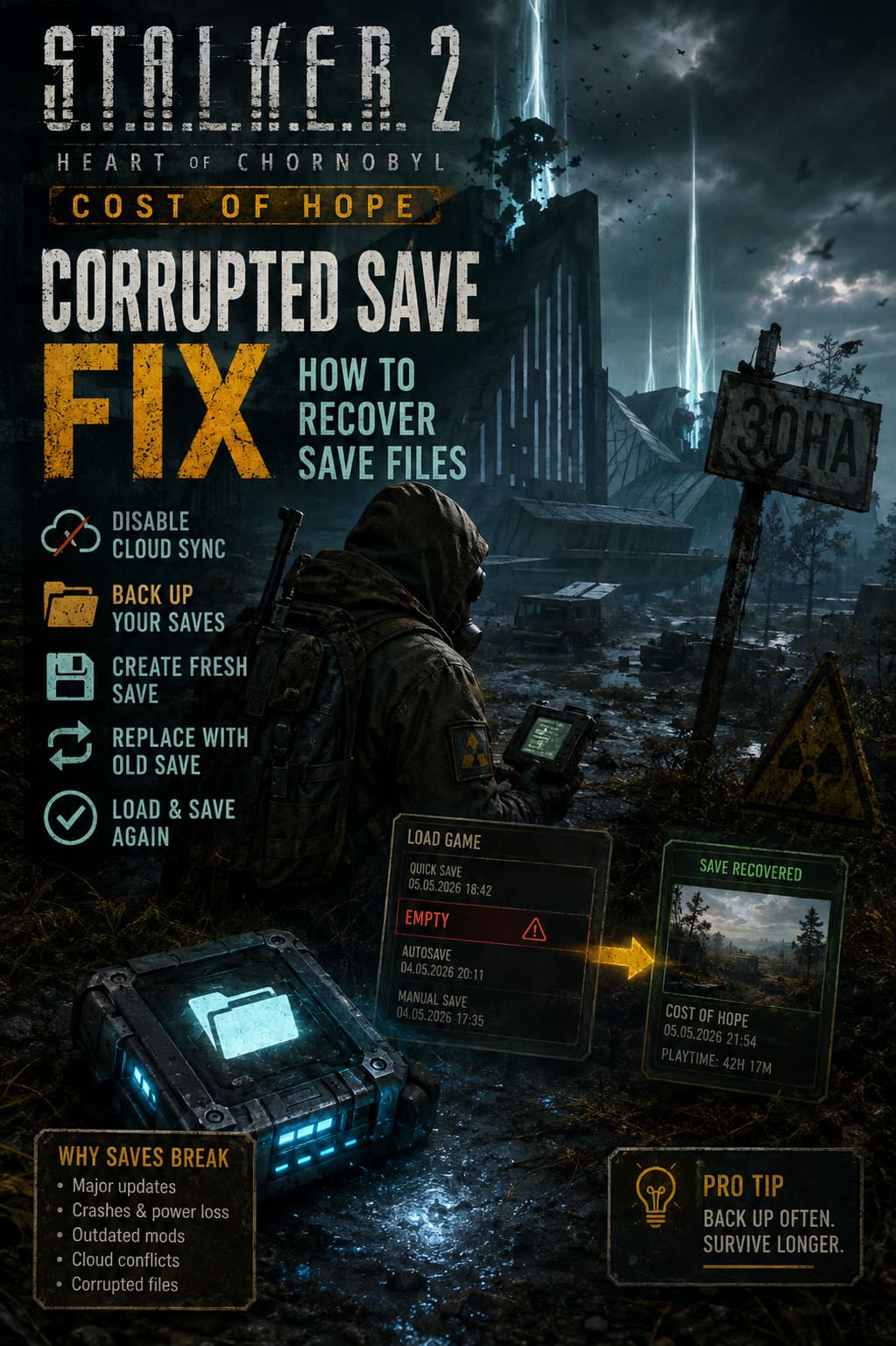
STALKER 2 Cost of Hope Corrupted Save Fix: How to Recover Save Files
There are few things more painful in a game like S.T.A.L.K.E.R. 2: Heart of Chornobyl than losing a save. The Zone is built around slow exploration, dangerous encounters, side quests you can easily miss, and long stretches where you are simply trying to survive with whatever ammunition and supplies you have left. So when Cost of Hope arrives alongside a major engine update and suddenly your save list looks empty, it is understandable to assume that dozens of hours are gone forever.
The good news is that a missing save in STALKER 2 Cost of Hope does not always mean the actual progress has been destroyed. Sometimes the game simply stops recognizing the campaign structure that points toward your existing save files. In other cases, the problem comes from cloud synchronization, outdated mods, interrupted autosaves, or files left behind after a major update. I have seen similar situations in plenty of PC games, and the first rule is always the same: do not start deleting random files before making a backup.
This guide focuses on practical ways to recover STALKER 2 save files after corruption, missing campaign entries, crashes, or an apparently empty Load Game menu. None of these methods is guaranteed for every installation, but they give you several options before you accept starting the Zone all over again.
How to Fix Stalker 2 Cost of Hope Black Screen After Cutscene Error
Why STALKER 2 Saves Can Break After a Major Update
Large updates are complicated beasts. When a game moves to a significantly changed engine build or receives a major expansion, the underlying way it handles profiles, configuration data, mods, and saved-game information can change. A save that worked perfectly yesterday can suddenly behave strangely after the update.
One particularly frustrating situation is when the individual save files are still sitting on your SSD, but STALKER 2 no longer displays them correctly in the game menu. That distinction matters. If the files are physically present, recovery may still be possible.
Crashes during saving are another obvious suspect. A power failure, forced shutdown, game crash, or PC reset at exactly the wrong moment can leave incomplete data behind. Mods can make things even messier, especially when an older mod was created for a previous version of the game.
| Problem | What You May See | Possible Cause |
|---|---|---|
| Missing saves | Load Game appears empty | Campaign or profile data problem |
| Greyed-out saves | Files exist but cannot be selected | Version or profile mismatch |
| Crash while loading | Game closes or returns to desktop | Corrupt save or incompatible mod |
| Progress reverted | Older checkpoint appears | Cloud synchronization conflict |
| New Game only | Existing campaign disappears | Local campaign metadata issue |
The important thing is not to panic and immediately overwrite everything with a new playthrough.
Where to Find Your STALKER 2 Save Files
Before trying anything complicated, locate the save directory. Make a complete copy of your existing saves first. Put that backup somewhere outside the game’s normal AppData folders, such as a separate desktop folder or another drive.
Steam Save Location
For Steam installations, the supplied community path is:
C:\Users\YOUR_USERNAME\AppData\Local\Stalker2\Saved\STEAM\SaveGames\Data
Xbox App and Microsoft Store Save Location
Microsoft Store and Xbox App installations use a different Windows package structure:
C:\Users\YOUR_USERNAME\AppData\Local\Packages\GSCGameWorld.S.T.A.L.K.E.R.2HeartofChernobyl_6fr1t1rwfarwt\SystemAppData\xgs\
The exact structure inside the Xbox directory can contain several folders and numerical identifiers, so do not be surprised if it takes a little digging to reach SaveGames\Data.
There is another small Windows annoyance here: AppData is hidden by default. Open File Explorer, select the View options, and enable Hidden Items. Once you find the folder, resist the temptation to start experimenting immediately. Copy it first.
Method 1: Create a Fresh Save and Replace Its File
This is probably the most interesting recovery technique when the original saves are still present but the game refuses to recognize them. The basic idea is to let STALKER 2 create a completely fresh save, then use that new save as a template for the file name and slot structure.
It sounds strange, but games sometimes behave differently when a save has been created through the current version of the game. You are essentially giving the game a fresh entry and then testing whether your older progress can be loaded through that structure.
Step 1: Stop Cloud Synchronization
Before touching your local files, prevent the cloud service from immediately restoring the problematic version.
On Steam, open the game’s Properties and check the Steam Cloud setting. If you are using the Xbox App or Microsoft Store version, temporarily disconnecting the PC from the internet can prevent unwanted synchronization while you work.
The reason is simple: you want one controlled copy of the data. Otherwise, you can spend ten minutes repairing something locally only for the cloud system to replace it with the damaged state.
Step 2: Back Up Everything
Find the relevant STALKER 2 save directory and copy the entire Data folder somewhere safe.
Do not skip this step. If the experiment fails, your backup is the thing that allows you to try another approach without making the situation worse.
Step 3: Clear the Local STALKER 2 Data Carefully
The original method suggests removing the local STALKER 2 folder so that the game can regenerate its configuration and campaign information. This can clear corrupted metadata, but it is also the point where you need to be especially careful.
Never perform this without a verified backup of your saves.
After the local data has been cleared, start the game and allow it to create a fresh profile environment.
Step 4: Make a New Manual Save
Start a new game and play until you have control of your character. You do not need to waste time progressing through the campaign. Create a new manual save as soon as the game allows you to do so.
Leave the game running and minimize it rather than closing it completely.
Now open the save directory again. You should have a freshly generated save file created by the current installation.
Step 5: Replace the Fresh Save With Your Old Progress
Find the new save and copy its exact filename. Keep that filename available because you will use it for the older save.
Next, remove the newly generated save from the active folder. Go back to your backup and identify the most recent old save using the Date Modified information.
Rename the old save to match the filename of the fresh save and place it into the active save directory.
This is the part where I would slow down and double-check everything. You do not want to accidentally rename the wrong file or move your only backup.
Step 6: Load and Immediately Save Again
Return to STALKER 2 and check the Load Game menu. If the replacement worked, the game may now recognize the save through the newly generated campaign structure.
If your old character and progress appear, make another manual save immediately. Do not spend twenty minutes wandering around the Zone before creating a new recovery point.
Once you have confirmed that the new save works, you can reconnect cloud synchronization and carefully decide which version should become the active cloud copy.
Method 2: Try a Clean Cloud Synchronization
Sometimes the local files are the problem while the cloud still contains a usable version. This method is therefore worth attempting if your cloud saves were synchronized before the corruption occurred.
First, completely close STALKER 2. Then remove the local game data after backing it up, reconnect to the internet, and make sure cloud synchronization is enabled.
Launch the game and allow the platform to download the available synchronized files. If the cloud copy predates the corruption, the missing campaign may return.
This is one of those fixes where timing matters. If the corrupted files have already synchronized to the cloud, downloading them again will not magically repair them. In that case, your local backup becomes much more valuable.
Method 3: Remove Mods Before Blaming the Save
If you have been using mods, do not ignore them.
A major STALKER 2 update can change files, systems, and engine behavior that older mods were designed around. A mod that was perfectly stable before the Cost of Hope update can suddenly cause loading failures or crashes.
Start by disabling or unsubscribing from your mods. Then check the installation directory for the ~mods folder under:
Stalker2\Content\Paks\~mods
If you find old mod files, remove them after making sure you have backups of anything you actually need.
Afterward, use Steam’s Verify Integrity of Game Files option. This forces the launcher to compare your installation against the official files and replace missing or damaged game assets.
I would absolutely try this before doing anything aggressive with save files. If the game crashes because of an incompatible mod, replacing perfectly healthy saves will accomplish nothing.
What If Nothing Works?
This is the frustrating part of save recovery: sometimes the underlying save really is damaged. A game can occasionally write incomplete data that cannot be reconstructed by simply changing filenames or clearing campaign metadata.
Still, do not immediately delete the broken files. Keep them archived. Future patches, community tools, or developer fixes can sometimes change what is recoverable.
Also check every available autosave and manual save rather than focusing exclusively on the newest one. In a game like STALKER 2, losing twenty minutes is irritating. Losing fifty hours because you only checked one file is considerably worse.
How I Would Protect a STALKER 2 Playthrough
After dealing with corrupted saves in different games, I have become a little obsessive about backups. It takes seconds to copy a save directory, while replaying an entire RPG campaign can take days.
A simple manual routine works surprisingly well. Before installing a major update, copy the current SaveGames folder somewhere safe. Keep several generations rather than constantly replacing the same backup.
You can also automate the process with a small Windows batch script that copies the save directory into a separate backup location. The important part is not the script itself. It is having multiple restore points.
I would especially recommend a backup before installing major DLC, engine updates, graphics-driver changes, or mods. Those are the moments when your otherwise stable setup can suddenly become unpredictable.
Final Thoughts
A corrupted or missing STALKER 2 save after the Cost of Hope update is a horrible surprise, but an empty Load Game menu does not automatically mean your entire journey through the Zone has vanished. The first thing I would do is locate the physical saves and make a backup. From there, disabling cloud synchronization, generating a fresh save, testing the profile-slot replacement approach, checking cloud recovery, and removing outdated mods are all reasonable steps.
Personally, I would start with the least destructive option and work upward. Backup first, experiment second. That is the golden rule.
STALKER 2 is the kind of game where your save file represents much more than a few numbers on a hard drive. It represents quests completed, gear collected, decisions made, anomalies survived, and all those ridiculous moments that only happen when you are barely alive in the Zone. If your files are still sitting on the drive, do not give up on them just because the game menu suddenly refuses to cooperate.
And once you get back in, make a new manual save. Then make another backup. The Zone has enough anomalies already.