Nivalis Nights System Requirements: Minimum & Recommended PC Specs
I have played plenty of cyberpunk games over the years, from action-heavy shooters to slower narrative adventures, and Nivalis Nights immediately caught my attention for a very different reason. This isn’t another game where you spend the whole evening shooting corporate soldiers or hacking your way through some giant conspiracy. Instead, ION LANDS is taking the world established with Cloudpunk and turning it into a much broader life simulation, business management game, and open-ended cyberpunk sandbox.
The setting alone makes it interesting. Nivalis is a gigantic vertical city built above an ocean, filled with neon signs, wet streets, crowded walkways, businesses, apartments, waterways, and the constant movement of people and vehicles. You start at the bottom, both literally and economically, trying to make a living with a small food business before gradually building something much larger. But all that detail comes with a price, and that price is PC hardware.
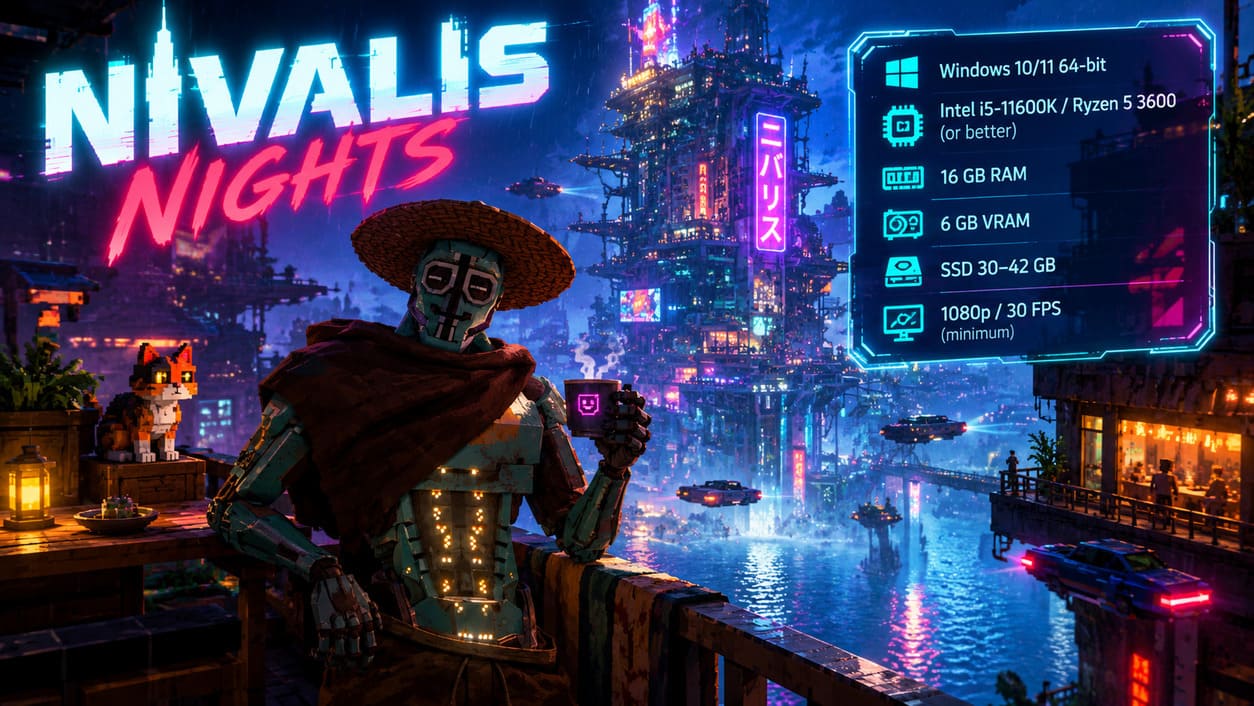
If you’re wondering whether your computer can run Nivalis Nights, the most important things to look at are 16 GB of RAM, a dedicated GPU with at least 6 GB of VRAM, a modern multi-core processor, and an SSD. The game is designed around a handcrafted voxel-based city and a persistent simulation, so its requirements aren’t simply about rendering pretty neon lights. A lot is happening behind the scenes as well.
Best Multiplayer Campaign Factions in Total War: Warhammer 3 (2026 Co-Op Guide)
Nivalis Nights PC Requirements at a Glance
Before getting into the technical details, here’s the basic picture. The minimum configuration is aimed at 1080p and around 30 FPS on very low settings, while the recommended specification is intended for substantially smoother 1080p or 1440p gameplay at around 60 FPS with medium-to-high visual settings.
| Component | Minimum | Recommended |
|---|---|---|
| Operating System | Windows 10/11 64-bit | Windows 10/11 64-bit |
| CPU | Intel Core i5-11600K / AMD Ryzen 5 3600 or equivalent | Modern high-performance multi-threaded Intel/AMD CPU |
| RAM | 16 GB | 16 GB, preferably dual-channel |
| GPU | 6 GB VRAM dedicated GPU | 8 GB VRAM GPU or better |
| DirectX | DirectX 11 | DirectX 12 |
| Storage | 30–42 GB | 30–42 GB SSD |
| Target | 1080p / 30 FPS / Very Low | 1080p–1440p / 60 FPS / Medium–High |
Why 16 GB of RAM Matters So Much
The part of the Nivalis Nights requirements that stands out to me most is the fact that 16 GB of system RAM is required even at the minimum level. That’s increasingly common in ambitious modern PC releases, but it’s still worth pointing out because life sims and management games traditionally haven’t always been particularly demanding in this area.
The reason makes sense when you look at how Nivalis is constructed. This isn’t a tiny collection of procedural streets being generated around the player. ION LANDS has created a large handcrafted voxel environment with interconnected areas, detailed interiors, furniture, businesses, characters, vehicles, and other persistent objects. The game needs to keep a lot of information available while you move around the city, particularly if it wants to avoid constantly interrupting the experience with loading screens.
There’s also the customization side. Once you’re buying apartments and businesses, the game has to remember where objects are placed, what you’ve changed, which properties you own, and various simulation states. That’s a very different workload from a linear cyberpunk adventure. Personally, I wouldn’t recommend trying to squeeze Nivalis Nights onto an 8 GB system even if some clever optimization eventually makes it launch. 16 GB should be treated as the practical floor, not a target you want to sit below.
CPU Requirements and the Living City
The GPU will obviously attract most of the attention when people talk about PC requirements, but Nivalis Nights also looks like the kind of game where CPU performance can make a surprisingly big difference. The city isn’t just decoration. Its inhabitants, vehicles, shops, customers, businesses, and other systems are constantly being simulated.
Think about what happens when you’re running your own restaurant while hundreds of other things continue elsewhere. Customers have their own routines, businesses are producing economic activity, vehicles are moving through the city, and different areas become more or less active depending on the time of day. That creates a very different CPU workload from a game where most NPCs simply stand around until you walk close enough to them.
This is why I’d pay particular attention to the processor if you’re using an older gaming PC. A decent six-core CPU should give you a much healthier starting point than an aging quad-core chip, especially in crowded areas. Nighttime city districts filled with NPCs and active businesses are exactly where CPU limitations could become noticeable.
GPU and VRAM: 6 GB Is the Starting Point
Nivalis Nights also has a fairly clear requirement when it comes to graphics memory: 6 GB of dedicated VRAM at minimum. The examples listed around this class include cards such as the GTX 1660 SUPER, RTX 3050, RX 6600, and Intel Arc A750. Naturally, exact performance will depend on the rest of the system and the game’s final optimization, but the VRAM requirement is the number I’d watch first.
The reason is easy to understand when you look at the visual design. Nivalis is built around dense environments, reflective wet surfaces, neon illumination, weather effects, detailed interiors, and a large amount of geometry. A 4 GB graphics card might still be capable of rendering many modern games at reduced settings, but it doesn’t give you much breathing room for a title designed around this kind of continuously streamed environment.
If you’re buying or upgrading specifically for Nivalis Nights, I’d personally aim beyond the absolute minimum. 8 GB of VRAM is a much more comfortable place to start, particularly if you want to use higher texture settings or play at 1440p. Modern RTX hardware also gives you access to additional technologies that can help when the raw rendering workload becomes heavy.
Can You Play Nivalis Nights on a Laptop?
This is where things become more complicated. Integrated graphics are not the configuration I’d consider suitable for Nivalis Nights, and the official requirements point toward a dedicated GPU with its own VRAM. That immediately rules out a huge number of thin office laptops and inexpensive ultrabooks, regardless of how new their processors might be.
A gaming laptop with a dedicated NVIDIA, AMD, or Intel GPU and at least 6 GB of VRAM is the safer route. However, don’t assume that a laptop GPU with the same name as a desktop model will deliver identical performance. Laptop GPUs have power and thermal limitations, and sustained gaming performance can vary considerably between different machines.
If your goal is something closer to 1440p at 60 FPS with high settings and minimal reliance on upscaling, you’ll want a genuinely powerful gaming laptop rather than an entry-level machine that merely meets the minimum specification on paper.
Why an SSD Is More Than a Nice Upgrade
The storage requirement itself isn’t frightening. Nivalis Nights is expected to occupy roughly 30–42 GB, which is pretty manageable compared with some enormous modern releases. What matters more is where you install it.
An SSD makes much more sense for this game because the city is constantly moving between different environments and asset states. You can travel across districts, enter businesses, move between different vertical sections of Nivalis, and encounter changing weather conditions. A mechanical HDD can still offer plenty of storage capacity, but its slower random access performance can become a problem when a game is constantly requesting new assets.
In practice, this is the sort of title where I’d rather sacrifice some spare storage than put it on an old hard drive. A SATA SSD is already a major improvement, while an NVMe SSD gives you an even faster and more modern storage setup. It won’t magically increase your average FPS, but it can help with loading and asset streaming, which is especially important in a large city simulation.
DirectX 11 vs DirectX 12
The minimum specification lists DirectX 11 compatibility, while the recommended configuration moves to DirectX 12. That distinction is worth noting because modern rendering APIs can make better use of multi-threaded CPU workloads and newer GPU architectures.
If you’re using relatively modern hardware, there’s little reason to deliberately chase an older graphics API simply because your system supports it. DirectX 12 is particularly relevant for players using newer graphics cards and technologies such as DLSS. Still, the actual performance difference will depend on how well the game implements each rendering path, so I wouldn’t assume that simply switching APIs guarantees a higher frame rate.
DLSS and Modern NVIDIA GPUs
Players with newer NVIDIA hardware have another advantage. Nivalis Nights supports modern rendering features through its DirectX 12 path, giving compatible systems the opportunity to use technologies such as DLSS where supported by the game and GPU.
This matters because a visually dense cyberpunk city can become expensive to render at native resolution. Reflections, atmospheric effects, volumetric lighting, rain, fog, crowds, and detailed surfaces all add up. Upscaling technologies can reduce the amount of raw rendering work the GPU has to perform while still producing a high-resolution final image.
For an RTX 40-series or RTX 50-series owner, I’d definitely experiment with these options rather than automatically forcing native resolution. There’s no prize for making your GPU suffer if a well-configured upscaling mode delivers a nearly identical image with considerably better frame pacing.
What Kind of PC Would I Personally Build for Nivalis Nights?
If I were putting together a PC specifically for this game, I wouldn’t build directly around the minimum requirements. Minimum specifications are useful for knowing whether a game should launch, but they’re rarely where I want to be for a long-term gaming machine.
I’d aim for something along these lines:
- CPU: Modern six-core or eight-core processor with strong single-thread performance.
- RAM: 32 GB if building a new gaming PC, even though 16 GB is the official requirement.
- GPU: Dedicated card with at least 8 GB VRAM for more breathing room.
- Storage: NVMe SSD with plenty of free space.
- OS: Windows 10 or Windows 11 64-bit.
There’s nothing exotic about that configuration by modern gaming standards. The important thing is that it gives you room to experiment with higher settings rather than forcing you to spend the entire game fighting the graphics menu. And for a title whose biggest attraction is the atmosphere of its city, that extra headroom could make a noticeable difference.
What Makes Nivalis Nights So Demanding?
After looking at the specifications, I don’t think it’s accurate to say the game is demanding simply because it has pretty graphics. The bigger issue is that Nivalis Nights is trying to simulate an entire lifestyle inside a dense cyberpunk city. You’re running businesses, interacting with characters, customizing properties, traveling through the city, dealing with changing weather, fishing, exploring, and following a narrative while the world continues to operate around you.
That’s what makes the project interesting to me. Games like this can become much more memorable when the world feels like it continues existing even when you’re not directly involved. At the same time, that ambition creates a much more complicated technical problem for the developers. Every extra persistent system potentially means more CPU calculations, more memory usage, more saved state, and more assets being streamed.
Nivalis Nights Launch Preparation
Nivalis Nights is scheduled to launch on September 29, 2026, and there isn’t a public demo available to use as a convenient hardware benchmark. That makes the official requirements particularly useful before launch, but I would still keep expectations realistic around the first version of the game.
PC games can behave very differently depending on the exact combination of CPU, GPU, drivers, RAM configuration, resolution, background applications, and graphics settings. Two machines with technically similar specifications can sometimes produce very different frame-time behavior. That’s why launch-day performance reports will be especially useful for people whose computers sit right around the minimum specification.
Final Nivalis Nights PC Checklist
For me, the main takeaway is pretty straightforward: don’t look only at the GPU. Nivalis Nights is a simulation-heavy game, so CPU performance, system RAM, VRAM, and storage speed all matter. If your PC has 16 GB of RAM, a dedicated 6 GB GPU, a reasonably modern multi-core processor, and an SSD, you’re at least working with the hardware class the developers are targeting.
If you’re comfortably above those numbers, you should have much more freedom to push visual quality and resolution. I’d especially recommend 32 GB of RAM for a new PC build, even though it isn’t necessary according to the official baseline, simply because it gives the rest of the system more breathing room for a modern Windows gaming setup.
Nivalis Nights is one of those games where the technical requirements actually tell you something about the design philosophy. The developers aren’t building a small cyberpunk backdrop for a linear adventure; they’re trying to create a city that feels inhabited, persistent, and worth living in. If the final version manages to combine that ambition with solid PC optimization, wandering through Nivalis beneath the neon rain could be one of the more interesting cyberpunk experiences of 2026.