How to Spawn Vehicles in WARDOGS: Ultimate Bulkhead Guide
WARDOGS is the kind of tactical shooter where having good aim is only half the battle. With huge 100-player matches, destructible environments, a persistent cash economy, and a massive battlefield, simply running toward the objective with a rifle is usually a great way to arrive late and die tired. After playing plenty of large-scale shooters, I really like the way WARDOGS makes vehicles feel like strategic resources rather than disposable toys. If your squad understands how to buy, deploy, protect, and replace its vehicles, you can save huge amounts of time and keep your faction supplied around the central objective.
The important thing to understand is that vehicles in WARDOGS are tied directly to the game’s economy. You don’t just wait for a tank to respawn at a random flag, jump inside it, and drive away for free. Your progression, available cash, team organization, and battlefield infrastructure all matter. That can seem complicated at first, but once the system clicks, vehicle deployment becomes one of the most useful parts of the game.
WARDOGS Base Building Guide: Essential Fortification Tips to Win the Control Zone
How the Vehicle Economy Works in WARDOGS
At the beginning of a match, your faction operates from its main Headquarters, or HQ. The base is protected from enemy attacks, but it is positioned a long distance away from the active combat zone. That distance is one of the first things new players underestimate. You can technically walk toward the objective, but in a game built around large-scale combined arms warfare, spending several minutes jogging across the map is rarely the best use of your time.
This is where vehicles become essential. Ground transports, armored vehicles, tanks, and helicopters allow your team to turn the enormous map into a manageable battlefield. Instead of treating a vehicle as something you grab whenever one happens to be available, I recommend thinking about every purchase as an investment. A cheap transport can get a squad into position, while an expensive tank might completely change how the enemy approaches a contested area.
There are also two different financial considerations. A vehicle generally needs to be unlocked through your progression before you can use it, and spawning that vehicle during a match requires additional cash. So unlocking a powerful tank doesn’t mean you can immediately summon one whenever you want. You still need enough money in the current match to pay for the deployment.
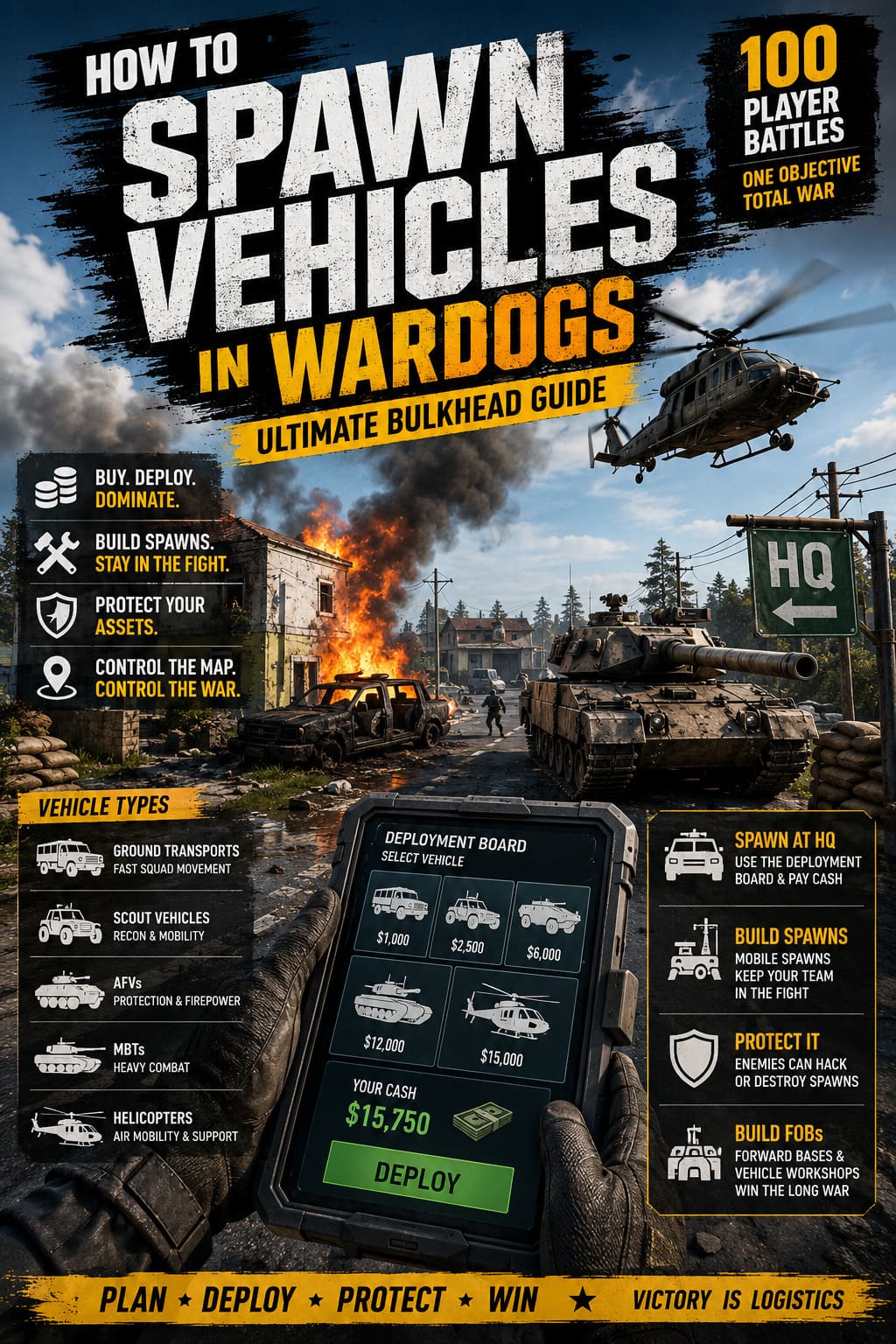
| Vehicle Type | Main Purpose | Best Use |
|---|---|---|
| Ground Transports | Fast squad movement | Getting infantry to the front |
| Scout Vehicles | Recon and mobility | Flanking and spotting |
| AFVs | Protection and firepower | Supporting infantry |
| MBTs | Heavy combat | Breaking defensive positions |
| Helicopters | Air mobility and support | Rapid deployment and battlefield pressure |
How to Spawn a Vehicle at Your HQ
The basic vehicle spawning process is fairly straightforward once you know where to look. When you arrive at your faction’s HQ, don’t immediately start searching around the base for a vehicle sitting outside. Your first stop should be the Deployment Board, which acts as the central purchasing point for your faction’s available assets.
Step 1: Find the Deployment Board
Enter the HQ and locate the physical Deployment Board terminal. Interacting with it opens the strategic purchase interface. This is where you can see the vehicles currently available to your faction.
Step 2: Select Your Vehicle
The purchase screen separates vehicles into different categories, including transports, armored fighting vehicles, main battle tanks, and helicopters. Take a moment to check the options instead of automatically buying the biggest machine available. A massive tank might look impressive, but sometimes putting several squad members into a transport and getting them onto the objective is much more valuable.
Step 3: Check Your Unlock and Cash Requirements
This is the part that can catch new players off guard. You need to have the vehicle unlocked through progression, and you also need enough match cash to actually spawn it.
Heavy equipment can require a substantial progression investment. For example, powerful main battle tanks such as the L2A6 can demand a large amount of credits to unlock, while their actual battlefield deployment costs additional match-specific cash. Always check both requirements before committing your money.
Step 4: Confirm the Purchase
Once you’ve selected an available vehicle and confirmed that you have enough cash, execute the spawn command. If everything is valid, the game will process the purchase and prepare your vehicle for deployment.
Step 5: Move It Away From the Spawn Pad
Your new vehicle should appear at the appropriate production pad or runway inside the HQ. This final step sounds obvious, but it is surprisingly important. If you leave a tank, helicopter, or other large vehicle sitting directly on the deployment area, another teammate may be unable to spawn their own vehicle.
If you encounter a ‘Space Occupied’ message, don’t immediately assume the system is broken. Check whether another vehicle is blocking the production area. In a coordinated squad, someone should move the existing vehicle away from the pad as soon as possible.
Why Mobile Spawn Vehicles Matter So Much
Getting a tank or transport from HQ is useful for the opening push, but the real power of WARDOGS appears when your faction establishes forward mobility. The map is simply too large for your team to repeatedly travel from the main base after every death.
This is where Spawn Vehicles become incredibly valuable. These mobile assets function almost like temporary forward operating bases, allowing teammates to respawn much closer to the fighting. From my experience with large-scale multiplayer shooters, this is exactly the kind of system that can separate an organized faction from 30 players doing their own thing.
To construct one, your team needs the appropriate Hammer and Wrench tools, along with enough building supplies. Your faction can only maintain a limited number of active Spawn Vehicles, so placement matters. You don’t want to park both of them somewhere that looks convenient for five minutes but becomes useless once the battle moves.
How to Use a Mobile Spawn Effectively
Once a Spawn Vehicle has been built, move it into a defensible but useful position. Ideally, it should be close enough to the objective to save your team significant travel time without being so exposed that the enemy can destroy or hack it immediately.
Dead teammates can access the tactical map and select the forward spawn option. Using it costs a relatively small amount of cash, but the important resource is the time saved. Instead of returning to HQ and spending several minutes traveling back to the fight, players can rejoin the battle almost immediately.
There is a catch: mobile spawns aren’t an unlimited respawn machine. Individual players can face a cooldown of several minutes before using the same asset again. That prevents a single Spawn Vehicle from becoming an endless stream of infantry attacking the same position without consequence.
Protect Your Spawn Vehicles
If your team builds a forward spawn and simply forgets about it, you’re practically handing the enemy a strategic target. Spawn Vehicles can be interacted with by opposing players, and a successful hack can temporarily turn your own infrastructure against you.
That possibility changes how I approach vehicle placement. I would rather put a spawn slightly farther from the objective behind cover, with a few teammates watching the surrounding area, than place it directly beside the capture zone where every enemy knows exactly where to look.
A good spawn location should provide three things:
- Reasonable distance from the objective.
- Cover or terrain that makes it difficult to attack.
- Enough room for your team to defend and move vehicles around it.
If the enemy captures or hacks your spawn, the consequences can be brutal. A position that was helping your faction reinforce the hill can suddenly become an advantage for the other side.
FOBs and Forward Vehicle Production
Spawn Vehicles aren’t the only way to bring your infrastructure closer to the action. WARDOGS also allows factions to establish Forward Operating Bases, or FOBs. These static positions take more planning but can become extremely valuable when a battle remains concentrated in one region.
FOBs require construction resources and cooperation from multiple players. There are restrictions on how close they can be built to one another, so randomly dropping them around the map isn’t an effective strategy. A properly positioned FOB gives your faction a durable forward presence rather than another temporary spawn point.
One particularly useful upgrade is the Vehicle Production Workshop. Once established at an appropriate FOB, it can function as a secondary vehicle production point. Instead of sending every transport all the way from HQ, your faction can produce suitable light vehicles much closer to the front.
That can make a huge difference during prolonged King of the Hill fights. When both sides are constantly replacing losses, shaving minutes off every vehicle delivery eventually becomes a massive strategic advantage.
Don’t Waste Your Vehicle Investment
The biggest mistake I see in vehicle-focused multiplayer games is treating expensive equipment like it has infinite lives. WARDOGS makes that habit especially painful because vehicles are connected to the economy. Losing a valuable tank because someone drove it alone into an enemy position can hurt much more than simply giving the opposing team a kill.
Heavy equipment should have a crew whenever possible. A driver, gunner, and commander working together can spot threats, react faster, and keep the vehicle alive considerably longer. A tank with a coordinated crew is a completely different beast from a tank controlled by one player who is trying to do everything at once.
You should also avoid unnecessary collisions around HQ. Vehicle traffic can become chaotic, especially when several players are trying to spawn equipment at once. Damage and repair costs can turn careless driving into a surprisingly expensive mistake, so don’t treat the deployment area like a demolition derby.
The Best WARDOGS Vehicle Habits
If you’re still learning the game’s economy, I’d keep a few simple rules in mind. First, don’t spend all your money on the most expensive vehicle just because you can afford it. Second, keep important vehicles moving when the battlefield demands it, but don’t drive them directly into situations where their survival is unlikely. Third, always think about where your team will respawn after the next wave of deaths.
A strong faction should also communicate before spending large amounts of cash. There is little point in one player purchasing a helicopter while another buys a tank if the squad actually needs several transports to reinforce a capture point. Vehicle purchases should support the team’s current objective, not simply satisfy individual players who want to drive something huge.
Finally, remember that a vehicle can be strategically useful even when it isn’t shooting anyone. A transport that gets an entire squad to a flank, a helicopter that rapidly relocates players, or a Spawn Vehicle positioned behind a defensive line can have more impact than a tank that gets three kills before being destroyed.
Final Thoughts
WARDOGS rewards players who understand that battlefield logistics are just as important as gunfights. The basic process of spawning a vehicle at HQ is simple: use the Deployment Board, choose an unlocked vehicle, pay the required match cash, and move the vehicle away from the production area. The deeper strategy comes from deciding which vehicle to buy, where to take it, when to replace it, and how to protect it.
For me, that’s one of the most interesting aspects of WARDOGS. The enormous map would become exhausting without a strong vehicle and spawn system, but the game doesn’t simply hand everyone free mobility. You have to earn it, pay for it, organize around it, and sometimes defend it like a real piece of military infrastructure.
If your squad starts treating vehicles as shared strategic resources instead of personal toys, you’ll get far more value from the WARDOGS vehicle system. Establish forward spawns, build useful FOBs, keep your expensive assets protected, and spend your cash with a plan. In a 100-player King of the Hill battle, those small logistical decisions can easily be the difference between controlling the battlefield and spending the entire match running back from HQ.