MECCHA CHAMELEON Windows Defender False Positive: Is It a Virus?
When a game suddenly explodes in popularity, players usually expect overloaded servers, matchmaking problems, or download queues. Nobody expects their antivirus software to become the final boss blocking access to their newest obsession.
That is exactly what happened with MECCHA CHAMELEON, the colorful multiplayer hide-and-seek phenomenon that completely surprised the gaming community. After becoming one of the biggest viral indie releases of June 2026, the game attracted millions of players searching for something different from the usual competitive multiplayer formula.
The idea behind the game is simple but incredibly addictive. Players control a unique white chameleon creature that must physically paint itself and adapt to the environment to disappear into detailed stages while other players take the role of Seekers hunting them down. It is the kind of concept that sounds simple on paper but creates those unforgettable multiplayer moments where one perfect hiding spot can completely change the outcome of a match.
After following the gaming industry for years, this is exactly the type of indie idea that stands out. MECCHA CHAMELEON has that rare “one more match” feeling. You jump in planning to play for a few minutes, then suddenly realize an entire evening has disappeared because you are still trying to create the ultimate camouflage strategy.
Unfortunately, many players never even reached that point.
Thousands of users started reporting a frustrating issue: Windows Defender was detecting the MECCHA CHAMELEON executable as a possible threat. Some players had their game files automatically quarantined, others experienced crashes during startup, and many Steam users received errors claiming the game executable was missing.

The reaction across the internet was immediate. Reddit discussions, Steam Community posts, and gaming support forums quickly filled with worried players asking the same questions:
- Is MECCHA CHAMELEON infected with malware?
- Did Steam accidentally distribute a dangerous file?
- Should players uninstall the game immediately?
The good news is that this situation matches a very common problem in PC gaming: a Windows Defender false positive. The warning appears to come from how modern antivirus software evaluates unknown applications, especially brand-new indie games that suddenly become extremely popular.
What Exactly Is Windows Defender Detecting?
The warning message shown by Windows Defender can differ depending on the user’s security definitions and system updates. Many players reported generic heuristic detections instead of a direct virus signature match.
Examples of these warnings can include:
- Trojan:Win32 detection categories
- Trojan:Script detection categories
- Machine-learning based threats marked with the “!ml” suffix
The important detail is that these alerts are usually based on behavior analysis, not necessarily because Microsoft has discovered a known virus hidden inside the game.
Modern antivirus software does much more than compare files against a list of known malware. It studies how programs operate, including:
- How the application uses memory
- Whether files are compressed or encrypted
- How the software communicates online
- Whether it interacts with other files
- Whether it launches unusual background processes
For a newly released multiplayer game, some of these behaviors can appear suspicious to automated systems.
A completely harmless game executable that suddenly appears on millions of computers worldwide creates a strange situation for security algorithms. From a machine-learning perspective, a previously unknown file spreading extremely quickly can look similar to the early stages of a malware outbreak.
The difference is simple: MECCHA CHAMELEON spread because players wanted to play it.
Antivirus systems only see patterns and statistics.
Why Is MECCHA CHAMELEON Triggering False Positives?
Looking at how modern PC games are developed and distributed, there are several likely reasons why Windows Defender reacted to MECCHA CHAMELEON.

1. The Game Does Not Have a Long Digital Reputation Yet
Large AAA publishers benefit from years of established trust. Their applications, development tools, and signed files are already recognized by security systems around the world.
Indie developers often face a different situation. A smaller studio or solo creator can release an amazing game without having the same digital reputation history as major companies.
If an executable does not have a strong trusted signature or reputation record, Windows may treat it with additional caution.
The system sees several warning signs:
- Unknown developer history
- New executable file
- Rapid worldwide downloads
- Limited security reputation data
It is similar to joining an online match and seeing a player with a brand-new account. They might be completely legitimate, but automated systems naturally watch more carefully until trust is established.
2. Viral Popularity Can Accidentally Look Like Malware Activity
This is probably the most ironic part of the entire situation.
A game becoming successful can actually increase the chance of triggering security systems.
Imagine a previously unknown executable that goes from a small number of downloads to millions of installations within days. Automated security networks suddenly detect:
- A massive increase in file activity
- The same unknown program appearing worldwide
- Rapid distribution patterns
Those same patterns can sometimes appear during malware campaigns.
In this case, the “infection” was simply players discovering a fun multiplayer game and sharing it everywhere.
3. Multiplayer Systems Can Look Suspicious
Modern online games are complicated software packages. MECCHA CHAMELEON needs many systems working together:
- Online matchmaking
- Server communication
- Player synchronization
- Anti-cheat protection
- File integrity checks
Unfortunately, some legitimate gaming technologies can resemble behaviors used by malicious software.
A game checking memory values, monitoring files, or communicating constantly with servers may look unusual to automated scanners. Anti-cheat systems especially create confusion because they need deeper access to ensure players are not using unfair tools.
A program protecting a game from cheaters can sometimes appear similar to a program attempting to manipulate a system.
Is MECCHA CHAMELEON Actually Safe?
For players who downloaded MECCHA CHAMELEON directly through the official Steam client, the answer is most likely yes.
A false positive does not mean antivirus software failed. In fact, this situation demonstrates why modern security tools are cautious. They are designed to block suspicious behavior before it becomes a serious problem.
The most important factor is the source of the download.
The official Steam version is completely different from random files found on unknown websites.
Players should avoid downloading:
- Unofficial “premium unlock” tools
- External cheat programs
- Random Discord attachments
- Modified game executables
- Suspicious third-party launchers
A clean Steam installation and an unknown executable from the internet are two completely different situations.
How to Fix MECCHA CHAMELEON Windows Defender False Positive
If Windows Defender already removed your game files, Steam verification alone may not solve the problem. Defender can quarantine the executable again immediately after Steam restores it.
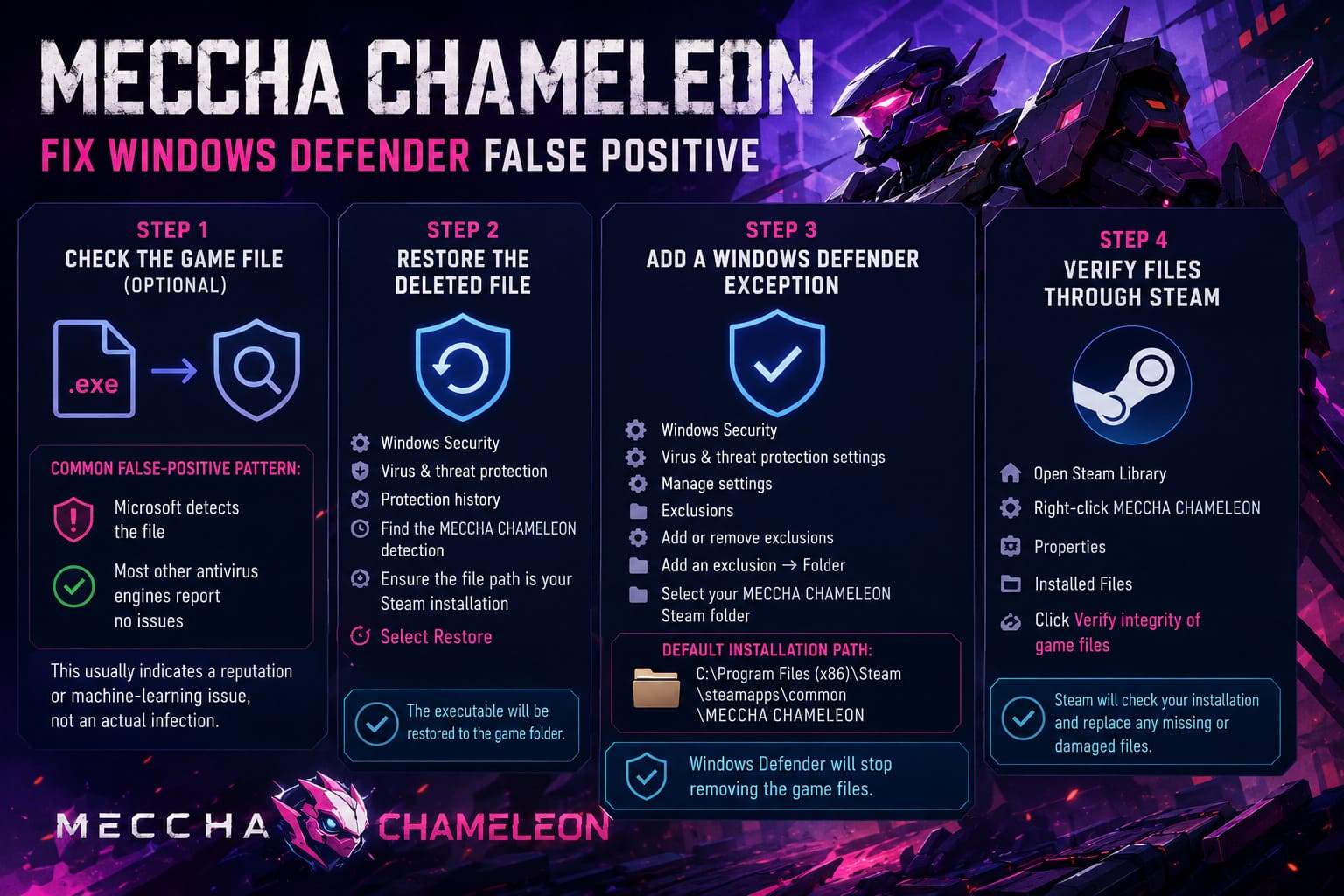
Step 1: Check the Game File (Optional)
If you want additional confirmation before changing security settings:
- Open your MECCHA CHAMELEON installation folder.
- Locate the main executable file.
- Upload the file to a trusted multi-engine scanner.
- Review the detection results.
A common false-positive pattern looks like this:
- Microsoft detects the file
- Most other antivirus engines report no issues
This usually indicates a reputation or machine-learning problem rather than an actual infection.
Step 2: Restore the Deleted Game File
If Windows Defender quarantined the executable:
- Open Windows Security.
- Select Virus & threat protection.
- Open Protection history.
- Find the MECCHA CHAMELEON detection.
- Check that the file path belongs to your Steam installation folder.
- Select Restore.
The missing executable should return to the game directory.
Step 3: Add a Windows Defender Exception
To prevent the same issue from happening again:
- Open Windows Security.
- Go to Virus & threat protection settings.
- Select Manage settings.
- Scroll down to Exclusions.
- Select Add or remove exclusions.
- Choose Add an exclusion → Folder.
- Select your MECCHA CHAMELEON Steam folder.
The default installation path is:
C:\Program Files (x86)\Steam\steamapps\common\MECCHA CHAMELEON
After adding the exclusion, Windows Defender should stop repeatedly removing the game files.
Step 4: Verify Files Through Steam
If the game still refuses to launch:
- Open Steam Library.
- Right-click MECCHA CHAMELEON.
- Select Properties.
- Open Installed Files.
- Click Verify integrity of game files.
Steam will compare your installation with official servers and replace any missing or damaged files.
Frostpunk 2 Breach of Trust Guide: How to Survive the Volcano Eruption Crisis
What Players Should Expect Next
False positives usually disappear with time.
As MECCHA CHAMELEON receives updates and builds a stronger reputation, security systems can better recognize the game as legitimate. Antivirus companies can also adjust their detection models and remove unnecessary warnings.
This is a common growing pain for successful indie releases. Many popular PC games have faced similar problems when they suddenly exploded in popularity.
Right now, MECCHA CHAMELEON’s biggest enemy is not the Seekers inside the game world. It is convincing antivirus software that it is not hiding something dangerous.
For players, the safest approach is simple:
- Download the game only through Steam
- Keep Windows updated
- Avoid suspicious external tools
- Restore files if Defender removes them
- Create an exclusion if necessary
A game built around disappearing into the environment should not have to hide from your own security software. Hopefully, future updates will allow players to focus on what actually matters: finding the perfect hiding spot, confusing the Seekers, and enjoying one of the most creative multiplayer experiences of 2026.