WARDOGS 4K Gaming PC Benchmarks: Performance Analysis And Optimization Guide
WARDOGS is not the kind of shooter you casually throw onto a PC and expect to run perfectly. Bulkhead’s 100-player tactical FPS is built around enormous battles, three competing factions, vehicles, destructible structures, fortifications, artillery, helicopters, and a battlefield that can turn into complete chaos within seconds.
That scale is exactly what makes WARDOGS so much fun. It is also why getting a genuinely smooth 4K gaming experience is considerably harder than the official system requirements might suggest.
Released into Steam Early Access on September 10, 2026, WARDOGS takes obvious inspiration from large-scale tactical experiences such as the Arma 3 King of the Hill scene while adding its own cash-driven progression and objective-focused warfare. The result is a shooter where simply surviving a firefight is only part of the problem. Your PC has to keep track of dozens of players, vehicles, physics interactions, destruction events and constantly changing combat zones while simultaneously rendering a huge Unreal Engine 5 battlefield.
I’ve spent enough time with demanding UE5 games to know the difference between a game that is genuinely GPU-heavy and one that simply has bad settings. WARDOGS is a little of both. At 4K, your graphics card takes a beating, but your CPU can also become the hidden culprit when the battlefield gets crowded.
So, if you’re trying to figure out whether your RTX 4090, RTX 5080, RTX 5090 or RX 7900 XTX can handle WARDOGS at 3840×2160, here’s what actually matters.
WARDOGS 4K System Requirements: The Official Numbers Don’t Tell the Whole Story
Bulkhead’s official requirements provide a useful starting point, but there is a massive difference between “the game launches and reaches the target FPS” and “the game stays smooth when 30 players, tanks, smoke and explosions occupy the same Control Zone.”
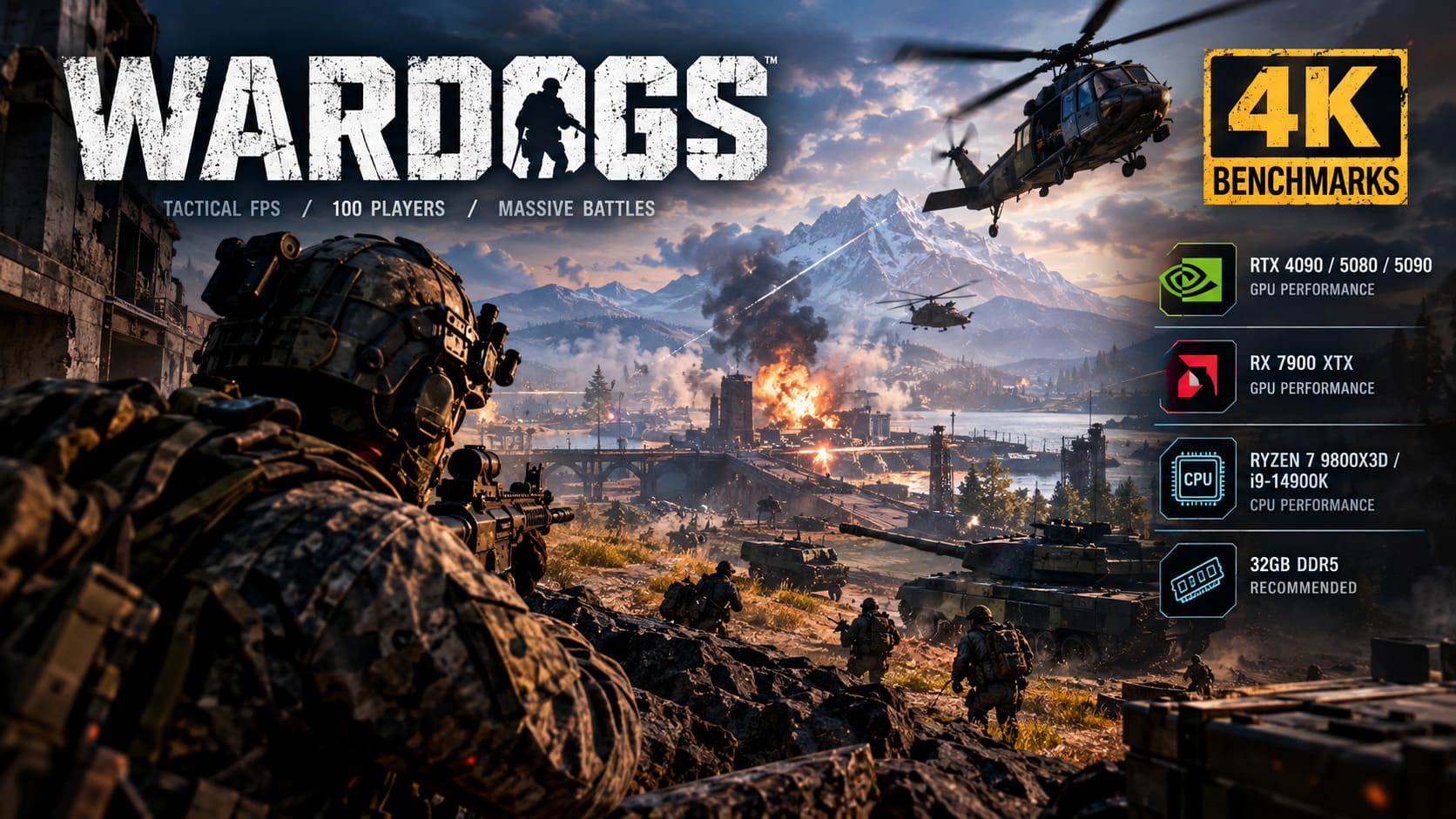
| Hardware Tier | CPU | GPU | RAM | Target |
|---|---|---|---|---|
| Minimum | Intel i5-8600 / Ryzen 5 3500 | GTX 1660 / RX 590 | 16GB | 1080p Low, 60 FPS with Upscaling |
| Recommended | Intel i7-12700K / Ryzen 7 5700X | RTX 3070 / RX 6700 XT | 16GB | 1440p Medium 70+ FPS / 4K Medium 60+ FPS Upscaled |
The recommended specification is where things get interesting.
An RTX 3070 or RX 6700 XT being positioned for 4K at around 60 FPS already tells you that WARDOGS expects players to use upscaling. That’s perfectly reasonable for modern PC gaming, but it is not the same thing as rendering a native 3840×2160 image every frame.
If your goal is native 4K, Maximum settings and consistently high refresh rates, forget about the recommended tier. You’re entering flagship territory.
WARDOGS 4K GPU Benchmarks
The most demanding scenarios aren’t empty roads or the opening seconds of a match. The real stress test happens when the map is packed with players, vehicles, smoke, explosions and destroyed structures.
That’s when the GPU workload spikes and frame-time consistency becomes more important than the average FPS number sitting in the corner.
RTX 5090: The King, But Even It Has Limits
The GeForce RTX 5090 32GB is currently the obvious monster for WARDOGS.
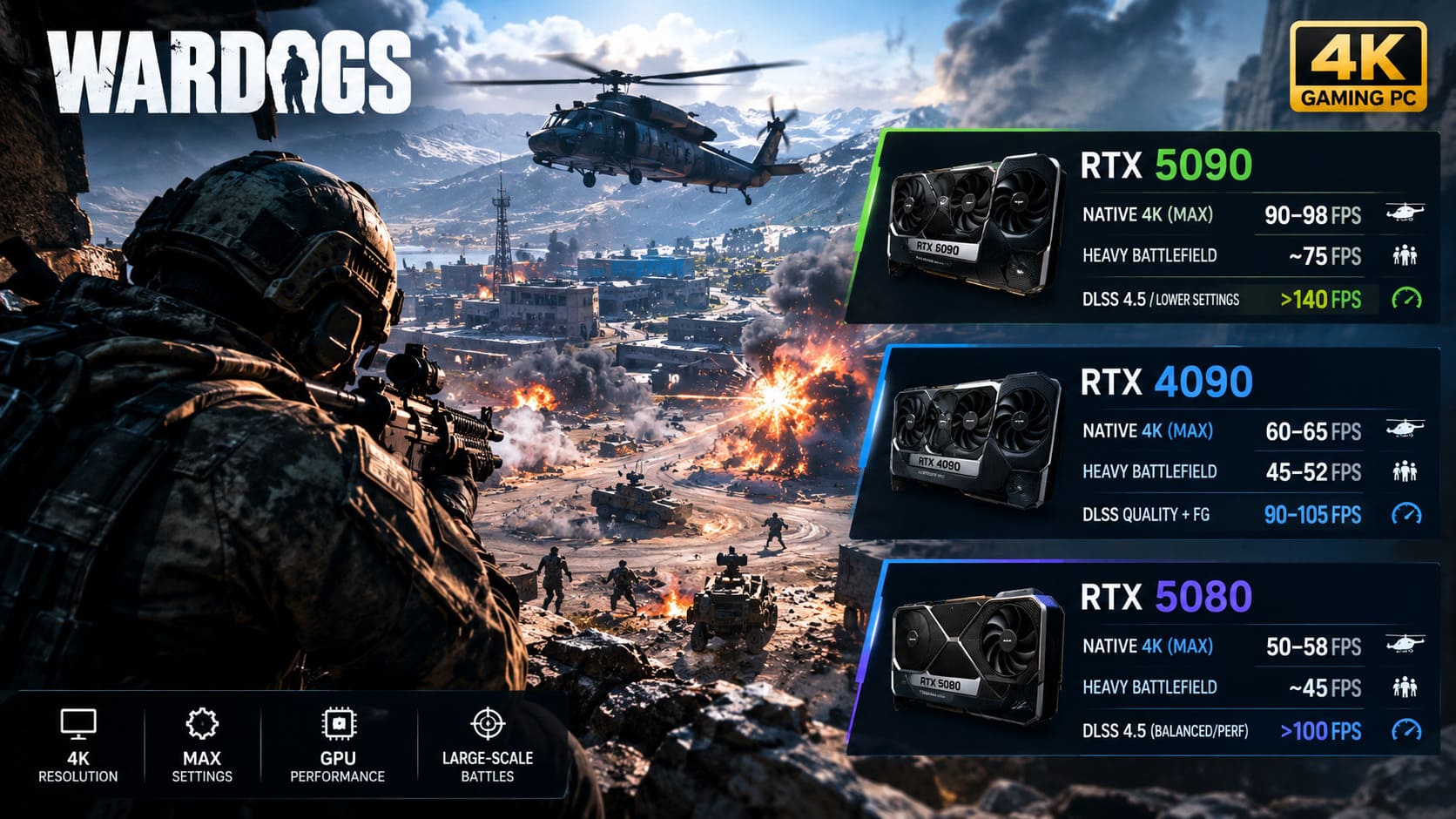
At native 4K with Maximum settings, it can push roughly 90–98 FPS while flying across the map in a transport helicopter. That’s an impressive result considering the scale of the game.
But don’t mistake that number for a guaranteed 100 FPS lock.
Drop into a heavily fortified Control Zone with 30 or more players, smoke effects, explosions and vehicles everywhere, and performance can fall into the mid-70 FPS range.
That’s still very playable, but this is a 5090 we’re talking about.
The good news is that enabling DLSS 4.5 or reducing some of the game’s most expensive lighting settings can push average performance beyond 140 FPS. For high-refresh 4K gaming, that’s the configuration I’d personally favor.
RTX 4090: Still Extremely Fast, But Native 4K Gets Ugly
The RTX 4090 remains a fantastic GPU, but WARDOGS exposes just how demanding modern large-scale UE5 games can be.
At native 4K Maximum, lighter sections can sit around 60–65 FPS. That’s fine until the battlefield starts falling apart.
Heavy armor engagements and large destruction events can pull the RTX 4090 down to approximately 45–52 FPS, with noticeable frame-time spikes.
And honestly, this is where average FPS stops telling the full story. A 60 FPS average doesn’t feel like 60 FPS when the game suddenly stutters during an important firefight.
For the RTX 4090, I strongly prefer DLSS Quality plus Frame Generation. With that setup, performance can climb into roughly the 90–105 FPS range, giving the card enough breathing room to maintain a much more consistent experience.
RTX 5080: Built for Upscaled 4K
The RTX 5080 has a similar story.
Native 4K Maximum lands around 50–58 FPS in demanding scenarios, and sudden destruction can introduce additional hitching.
But once DLSS enters the picture, the situation changes dramatically.
Using DLSS 4.5 in Balanced or Performance mode can take the RTX 5080 comfortably beyond 100 FPS. For players who want sharp 4K output without sacrificing responsiveness, this is arguably a much more sensible approach than stubbornly insisting on native rendering.
In a competitive tactical shooter, I would take a stable 100+ FPS with excellent reconstruction over a prettier 55 FPS image every single time.
RX 7900 XTX: Lots of VRAM, Still a Tough 4K Workout
AMD’s Radeon RX 7900 XTX brings a huge 24GB VRAM buffer to the fight, which is useful for WARDOGS’ large environments and texture workload.
Unfortunately, VRAM capacity isn’t the only thing that matters.
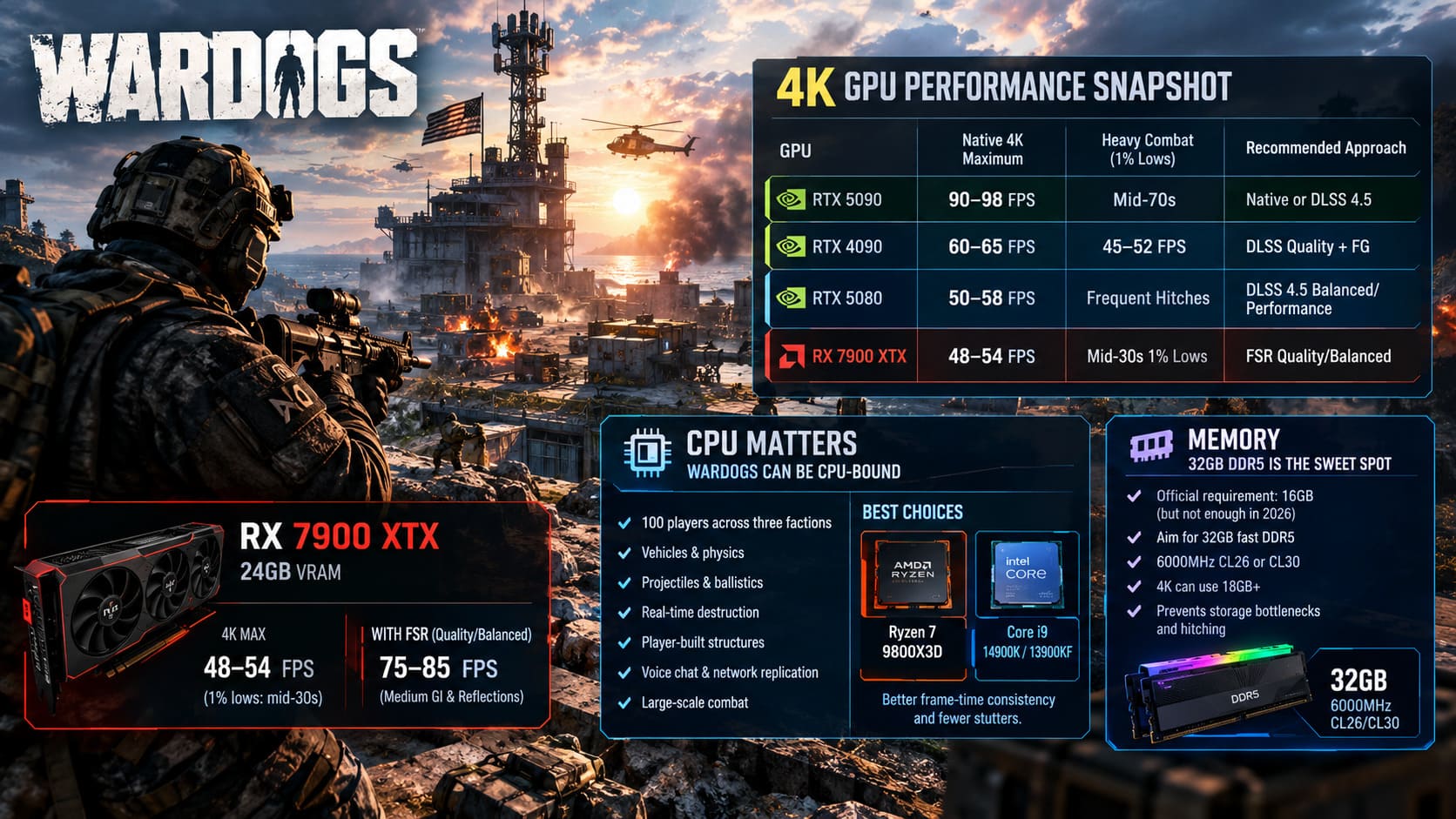
At native 4K Maximum, the 7900 XTX sits around 48–54 FPS, while 1% lows can fall into the mid-30s during particularly nasty mortar strikes and heavy combat.
Switching to FSR Quality or Balanced helps significantly. Lowering Global Illumination and reflections to Medium can push the card into the 75–85 FPS range in demanding situations.
That’s a much better target for actual gameplay.
4K GPU Performance Snapshot
| GPU | Native 4K Maximum | Heavy Combat | Recommended Approach |
|---|---|---|---|
| RTX 5090 | 90–98 FPS | Mid-70s | Native or DLSS 4.5 |
| RTX 4090 | 60–65 FPS | 45–52 FPS | DLSS Quality + FG |
| RTX 5080 | 50–58 FPS | Frequent Hitches | DLSS 4.5 Balanced/Performance |
| RX 7900 XTX | 48–54 FPS | Mid-30s 1% Lows | FSR Quality/Balanced |
These figures are far more useful than a single average benchmark because WARDOGS is wildly inconsistent depending on what is happening around you.
Don’t Ignore Your CPU: WARDOGS Can Become CPU-Bound
Here’s the part that can catch experienced PC gamers off guard.
At 4K, everyone assumes the GPU is going to be the limiting factor. Usually that’s true. WARDOGS, however, has a huge amount of simulation happening underneath the graphics.
The game has to track:
- 100 players across three factions
- Vehicle physics and movement
- Projectile and ballistic calculations
- Real-time destruction
- Player-built structures
- Proximity voice communication
- Network replication
- Large-scale combat interactions
When you enter a packed Control Zone, the CPU suddenly has a mountain of work to process.
High-end chips such as the Ryzen 7 9800X3D and Core i9-14900K / 13900KF deliver noticeably better frame-time consistency in these situations. The Ryzen 7 9800X3D is particularly attractive for a system where stable gaming performance matters more than workstation workloads.
Older processors can still run the game, but you may encounter micro-stutters even when your GPU has plenty of rendering headroom.
That is incredibly frustrating in a tactical FPS. Seeing a 70 FPS counter while the game feels like it is skipping frames is not the experience anyone wants.
32GB RAM Should Be Your Real Starting Point
The official requirement lists 16GB RAM, but I would not build a new WARDOGS gaming PC around 16GB in 2026.
For this game, 32GB of fast DDR5 is the sweet spot.
Something around 6000MHz CL26 or CL30 is an excellent target for a modern gaming platform.
At 4K, system memory consumption can climb beyond 18GB, particularly with asset streaming and a large number of active entities. A 16GB system can therefore end up relying much more heavily on the storage drive, producing additional hitching.
If you’re building a PC specifically for WARDOGS, 32GB isn’t an extravagant upgrade. It’s the sensible baseline.
The WARDOGS Settings That Actually Matter
Not every graphical option deserves the same attention.
Some settings make WARDOGS look dramatically better while barely affecting performance. Others eat your FPS alive for changes that you’ll barely notice during an actual firefight.
Global Illumination
This is the big one.
Global Illumination is among the heaviest settings in WARDOGS, particularly at 4K. Dropping it from Maximum to Medium, or disabling it where appropriate, can produce roughly a 20–25% performance improvement.
Yes, the lighting loses some of its cinematic quality.
No, I don’t care when I’m trying to win a firefight.
Medium is an excellent compromise.
Reflections
Maximum reflections look great on wet industrial surfaces, vehicles and damaged environments.
They also cost a ridiculous amount of performance for something you rarely stop to admire while somebody is shooting at you.
Set reflections to Low or use the community-style Potato Mode approach if necessary.
Picture-in-Picture Scopes
This setting is easy to overlook and can have a surprisingly large impact.
WARDOGS’ magnified optics can use a dual-render approach, meaning the game effectively renders the battlefield again inside the scope.
At 4K, aiming through certain high-powered optics can cost around 30% performance.
That’s brutal.
If you care about competitive consistency, disable Picture-in-Picture Scopes and use the standard zoom presentation instead.
Textures
This is one setting I would not aggressively reduce on a modern high-end GPU.
With 16GB or more VRAM, you can comfortably keep textures on High or Maximum.
Reducing texture quality simply to gain a few frames can make distant surfaces look noticeably worse while providing relatively little benefit on a flagship GPU.
View Distance
Keep this high.
In a tactical shooter, visibility is gameplay.
You need to see distant infantry, fortifications, vehicles and helicopters before they see you. Sacrificing View Distance for a small FPS gain is one of those optimizations that looks good in a benchmark chart and feels terrible during an actual match.
My Recommended WARDOGS 4K Settings
If I were setting up a high-end WARDOGS machine today, this is where I’d start:
| Setting | Recommended Value |
|---|---|
| Resolution | 3840 × 2160 |
| Display Mode | Fullscreen |
| VSync | Off |
| FOV | 95–110 |
| Global Illumination | Medium / Off |
| Reflections | Low / Potato |
| Shadows | Medium |
| Textures | High / Maximum |
| View Distance | High / Ultra |
| Effects | Medium |
| Foliage | Low / Medium |
| Post-Processing | Low |
| PiP Scopes | Disabled |
There is no magic preset that works for every machine, but this configuration cuts the settings that hurt performance most while protecting the ones that actually affect competitive visibility.
DLSS and FSR: Stop Treating Upscaling Like a Dirty Word
There was a time when PC gamers treated upscaling as a compromise you only used when your GPU was struggling.
That attitude doesn’t make much sense anymore.
Modern reconstruction technologies can deliver an excellent image while allowing your GPU to spend its resources where they matter.
NVIDIA GPUs
For RTX 40 and RTX 50 series cards, I’d start with:
DLSS Quality
If you still need more performance, move to:
DLSS Balanced
For the RTX 5090, native 4K is viable, but DLSS 4.5 can provide enough additional headroom to keep performance much higher during massive battles.
Frame Generation is also worth using when you’re already GPU-bound and want to push into high-refresh territory.
AMD GPUs
For the RX 7900 XTX, start with:
FSR Quality
Move to Balanced if you’re struggling during large engagements.
I’d rather have a clean 80 FPS experience than obsess over native 4K while watching the frame counter collapse every time artillery starts landing.
Wardogs PC Optimization Guide: Best Settings for RTX 4070 Ti Super (2026)
What Kind of PC Do You Actually Need for 4K WARDOGS?
If your goal is simply to play at 4K, you don’t need the most expensive gaming PC on the planet.
If you want native 4K Maximum at high refresh rates, that’s another story.
The RTX 5090 is the obvious choice for that particular target. Pair it with a strong gaming CPU such as the Ryzen 7 9800X3D, 32GB of fast DDR5 and a fast SSD, and you have a system capable of handling WARDOGS’ worst scenarios far more comfortably.
The RTX 4090 and RTX 5080 are still excellent choices, but I’d build around DLSS rather than native 4K Maximum.
The RX 7900 XTX also remains highly capable, particularly once FSR and sensible lighting reductions are applied.
WARDOGS Best Budget Weapons Under $1000: Economy Guide (2026)
Final Verdict: WARDOGS Is Brutal on Hardware, But It Can Be Tamed
WARDOGS is exactly the kind of game that exposes weak optimization and weak hardware at the same time.
The impressive part is how much is happening simultaneously. A 100-player battlefield filled with vehicles, destructible structures, fortifications, smoke and artillery is a serious technical workload. The downside is that even extremely expensive hardware can suffer when everything goes completely sideways.
For native 4K Maximum, the RTX 5090 is the clear winner and the closest thing to a no-compromise solution.
For everyone else, optimization is the name of the game.
An RTX 4090 or RTX 5080 with DLSS, or an RX 7900 XTX with FSR, can deliver a much smoother experience without making WARDOGS look dramatically worse. The biggest wins come from cutting Global Illumination, reflections, heavy effects and PiP scopes while keeping textures and View Distance high.
And don’t forget the CPU.
A powerful GPU cannot completely save a system that chokes when the Control Zone fills with players and vehicles. 32GB RAM and a modern high-end gaming processor are extremely worthwhile for maintaining consistent frame times.
WARDOGS is still in Early Access, so performance should improve as Bulkhead continues working on optimization. But you don’t have to wait for future patches to make the game run better. With the right settings, even the most chaotic battles become considerably more manageable.
At the end of the day, I’d rather see 90–120+ stable FPS with sensible compromises than a beautiful native 4K screenshot that turns into a slideshow the moment six tanks roll into the objective.
That’s the real WARDOGS 4K sweet spot: keep the image sharp, protect visibility, cut the expensive eye candy, and leave enough performance headroom for the battlefield to completely lose its mind.