Valheim Xbox Series S Performance vs Graphics Mode: 2026 Guide
There is a very specific moment in Valheim when you stop thinking about Vikings, mead, and building a ridiculous wooden fortress and start thinking about frame rates.
You are standing in the middle of your base. There are workbenches everywhere, fires burning, wolves wandering around, portals humming, crops growing, storage chests stacked to the ceiling — and suddenly your beautifully constructed Viking kingdom starts moving like it has forgotten how legs work.
Welcome to Valheim on Xbox Series S.
I have spent a frankly unreasonable amount of time in survival games, and Valheim is one of those titles where performance matters more than its deliberately retro visuals might suggest. It looks simple at first glance. Blocky trees, chunky textures, relatively modest character models. You might expect almost any modern console to chew through it.
That assumption lasts until you build a mega-base.
The Xbox Series S is a fantastic little machine, but Valheim can push its CPU and memory management in ways that are not obvious when you’re casually wandering through the Meadows. The bigger your world becomes, the more complicated the simulation gets. Your buildings, terrain modifications, lighting, creatures, items and other objects all add to the workload.
So, which graphical mode should you actually use?
After looking at how the three main presets approach the hardware — and considering what really matters during combat, exploration and base building — my answer is pretty straightforward:
Performance Mode is my default recommendation for most Series S players. Balanced Mode is the king if your display supports it. Quality Mode is the choice for players who would rather admire Valheim than fight its frame-rate battles.
And yes, there’s a lot more to it than “30 FPS bad, 60 FPS good.”
Valheim Xbox Series S Graphics Modes Explained
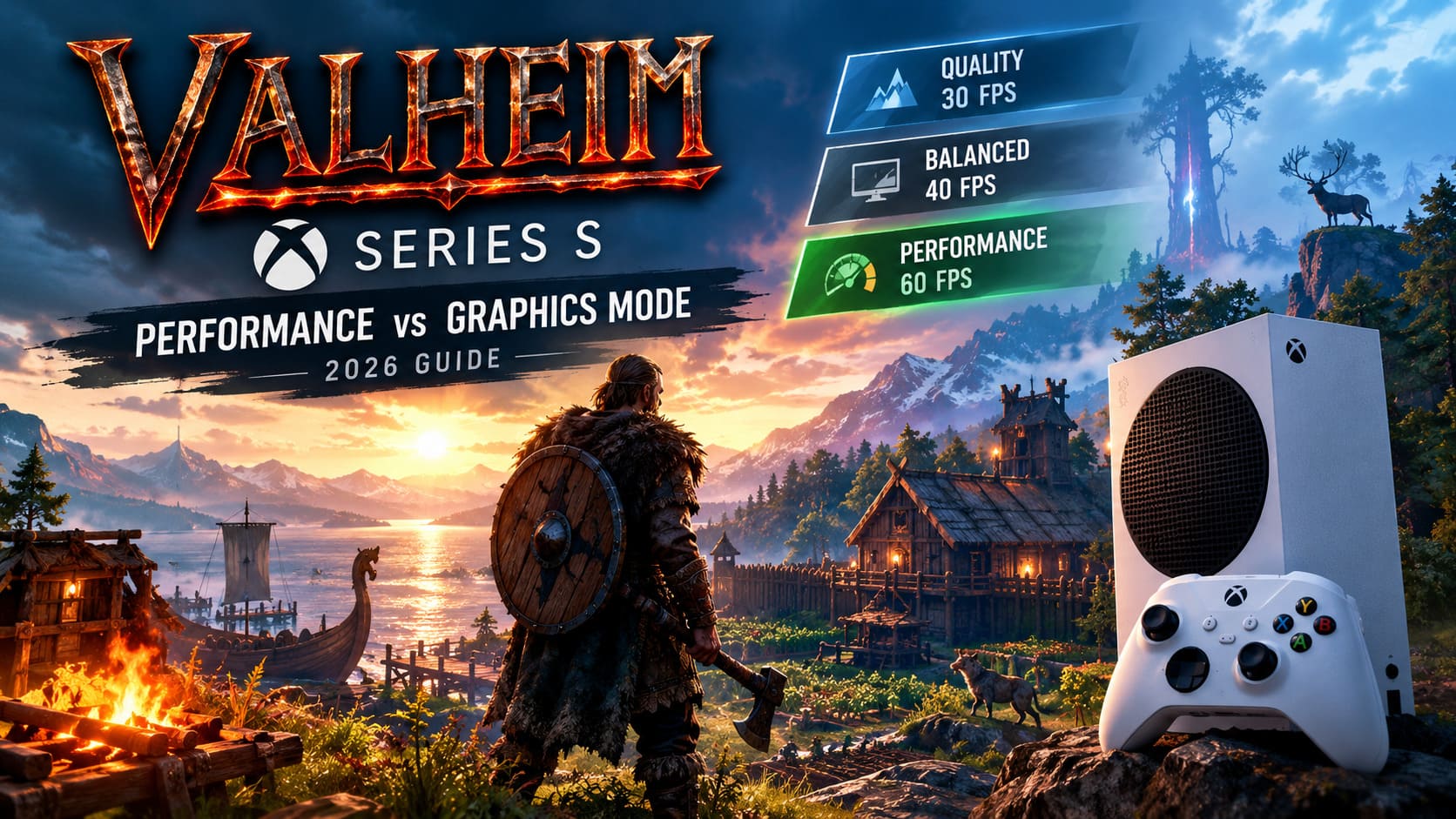
On Xbox Series S, Valheim gives players three different approaches to the visual/performance equation:
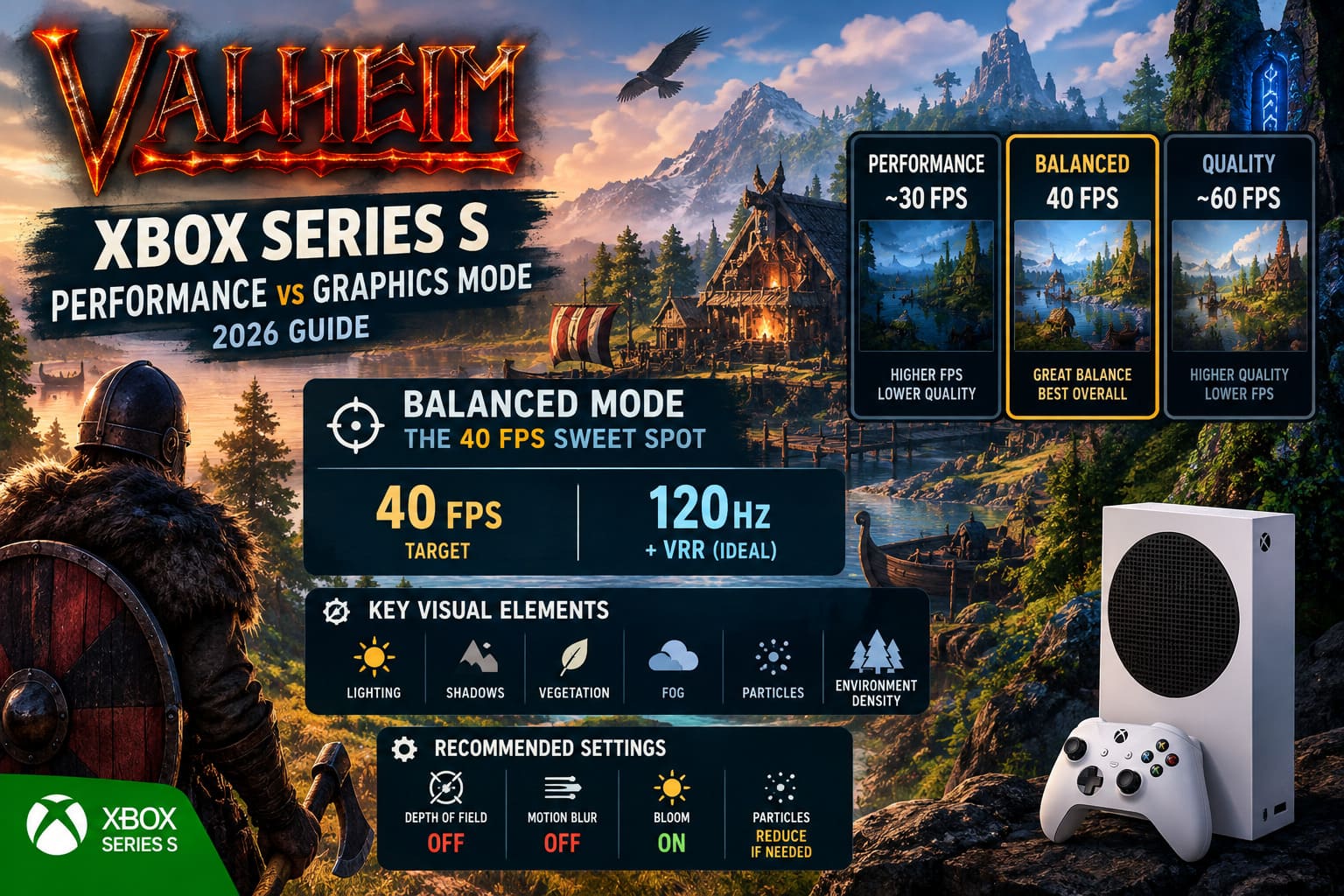
| Mode | Target FPS | Resolution Target | Main Advantage | Best For |
|---|---|---|---|---|
| Quality | 30 FPS | 1080p | Better visual fidelity | Building & Atmosphere |
| Performance | 60 FPS | 900p Dynamic | Higher responsiveness | Combat & Exploration |
| Balanced | 40 FPS | Around 900p | Middle-ground experience | 120Hz + VRR Displays |
The important thing to understand is that these modes aren’t simply three different brightness presets.
They change the way the game spends its limited hardware budget.
And in Valheim, that budget gets absolutely obliterated once your Viking ambitions become excessive.
Quality Mode: Beautiful, Calm, and Definitely Not Fast
Let’s start with the visual option.
Quality Mode targets 30 FPS and prioritizes graphical fidelity, with a 1080p presentation and stronger visual settings than Performance Mode.
If you are the kind of player who can spend three hours decorating a longhouse without killing anything more dangerous than a boar, this mode makes a lot of sense.
Valheim’s atmosphere is one of its greatest strengths. The lighting, fog, shadows, weather and environmental effects do an enormous amount of heavy lifting. The textures aren’t trying to compete with a modern photorealistic blockbuster. Instead, the game creates its mood through lighting and world composition.
Quality Mode lets those systems breathe.
Forests look denser. Distant scenery holds together better. Lighting around fires and buildings feels richer. The world simply has more visual weight.
At night, the difference can be surprisingly noticeable.
Walk into a torch-lit Viking hall in Quality Mode and Valheim can look fantastic. Light spilling across wooden walls, shadows around structures, fog hanging over the landscape — this is where the game’s art direction really clicks.
The problem is the 30 FPS target.
Thirty frames per second isn’t inherently terrible. A stable 30 FPS can absolutely be enjoyable. The issue is that Valheim isn’t a slow cinematic adventure where you spend most of your time watching cutscenes.
You’re dodging trolls.
You’re parrying skeletons.
You’re desperately trying to roll away from an Ashlands enemy while your stamina bar is screaming at you.
That is where 60 FPS starts to feel very tempting.
Performance Mode: The Setting I’d Actually Use
Performance Mode targets 60 FPS, sacrificing some graphical detail and resolution to make Valheim considerably more responsive.
And honestly?
This is where I would start.
The difference isn’t subtle when you switch between 30 and 60 FPS. Camera movement becomes noticeably smoother. Combat feels more immediate. Aiming a bow feels better. Turning quickly while exploring doesn’t produce the same sluggish sensation.
For a survival game where timing matters, that responsiveness is worth a lot.
Performance Mode lowers the rendering resolution to around 900p dynamically and cuts back some visual features. Vegetation density can be reduced, shadows aren’t as ambitious, and distant objects may appear less detailed.
On a smaller gaming monitor, I don’t think this is a huge deal.
On a giant 4K television?
Oh, you’ll notice.
The image can look soft, particularly when you’re moving quickly through the world. Distant trees and vegetation don’t have the same crisp definition as they do in the higher-fidelity mode.
But here’s my problem with obsessing over that difference:
You’re playing Valheim, not a digital museum exhibit.
If I’m fighting Moder, sailing through a storm or exploring a dangerous biome, I would rather have a responsive 60 FPS experience than prettier grass.
That is especially true during combat.
Balanced Mode: The 40 FPS Sweet Spot
This is the interesting one.
Balanced Mode targets 40 FPS, providing a compromise between the responsiveness of Performance Mode and the visual quality of the higher-fidelity preset.
There is one important catch: you really want a 120Hz display, ideally with VRR, to get the most from this mode.
Why 40 FPS?
Because 40 divides neatly into 120.
That means the display can refresh three times for every frame the game produces. Compared with 30 FPS on a 120Hz panel, the result feels substantially smoother while still giving the console more breathing room than a full 60 FPS target.
And this is where I think Valheim’s Balanced Mode gets unfairly overlooked.
Forty FPS is a seriously good target for a game like this.
You retain more visual quality than Performance Mode while avoiding the heavier sluggishness of 30 FPS.
For a player with a good 120Hz/VRR television or monitor, this is arguably the most satisfying overall setup.
It’s not as brutally smooth as 60 FPS.
It’s not as visually focused as Quality Mode.
But it doesn’t have to be.
Balanced Mode is basically Valheim saying: “Stop fighting over two extremes and meet me in the middle.”
How Much Does the Visual Difference Actually Matter?
This is where internet arguments about Valheim can get a little silly.
People love talking about resolution numbers.
900p.
1080p.
Dynamic resolution.
Shadow quality.
Vegetation.
But resolution alone doesn’t tell you why Valheim looks different between modes.
The game relies heavily on lighting, shadows, ambient occlusion, fog, particles and environmental density.
That’s why Quality Mode can feel dramatically richer despite the relatively modest resolution difference.
The lighting around structures becomes more convincing. Forests feel fuller. Distant scenery holds up better. The world has more depth.
Performance Mode removes some of that visual luxury to protect frame rate.
And personally, I think the trade-off is reasonable.
The one thing that can genuinely annoy me is image softness.
If you’re playing Performance Mode on a huge 4K screen from relatively close range, 900p can look rough. Add depth of field and motion blur on top of it and suddenly your Viking world starts looking like somebody smeared Vaseline across the television.
Thankfully, Valheim gives you some control over this.
My Recommended Xbox Series S Settings
If you’re using Performance Mode, there are a few settings I’d change immediately.
Turn Depth of Field Off
This is my number-one recommendation.
Depth of Field intentionally blurs parts of the image, and when you’re already dealing with a lower rendering resolution, that extra blur isn’t doing you any favors.
Turn it off.
Your environment immediately looks cleaner.
Turn Motion Blur Off
I almost always disable motion blur in games anyway.
In Valheim, it can make fast camera movement look even softer, especially when you’re already targeting a lower resolution.
Off. No regrets.
Keep Bloom On
Bloom contributes a lot to Valheim’s atmosphere.
Torches, fires and sunlight benefit from that soft glow, and I don’t consider it something worth sacrificing unless you’re desperate for every last bit of performance.
Be Careful With Particles
If your massive base is turning into a slideshow, reducing particle-heavy effects can help.
Don’t expect miracles, though.
And this brings us to Valheim’s real Xbox Series S problem.
The Mega-Base Problem Is Real
This is the part casual benchmarks often fail to communicate.
Valheim can run beautifully when you’re wandering around an ordinary world.
Then you build a settlement with several thousand objects and everything changes.
Every wall.
Every roof tile.
Every chest.
Every piece of furniture.
Every torch.
Every animal you decide to domesticate.
Your Viking brain says:
“This would look awesome here.”
The Series S says:
“Please stop.”
Valheim’s simulation becomes increasingly demanding as your settlement grows. At some point, you’re dealing with a CPU bottleneck rather than a simple GPU limitation.
That is why changing from Quality to Performance doesn’t magically guarantee 60 FPS inside a gigantic base.
You can lower the graphical workload all you want, but if the CPU is struggling with the simulation itself, there’s a hard limit.
This is why I’ve always considered huge Valheim bases the ultimate stress test.
A peaceful Meadows run can look fantastic at 60 FPS.
A sprawling multiplayer fortress with thousands of instances and dozens of active elements?
Different story.
Performance Mode can dip substantially in these situations, sometimes into the 30–40 FPS territory depending on the complexity of the area.
And this creates an interesting situation.
A stable 30 or 40 FPS can sometimes feel better than an unstable 60 FPS that constantly jumps around.
That sounds counterintuitive until you’ve experienced it.
Combat: Where 60 FPS Earns Its Keep
If you spend a lot of time fighting, Performance Mode is the easiest recommendation I can make.
Valheim’s combat isn’t a twitch shooter, but timing still matters.
Parries require rhythm.
Dodges require precision.
Bow shots benefit from smooth camera movement.
Fast enemy attacks can punish hesitation.
When the game is running at 60 FPS, every movement feels more immediate. The camera tracks more smoothly and input feels more connected to what’s happening on screen.
This becomes particularly valuable in chaotic fights where the screen is filled with particles, fire, enemies and environmental effects.
I’d much rather lose some vegetation detail than lose responsiveness when something enormous is trying to turn my Viking into lunch.
Exploration and Building Tell a Different Story
For exploration, the choice becomes more subjective.
If you’re sailing across the ocean, gathering resources or wandering through the Black Forest, 60 FPS feels fantastic.
But if your favorite part of Valheim is building?
Quality Mode starts making a much stronger argument.
There’s something satisfying about walking around a finished settlement and seeing all those visual details working together.
The lighting on wooden structures.
The shadows beneath roofs.
The fog rolling between trees.
The glow from fireplaces.
The denser vegetation surrounding your carefully designed town.
This is where the game becomes more of a digital Viking diorama.
If I’m spending an entire evening building rather than fighting, I can absolutely understand choosing Quality Mode.
2026 Valheim 10+ Player Server Guide: How to Fix Desync and Lag
So Which Valheim Xbox Series S Mode Should You Choose?
After looking at the trade-offs, here’s how I would break it down.
Choose Performance Mode if:
- You care about combat responsiveness.
- You play Valheim frequently.
- You prefer 60 FPS over visual detail.
- You’re using a smaller display or gaming monitor.
- Image softness at 900p doesn’t bother you.
This is the safest recommendation for most players.
Choose Quality Mode if:
- You play primarily for building and atmosphere.
- You have a large 4K television.
- You strongly dislike soft-looking images.
- You don’t mind playing at 30 FPS.
- Visual lighting and environmental detail matter more to you than responsiveness.
There’s nothing wrong with choosing Quality Mode. In fact, for a relaxed building-focused playthrough, it can be gorgeous.
Choose Balanced Mode if:
- Your display supports 120Hz.
- You have VRR.
- You want something smoother than 30 FPS.
- You don’t want to sacrifice as much visual quality as Performance Mode requires.
If your television supports the necessary refresh rate, this is my favorite compromise.
Valheim End-Game Meta 2026: Lightning vs Frost Damage Analysis
Final Verdict: 60 FPS or Better Graphics?
For me, Performance Mode wins on Xbox Series S.
Not because Quality Mode looks bad. It doesn’t.
Not because 30 FPS is unplayable. It absolutely isn’t.
It wins because Valheim is a game about interaction. You’re chopping trees, dodging attacks, aiming weapons, sailing, mining, building and constantly moving around a world that wants to kill you.
The higher frame rate makes all of those actions feel better.
But I wouldn’t hesitate to switch modes depending on what I’m doing.
Starting a new adventure?
Performance.
Preparing for a difficult boss?
Performance.
Building a massive Viking capital and spending hours admiring it?
Quality.
Own a 120Hz VRR display?
Balanced deserves serious consideration.
And then there’s the mega-base.
At that point, forget the marketing numbers. Your enormous Viking civilization may become the real graphics setting.
If Valheim starts crawling around your settlement at 35 FPS, the problem isn’t whether you selected 900p or 1080p. You’ve simply built too much stuff.
And honestly?
That’s probably the most Valheim problem imaginable.
The Xbox Series S may struggle to keep up with your ridiculous Viking ambitions, but that’s part of the charm. Build the giant hall. Light every torch. Breed too many wolves. Cover the mountainside with structures.
Then wonder why your frame rate collapsed.
That’s Valheim.
And I wouldn’t have it any other way.