NBA 2K27 Legend Badges Guide: How to Unlock the Legendary Tier
If you have played several recent NBA 2K games, you probably know the usual badge routine by heart. Build your MyPLAYER, push the right attributes high enough, unlock the badge tier you want, and then spend your progression resources where they matter. Simple, predictable, and, honestly, a little boring after a while.
NBA 2K27 changes that formula in a pretty significant way.
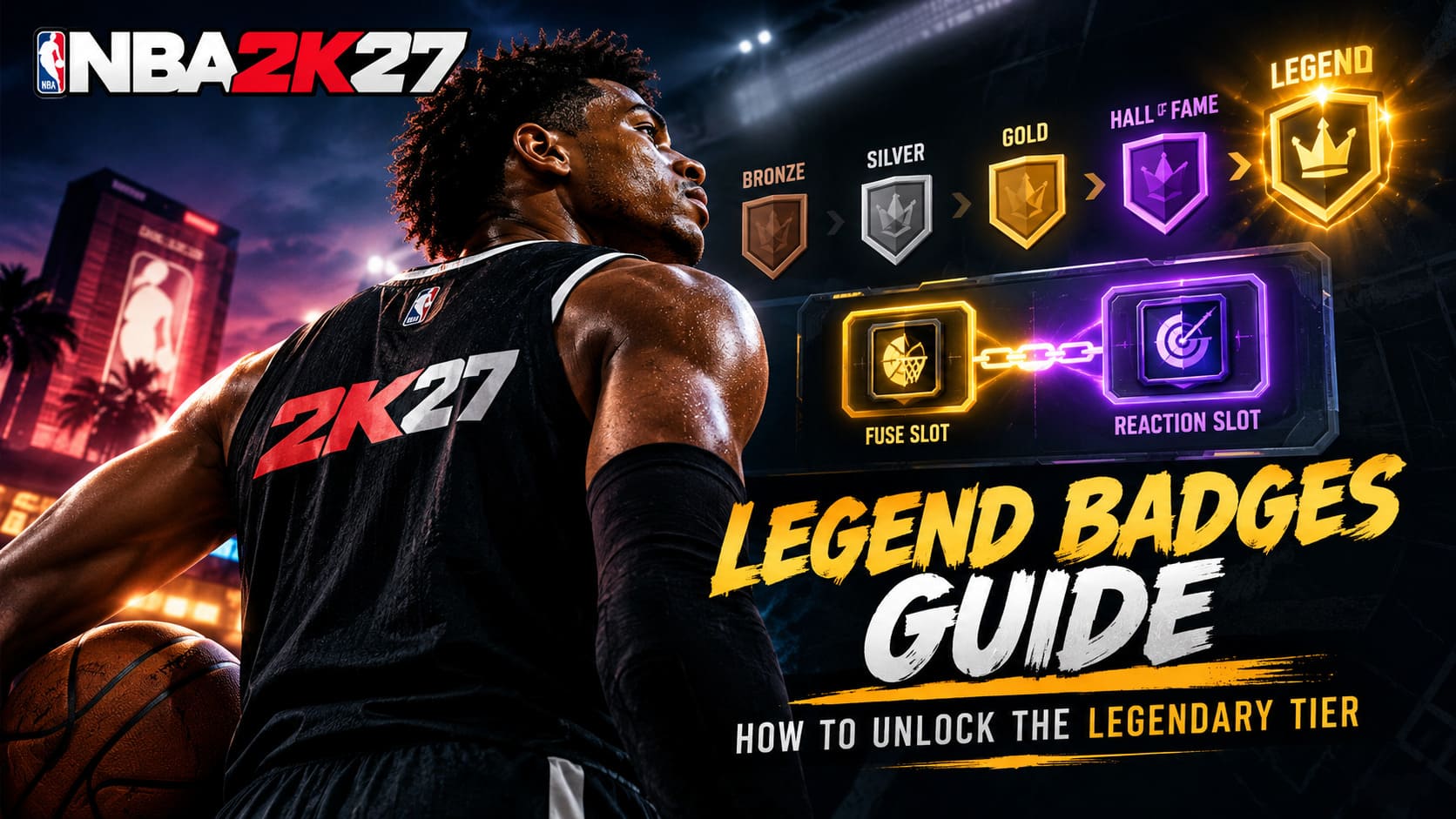
The biggest thing to understand is that you can no longer simply build around a 99 attribute and expect the game to hand you a Legend badge. The MyPLAYER Builder now stops your natural badge progression at Hall of Fame, meaning Legend is no longer something you buy during character creation.
Instead, NBA 2K27 makes you earn it through the new Badge Synergy system, which combines Fuse Slots, Reaction Slots, Badge Tokens, and actual gameplay triggers.
As someone who spends far too much time tweaking builds and testing badges, I actually like this direction. It makes Legend badges feel more valuable. At the same time, the system is not exactly beginner-friendly, and it is very easy to waste resources if you do not understand how the new architecture works.
Here is how I would approach it.
NBA 2K27 Badge Progression Is Different Now
The first major change is the way badges are unlocked and upgraded.
Every new MyPLAYER starts with 20 badge slots covering the major areas of the game:
- Finishing
- Shooting
- Playmaking
- Defense
- Rebounding
- Physicals
You still need the correct attributes to qualify for each badge tier, but simply having the required rating does not mean you can freely skip through the progression system.
NBA 2K27 introduces Badge Tokens, which are used to populate your available badge slots. You earn them by actually playing and progressing rather than simply dumping attribute points into your build.
Badge Tokens can come from several activities, including:
- Performance-based discipline meters
- Team Practice drills
- Weekly Gatorade Facility workouts
- Season Rewards
- Crew progression
This is an important distinction. Your attributes determine what you can access, while Badge Tokens help determine what you actually equip.
And then there is Legend.
Badge Tier Requirements in NBA 2K27
The traditional badge tiers still matter because they determine your starting point before Synergy enters the picture.
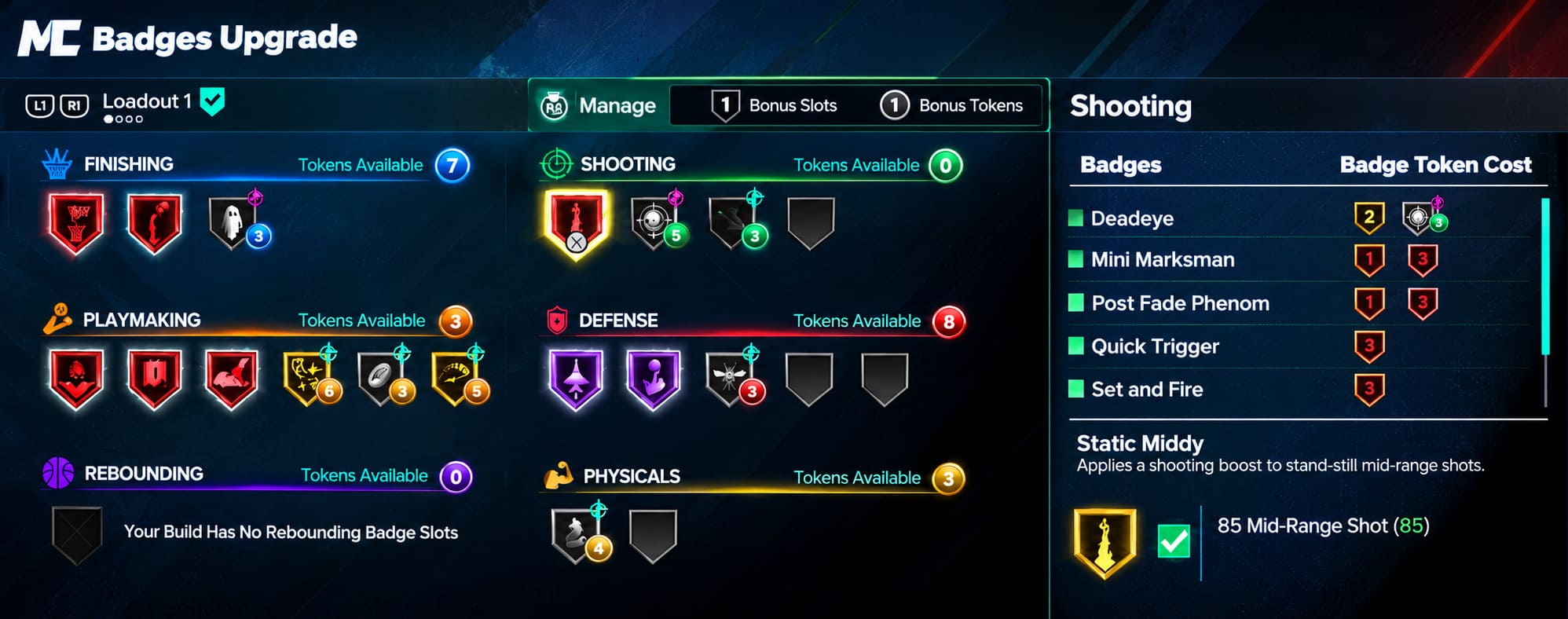
| Badge Tier | Approx. Attribute Requirement | Token Cost |
|---|---|---|
| Bronze | 50–85 | 1–3 |
| Silver | 62–93 | 2 |
| Gold | 66–96 | 1 |
| Hall of Fame | 70–99 | 1 |
| Legend | No direct threshold | Synergy Only |
The exact requirement depends on the individual badge, position, height, and build configuration, so don’t treat these ranges as universal numbers for every badge.
The key takeaway is much simpler:
Hall of Fame is now your natural ceiling. Legend comes from Synergy.
That changes how I would build a MyPLAYER from the ground up.
If your target badge only reaches Silver naturally, you are already putting yourself in a bad position. Even a +2 boost will only push that badge to Gold. If you want Legend, your build needs to be capable of reaching at least Gold or Hall of Fame naturally.
That is probably the single biggest mistake I would avoid when creating a 2K27 build.
What Is the Badge Synergy System?
This is where NBA 2K27 gets considerably more interesting.
Badge Synergy revolves around two connected slots:
Fuse Slots and Reaction Slots.
Think of the Fuse badge as the engine and the Reaction badge as the passenger that benefits when the engine is running.
The two systems are connected, but they do not behave in exactly the same way.
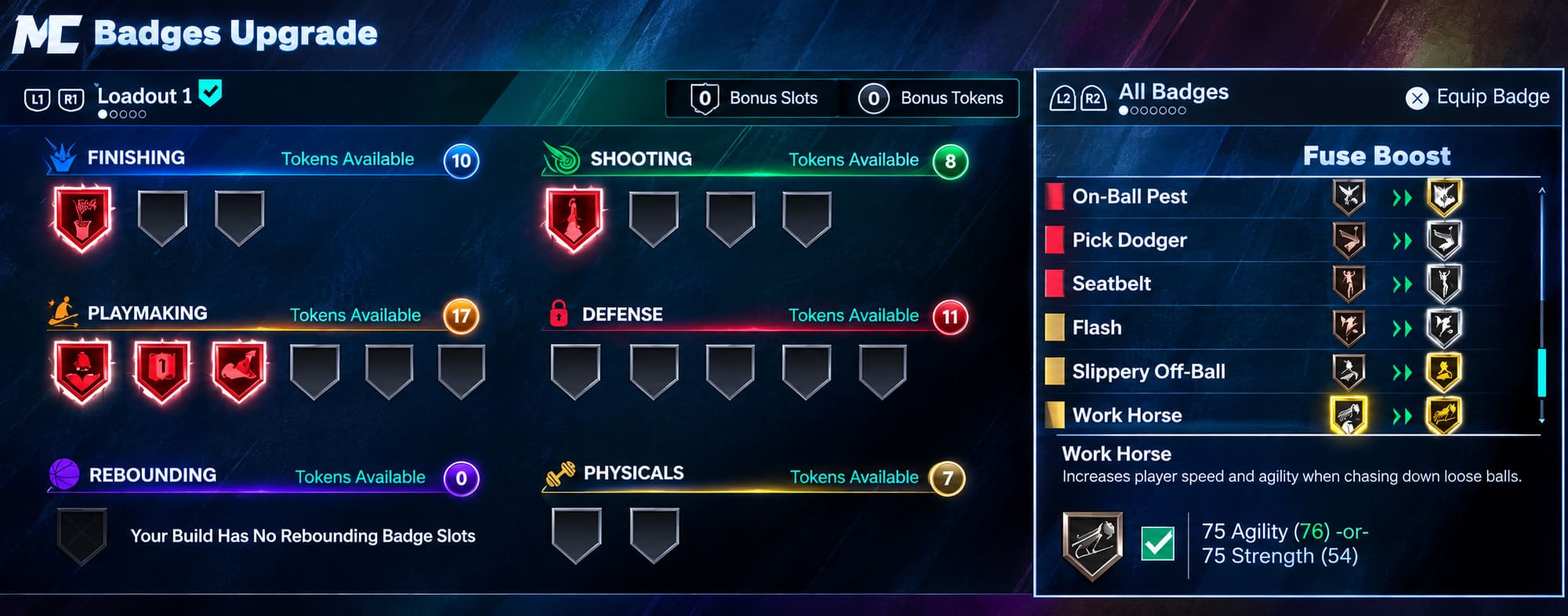
Fuse Slots Explained
The Fuse Slot is where you place the badge you want to enhance.
Once a qualifying badge enters the Fuse Slot, it receives a +1 or +2 level boost, depending on the specific Synergy setup available to your build.
This is what allows a naturally equipped Gold badge to potentially reach Legend with a +2 boost, or a Hall of Fame badge to reach Legend with just +1.
There is another benefit here that I think is just as important as the actual badge upgrade.
Fuse Slots refund the Badge Tokens previously spent on that badge.
So, if you spent a token to equip a badge and then move that badge into an eligible Fuse Slot, the system returns that investment to your available pool.
That effectively turns Fuse Slots into a badge progression efficiency tool.
And this is where smart resource management becomes important.
Instead of treating Fuse as nothing more than a way to get Legend, you should also think of it as a way to free up Badge Tokens for the rest of your build.
Reaction Slots Work Completely Differently
The Reaction Slot is tied directly to your Fuse Slot, but its boost is not simply active from the opening tip.
Instead, your Reaction badge receives its enhanced tier after you activate the Fuse badge during gameplay.
This creates a small but important gameplay loop.
For example, imagine you have:
Fuse: Set and Fire
Reaction: Deadeye
Your Set and Fire badge becomes the trigger. Once you perform the actions required to activate that badge during the game, the Reaction effect kicks in.
Deadeye can then receive its associated Synergy boost for the rest of that game.
That is a clever system because it makes the badge combination depend on how you actually play.
You cannot just throw two random powerful badges together and expect the game to cooperate. Reaction choices are restricted to badges that have a logical connection to the Fuse badge.
If your Fuse badge is a finishing-focused option such as Posterizer, the available Reaction choices will be built around compatible skills rather than completely unrelated defensive or shooting badges.
Personally, I prefer this over a completely open system. It forces players to think about badge combinations instead of individual badge strength.
How to Get a Legend Badge in NBA 2K27
If your goal is specifically to create a Legend-tier badge, this is the process I would follow.
1. Build Around the Badge First
Do not create your MyPLAYER and decide afterward which badges you want.
Work backward.
If you want Legend Posterizer, for example, make sure your build can naturally qualify for the required Gold or Hall of Fame level.
The Synergy boost is not magic. It cannot turn a Silver-only badge into Legend.
Your baseline tier matters.
This is why attribute planning is more important than ever in NBA 2K27.
2. Earn Your Badge Tokens
Once you have your build, start working through MyCAREER, streetball, practice activities, and other progression systems that award Badge Tokens.
Do not immediately spend everything just because you have tokens available.
Think about your final badge layout first.
I would rather have a few carefully selected high-impact badges than burn resources trying to activate every possible option early.
3. Open the Badge Progression Menu
Head into your player progression interface and open the Badges section.
From there, move into the Synergy configuration area using the appropriate controller input for your platform.
This is where your Fuse and Reaction setup becomes available.
4. Put Your Target Badge in the Fuse Slot
Choose the eligible badge you want to push toward Legend.
Place it into an available Fuse Slot.
If the badge starts at Hall of Fame and receives a +1 boost, you have your path to Legend.
If it starts at Gold and the Fuse provides +2, you can reach the same destination.
The important thing is to check the resulting tier before committing your setup.
5. Choose Your Reaction Badge Carefully
Now select the connected Reaction Slot.
You will be presented with compatible badges based on your Fuse selection.
Don’t automatically choose the badge with the highest theoretical tier.
Choose the badge that fits your actual playstyle.
A Reaction badge that triggers constantly is far more useful to me than one that looks impressive on a spreadsheet but almost never activates in a real game.
My Favorite NBA 2K27 Legend Badge Strategy
If you want to compete seriously in Park, Rec, Pro-Am, or other high-level modes, I would build Synergy around consistency rather than flashy combinations.
This is one of those systems where theorycrafting can get out of hand.
You might find a combination that looks absolutely ridiculous on paper. But if the Fuse trigger is something you rarely do during an actual game, that supposedly incredible Reaction badge isn’t doing much for you.
I would prioritize badges connected to actions you naturally perform.
For a perimeter scorer, that might mean building around frequent jump-shot actions.
For a slasher, a finishing badge that activates regularly could be the better anchor.
For a defensive player, consistency is again more valuable than trying to create some complicated setup that requires a perfect sequence every possession.
The best Synergy setup is the one you can trigger without thinking about it.
That is especially important because Reaction bonuses can remain active for the rest of the game once their requirements have been met.
Use Fuse Slots to Recycle Badge Tokens
There is another part of the system that I think players will underestimate.
The Badge Token refund makes Fuse Slots valuable even when you are not purely chasing Legend.
Suppose you have several badges that require tokens to activate. Moving an eligible high-value badge into Fuse can return those tokens to your inventory.
That gives you additional flexibility elsewhere.
My recommendation would be to prioritize the badges that give you the most value from the refund.
In other words, don’t just Fuse a badge because it happens to fit.
Look at the entire 20-slot economy.
If moving one badge into Fuse frees up resources that allow you to activate two or three useful supporting badges, that is a much better trade than simply chasing the biggest number on one badge.
What About Rebirth in NBA 2K27?
The Rebirth system can also make a huge difference if you plan to run multiple MyPLAYER builds.
Once your primary character is established, you can use Ronnie 2K at the Holohelp terminal inside MyCOURT to begin the Rebirth process.
The big advantage is that your progression on the primary build can provide permanent starting benefits for subsequent builds, including additional Badge Token allocations.
For players who constantly create new builds, this could save a ridiculous amount of early-game grinding.
And honestly, that is exactly the kind of feature I want from Rebirth.
I don’t mind grinding a new build when there is a meaningful reason to do it. What I don’t want is to repeat the same beginner progression loop every time I decide my shooting guard needs two inches less height or my center needs a completely different defensive setup.
Rebirth helps reduce that frustration.
NBA 2K27 Best Graphics Settings: Maximize FPS & Competitive Edge on PC
The Biggest Mistakes to Avoid
If you are starting NBA 2K27 for the first time, I would keep these mistakes in mind:
- Don’t assume 99 attributes automatically unlock Legend.
- Don’t build around a badge that only reaches Silver naturally.
- Don’t waste Badge Tokens without planning your final setup.
- Don’t choose Reaction badges solely because they look powerful.
- Don’t ignore the Token refund from Fuse Slots.
- Don’t create secondary builds before understanding how Rebirth can save progression time.
The biggest lesson is that Legend badges are no longer just an attribute check.
They are part of a larger progression strategy.
NBA 2K27 Save File Location: PC Guide to Saves & Config Files
Final Verdict: Are Legend Badges Better in NBA 2K27?
I think the new system has potential.
On previous versions of NBA 2K, badge progression could sometimes feel like a checklist. Hit the attribute requirement, equip the badge, and move on.
NBA 2K27 makes the process more interactive.
You have to consider your attributes, Badge Tokens, Fuse Slots, Reaction Slots, gameplay habits, and overall build economy. That adds another layer of strategy, and for experienced players, that is a welcome change.
The downside is obvious: the system is more complicated.
New players are going to need some time to understand why their badge is stuck at Hall of Fame, why another badge suddenly receives a temporary boost, and why certain Reaction options are unavailable.
But once the system clicks, I think it becomes one of the more interesting parts of the new MyPLAYER progression.
If you want a Legend badge in NBA 2K27, don’t think of it as something you simply unlock.
Think of it as something you build toward.
Get the right natural tier, save and recycle your Badge Tokens, choose a reliable Fuse trigger, pair it with a useful Reaction badge, and make sure the entire setup matches how you actually play.
That’s the real trick to getting the most out of the NBA 2K27 Legend badge system.