Nivalis Nights Steam Deck Compatibility: Performance, Specs, and Launch Expectations
Nivalis Nights is almost here, and as someone who has spent far too many hours jumping between demanding PC games and handheld hardware, I already know which question is going to dominate the Steam Deck community around launch day: how well will this cyberpunk life simulation actually run? ION LANDS and 505 Games are preparing to release the game on Steam on September 29, 2026, and the premise immediately caught my attention. This is not simply another neon city where you drive around completing missions. It combines exploration, business management, apartments, social systems, fishing, nightlife, and a constantly moving futuristic city into one surprisingly ambitious package.
That ambition is exactly why the Steam Deck situation is interesting. The Deck has handled plenty of games that looked impossible on paper, while some seemingly modest PC releases have struggled badly because of CPU simulation, shader compilation, or poor optimization. Nivalis Nights has several potential pressure points, including its detailed voxel-inspired city, dynamic weather, NPC activity, lighting, and simulation systems. So rather than assuming that the game will either magically work or completely fail, it makes more sense to look at what we actually know and what kind of experience Deck players should reasonably expect.
Nivalis Nights Black Screen on Launch Fix: Full Troubleshooting Guide
Will Nivalis Nights Run on Steam Deck?
The short version is that official Steam Deck verification is not something players should take for granted before launch. ION LANDS has indicated that the team is exploring handheld platforms, while the game itself is launching with full controller support. That distinction matters. A game can be perfectly usable with a controller and still need additional optimization before Valve considers it Verified, so the absence of a badge should not automatically be interpreted as a technical disaster.
Personally, I would much rather see proper controller support from day one than a rushed Verified label followed by awkward input mapping. Nivalis Nights has plenty of activities that need comfortable navigation, from managing businesses to walking through the city and interacting with characters. If the menus and movement have genuinely been designed around a gamepad rather than simply having keyboard controls translated to buttons, that gives the Deck a much better foundation.
There is also no obvious multiplayer anti-cheat obstacle standing in the way of SteamOS compatibility. Since this is primarily a single-player experience, Proton should theoretically have fewer barriers to overcome than it would in a competitive online game using aggressive anti-cheat software. That does not guarantee flawless compatibility, but it makes the basic prospect of launching Nivalis Nights on SteamOS considerably less worrying.

The PC Requirements Are the Real Warning Sign
This is where I become more cautious. Nivalis Nights is asking for 16GB of system memory and a dedicated graphics card with at least 6GB of VRAM at minimum. The recommended specification goes considerably higher, with hardware around an Intel Core i5-13600K or Ryzen 5 7600 and a GPU such as an RTX 4070 or Radeon RX 7800 XT for a 1440p/60 FPS high-quality target.
Obviously, comparing a Steam Deck directly with a desktop gaming PC is not completely fair. The Deck uses a custom AMD APU with four CPU cores and eight threads alongside RDNA 2 graphics, while its 16GB of LPDDR5 memory is shared between the processor and graphics hardware. That unified-memory design has worked remarkably well across thousands of games, but a title explicitly asking for dedicated VRAM creates an obvious question about how aggressively Nivalis Nights uses memory.
| Specification | Nivalis Nights PC Requirement | Steam Deck |
|---|---|---|
| System Memory | 16GB minimum | 16GB unified LPDDR5 |
| Graphics Memory | 6GB dedicated VRAM minimum | Shared system memory |
| Graphics Architecture | Dedicated AMD/NVIDIA GPU | Custom AMD RDNA 2 GPU |
| Storage | 30GB, SSD recommended | Internal SSD or MicroSD depending on model/storage |
| Controller Support | Supported | Built-in controls |
The biggest concern is not necessarily the headline GPU requirement by itself. It is the combination of graphics rendering and simulation workload. Nivalis Nights is built around a living city rather than a collection of isolated rooms. NPC schedules, economic systems, environmental effects, crowds, lighting, and asset streaming can all compete for CPU and memory resources. On desktop hardware with plenty of headroom, those systems may be invisible to the player. On a Steam Deck, however, every extra workload can show up as a frame-time spike.
Why the City Could Be More Difficult Than It Looks
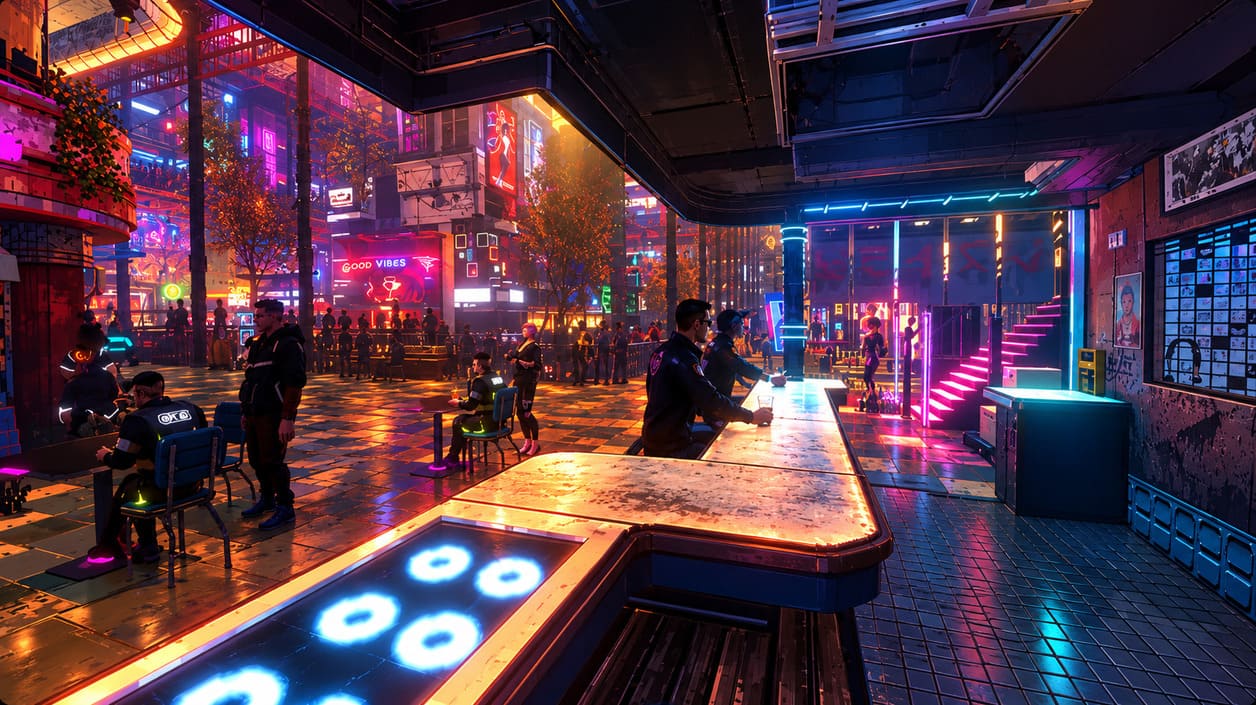
I have played enough open-world games on handhelds to know that screenshots rarely tell the whole story. A game can look gorgeous while running at a surprisingly stable frame rate, then suddenly collapse when you enter a crowded market packed with NPCs, reflections, particles, traffic, and scripted events. Nivalis Nights looks particularly vulnerable to this kind of situation because its appeal depends heavily on the density and atmosphere of its city.
The vertical design is another interesting factor. The world stretches through a huge cyberpunk metropolis with districts and locations connected across different heights. Add dynamic weather, day-night transitions, volumetric effects, wet surfaces, neon lighting, and a large number of active characters, and there are plenty of things that can stress the hardware at once. The Steam Deck does not necessarily need to render everything at maximum quality, but it needs the game engine to scale those systems intelligently.
This is also why I would not judge the Deck version solely by its average FPS. A locked 30 FPS with consistent frame pacing would be much more enjoyable to me than a supposedly faster 40-45 FPS experience that constantly jumps between numbers. Simulation-heavy games benefit enormously from consistency. If Nivalis Nights can deliver a stable handheld profile with sensible compromises, I would consider that a much more meaningful success than chasing a higher frame-rate number.
What the Steam Deck Community Is Watching
Comparisons with Cloudpunk are almost unavoidable because ION LANDS has already demonstrated an ability to create a distinctive cyberpunk world. Cloudpunk eventually became a comfortable Steam Deck game after optimization work, but Nivalis Nights is aiming for a considerably broader simulation experience. It has more systems running underneath the visual presentation, and that makes direct performance comparisons somewhat unreliable.
Community discussion around the game has naturally focused on whether the Deck can handle its city without major compromises. The interesting thing is that most experienced handheld players are not expecting a magical 60 FPS result. The more realistic expectation is a carefully tuned 30 FPS target, potentially with upscaling and reduced visual settings.
That sounds perfectly reasonable to me. A cozy cyberpunk management game is actually a good match for 30 FPS if the frame pacing is solid. You are not playing a competitive shooter where every millisecond matters, and the slower pace of exploration, conversations, decorating, business management, and fishing gives the hardware some breathing room. The real test will be whether that 30 FPS target survives the busiest areas rather than whether it looks good while standing inside an empty apartment.
Proton Compatibility Should Help
From a software perspective, Nivalis Nights has some advantages. There is no obvious competitive anti-cheat requirement preventing SteamOS users from launching the game, and Proton should provide the Windows compatibility layer needed to run it. That does not mean every configuration will be perfect on September 29, but it does mean the community can start experimenting quickly if launch-day problems appear.
For anyone unfamiliar with Steam Deck troubleshooting, the first few days after release can be surprisingly useful. Proton versions are updated frequently, and demanding new games sometimes behave differently between the default Proton release, Proton Experimental, and community builds such as GE-Proton. If Nivalis Nights has a strange video playback problem, black screen, shader issue, or controller quirk, there is a good chance that community reports will identify a workaround quickly.
I would still avoid changing ten different settings at once. When a game is brand new, it is much easier to diagnose problems if you change one variable at a time. Start with the default compatibility configuration, check performance, and only then experiment with Proton versions or graphics settings.
My Starting Steam Deck Settings
If I were installing Nivalis Nights on a Steam Deck OLED on launch day, I would approach it like a typical demanding 2026 release: start conservatively and work upward. There is no reason to sacrifice stability simply to make a screenshot look prettier, especially when the whole point of playing on the Deck is having a comfortable portable experience.
- Frame rate: Start with a 30 FPS cap and prioritize consistent frame pacing.
- Resolution: Use the Deck’s native 1280×800 output where possible.
- Upscaling: If FSR is available, begin with Quality or Balanced and compare both.
- Shadows: Medium or Low is a sensible first compromise.
- Volumetric effects: Reduce fog and similar effects if crowded areas produce frame drops.
- Crowd density: Lower it if there is a dedicated setting, especially in busy districts.
I would also keep an eye on where the game is installed. The developers recommend SSD storage on PC, and fast asset streaming could be particularly relevant for a city that moves the player between visually dense locations. If you have a Deck with internal SSD storage available, that is the configuration I would personally use for the first playthrough rather than immediately moving the game to a slower MicroSD card.
Steam Deck OLED vs. Original Steam Deck
The Steam Deck OLED is not a completely different generation of hardware, so I would not expect it to suddenly turn Nivalis Nights into a 60 FPS game. Its display and efficiency improvements can make handheld gaming feel nicer, but the fundamental performance ceiling remains broadly similar to the original Deck. That means optimization from ION LANDS will matter much more than simply owning the newer screen model.
The OLED model can still be attractive for this particular game because Nivalis Nights appears to be heavily dependent on atmosphere. Neon signs, dark streets, colorful lighting, rainy surfaces, and nighttime city scenes should look fantastic on an OLED display. If the performance profile is stable, this could be one of those games where the Deck OLED’s screen makes the handheld experience feel considerably more immersive.
What I Expect at Launch
I would go into the September 29 release without expecting a perfect Steam Deck experience on day one. The official hardware requirements are simply too demanding for me to assume that the Deck will effortlessly run every setting at high quality. At the same time, I also would not write the game off just because its minimum specification mentions dedicated VRAM.
The strongest argument in favor of handheld play is the game’s full controller support, single-player focus, and slower simulation-oriented gameplay. Those characteristics fit the Steam Deck extremely well. The biggest question is whether the engine can maintain stable frame times when the city becomes busy, because that is where CPU simulation, memory usage, and graphics effects are likely to collide.
For me, the ideal Nivalis Nights Steam Deck experience would be simple: 800p output, sensible upscaling, reduced shadows and volumetric effects, and a rock-solid 30 FPS. I would happily sacrifice some visual detail to preserve the atmosphere and avoid constant stuttering. A game about building a life in a futuristic city should feel relaxing when played in bed or on the sofa, not like I am constantly fighting the hardware.
Final Thoughts
Nivalis Nights looks like a fascinating stress test for the Steam Deck. It combines the kind of gorgeous cyberpunk visuals that usually demand a powerful GPU with simulation systems that can put serious pressure on the CPU. That combination makes the game more difficult to predict than a straightforward linear adventure, but it also makes the prospect of a good handheld configuration genuinely exciting.
I would treat launch day as the beginning of the Steam Deck testing process rather than the final answer. Developer patches, Proton updates, shader-cache improvements, and community configuration guides can all change the experience during the first weeks. If I were buying Nivalis Nights specifically for Steam Deck, I would keep expectations around 30 FPS, watch early user reports, and be prepared to lower the settings before deciding whether the handheld version works for my play style.
Ultimately, the Deck does not need to run Nivalis Nights like a high-end desktop PC to make the game worthwhile on handheld. If I can walk through those neon streets, manage my businesses, decorate an apartment, explore the city, and enjoy the slower cyberpunk life without major frame-time problems, that would be enough. For a game this focused on atmosphere and routine, a stable portable experience could end up being a surprisingly natural way to play it.