EA FC 27 The Grounds: How to Play 1v1 with Friends (Step-by-Step Guide)
There is something refreshingly chaotic about EA Sports FC 27’s The Grounds. After years of navigating menus, matchmaking screens, and endless Ultimate Team prompts, EA has finally created a space where football actually feels like a place rather than just another mode on a list.
The Grounds is essentially a giant social football playground. You can walk around, meet other players, customize your Avatar, visit different districts, watch matches, and jump into smaller games without feeling like you are constantly being pushed through a menu. And while the open-world concept is interesting on its own, the part I keep coming back to is the 1v1 format.
It is quick. It is personal. And when you are playing against a friend, every missed tackle suddenly feels much more embarrassing.
If you want to play EA FC 27 1v1 with friends, though, there are a few things worth knowing before you start running around The Grounds looking for each other. The game uses shared online instances, parties, and dedicated street pitches, so simply loading into the world at the same time isn’t enough.
Here is how the whole process works, along with some practical tips for getting into a match without wasting half an hour figuring out where your friend disappeared to.

What Exactly Is The Grounds in EA FC 27?
The Grounds is EA FC 27’s large-scale social hub, designed around the idea that football can exist outside traditional eleven-a-side matches.
Up to 100 players can occupy the same world instance, creating a much more active environment than the usual FC menus. You can see other Avatars moving around the districts, participate in smaller football activities, customize your character, and visit different locations across the hub.
The environment is divided into three main areas:
| District | Style |
|---|---|
| Monclair | French-inspired cage football atmosphere |
| Zeiza | Argentine street-football influence |
| Parkside | Traditional English football setting |
The real appeal, at least for me, is that The Grounds doesn’t make every activity feel like a formal competition. Sometimes you can just walk around, find a pitch, and decide you want to play.
That makes 1v1 football particularly effective here.
Instead of worrying about an entire squad, tactics, formations, and AI teammates, it comes down to you versus another player.
And yes, that also means there is nowhere to hide when you make a terrible defensive mistake.

What You Need Before Playing 1v1 With a Friend
Before trying to organize a private game, make sure both players actually have access to The Grounds.
The mode is designed for current-generation hardware, including:
- PlayStation 5
- Xbox Series X|S
- PC
- Nintendo Switch 2
You also need the full version of EA Sports FC 27 rather than the limited FC 27 Lite offering described in the game ecosystem.
An active online connection is obviously required, and console players should also have the appropriate online multiplayer subscription for their platform.
The most important thing, however, is making sure you and your friend are connected through EA Connect.
Step 1: Add Your Friend Through EA Connect
EA Connect is basically the foundation for organizing multiplayer sessions in The Grounds.
From the main menu, open the EA Connect overlay and find the player-search functionality. Search for your friend’s EA ID or supported platform identifier, then send the friend request.
Once they accept it, you should be able to see them through your in-game friends list.
This is worth doing before you enter The Grounds. You don’t want to load into a massive online city first and then discover that you can’t easily find or invite the person you actually came to play with.
Also check your crossplay settings if you are playing on different platforms.
If crossplay is disabled, you may not be able to connect properly with a friend using another supported platform.
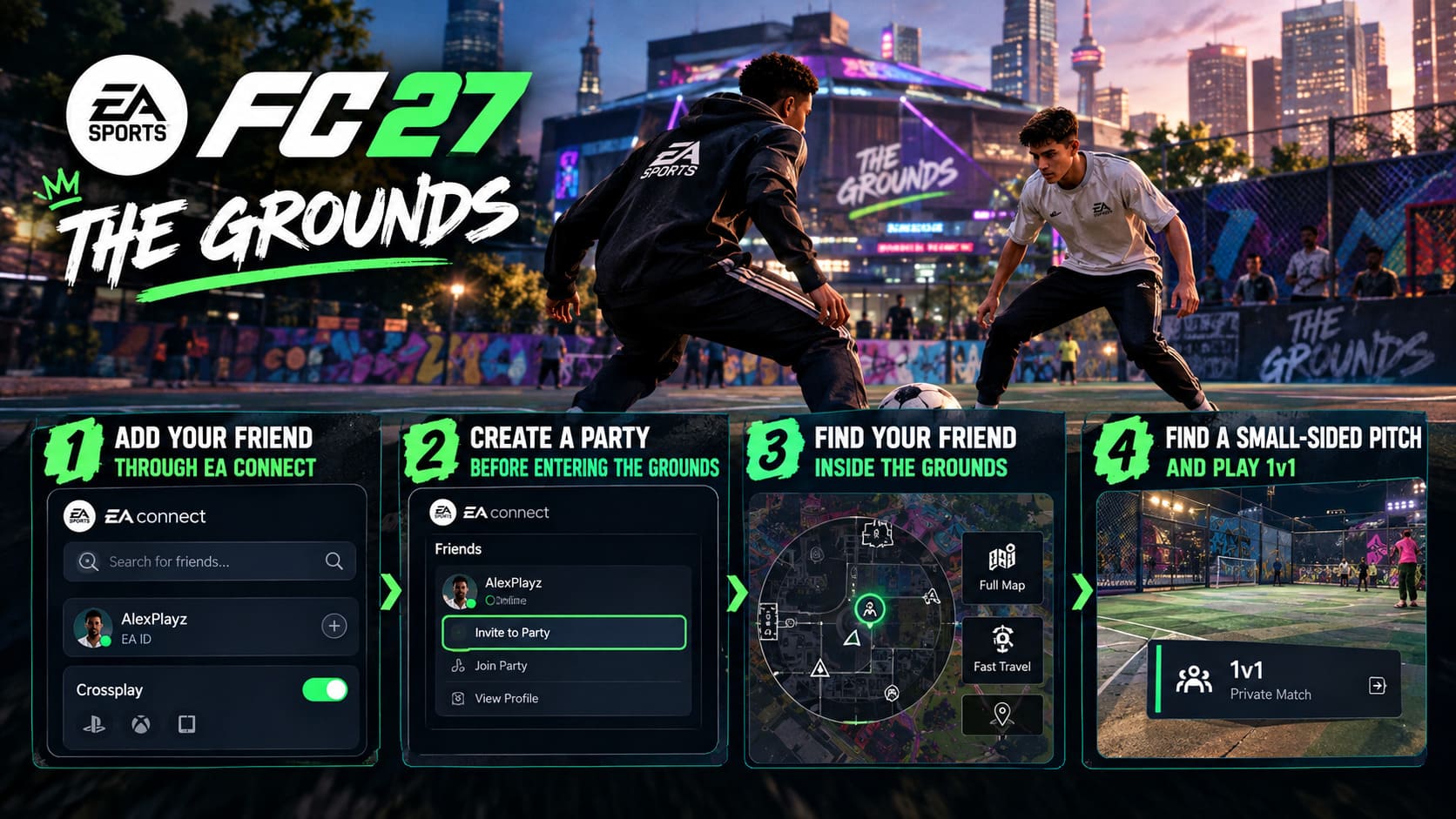
Step 2: Create a Party Before Entering The Grounds
This is probably the most important part of the entire EA FC 27 1v1 friends guide.
The Grounds isn’t one enormous server containing every player in the game. Instead, players are distributed across separate world instances.
That means you and your friend can both select The Grounds, load successfully, and somehow end up in completely different versions of the same city.
I’ve always found this kind of system slightly funny in open-world multiplayer games. You can technically be standing in the same location at the same time, yet the game effectively says, “Nope, different universe.”
The solution is simple: party up first.
Open EA Connect and find your friend in the Friends list. Choose Invite to Party, or join their existing party.
Once both players are in the same party, the party leader should launch The Grounds.
The game can then place both players into the same world instance.
If you’re already inside The Grounds, you can still open EA Connect and send a party invitation rather than immediately quitting and restarting everything.
Step 3: Find Your Friend Inside The Grounds
Once you load into the world, finding another person among potentially dozens of players can still be surprisingly awkward.
Fortunately, party members have identifiable markers.
Your friend should appear as a party-member marker on the mini-map, making it much easier to locate them than random players or NPCs.
You can also use the full map if you’re separated by a significant distance.
And don’t underestimate fast travel.
If your friend is standing near a particular football court while you’re on the opposite side of the district, there is little reason to spend several minutes running through the city. Check the map for a nearby small-sided football location and use the available fast-travel option where appropriate.
The Grounds is designed to encourage exploration, but that doesn’t mean you have to turn every 1v1 into a sightseeing tour.
Step 4: Find a Small-Sided Pitch
This is where the actual match begins.
Across The Grounds you’ll find various smaller football courts and activity areas. Depending on the location, these can look more like traditional street cages or compact outdoor pitches.
Walk toward the interactive area at the edge of the pitch and look for the matchmaking prompt.
The important part is selecting the correct format.
Depending on the available activity, you’ll see different small-sided options, but for a proper duel with your friend you want 1v1.
If the game gives you the choice between public matchmaking and a private activity, select the private option or the option that invites your current party.
Your friend should then receive the invitation.
Accept it, and the game can move both of you onto the pitch.
The Basic Process at a Glance
| Step | What To Do |
|---|---|
| 1 | Add your friend through EA Connect |
| 2 | Make sure crossplay is enabled when needed |
| 3 | Create or join the same party |
| 4 | Enter The Grounds together |
| 5 | Meet at a small-sided football pitch |
| 6 | Select 1v1 and invite your party member |
Once you understand this process, setting up another match becomes much faster.
What Makes 1v1 Different in The Grounds?
This is the part I personally find most interesting.
A normal EA FC match gives you eleven players, AI movement, passing lanes, tactical systems, and plenty of opportunities to blame someone else for what just happened.
1v1 removes almost all of that.
You control your own Virtual Pro while your opponent controls theirs. The goalkeepers remain AI-controlled, leaving the two human players responsible for everything happening in front of them.
That creates an entirely different rhythm.
There is much more space to attack, but that space can work against you too. If you commit too aggressively and miss the tackle, there isn’t another defender waiting behind you.
You’re exposed.
Dribbling becomes more important. So do changes of direction, acceleration, skill moves, and timing. A player who understands how to manipulate space can create chances without needing complicated team combinations.
Defending is arguably even more important.
A mistimed challenge can leave the entire goal exposed.
Your Avatar Build Actually Matters
One of the cleverer aspects of The Grounds is how your customized player build influences the experience.
Your attributes, PlayStyles, physical profile, and Archetype choices can have a noticeable impact on how your Avatar performs.
A powerful defender might dominate physically but struggle against a quick, agile opponent.
A smaller technical build can turn quickly and carry the ball beautifully but may have trouble when the opponent uses their body effectively.
That makes 1v1 matches more interesting than simply picking whichever build has the biggest numbers.
You start learning your friend’s tendencies too.
Does he always cut inside?
Does she rely on acceleration?
Does your friend try the same skill move every time?
After a few matches, the game becomes less about raw statistics and more about reading another human player.
That’s where EA FC 27 The Grounds 1v1 becomes genuinely fun.
Are 1v1 Matches Worth Playing for Progression?
There is another reason to spend time in these smaller matches: progression.
Playing activities in The Grounds can contribute to your Avatar’s development, with rewards connected to progression systems and the dedicated economy of the social hub.
Depending on your performance and the activity, you can earn rewards such as:
- Archetype XP for developing your Pro.
- Grounds Coins for cosmetic purchases.
- Cosmetic clothing and customization items.
- Additional opportunities to engage with the hub’s progression activities.
Grounds Coins can be used for different customization options, allowing you to make your Avatar look less like a default character wandering around the city.
And if you’re already going to spend time playing football with friends, getting progression rewards on top of the matches is a nice bonus.
I wouldn’t treat 1v1 as some magical progression shortcut, though. The biggest reason to play it is that the matches are quick and competitive.
The rewards are the extra incentive.
What About the Football Mentors?
The Grounds also includes a broader social progression layer involving recognizable football figures and fictional characters.
Mentors can provide additional activities, challenges, and story-related content as you explore the world.
This is one of those systems that could either become a genuinely enjoyable part of The Grounds or eventually feel like another checklist. It depends heavily on how much variety EA keeps adding.
For now, though, the idea works well with the overall structure.
You are not simply loading into a menu, playing a match, and disappearing. The world gives you reasons to stick around.
Common Problems When Trying to Play With Friends
Even after following the correct steps, multiplayer games can occasionally decide that your carefully organized evening needs another obstacle.
If you can’t see your friend, try these fixes.
Check the party first. Both players should actually be in the same EA Connect party before launching The Grounds.
Check crossplay. If you’re on different platforms, make sure crossplay hasn’t been disabled.
Refresh EA Connect. Sometimes closing and reopening the overlay can resolve an invitation that refuses to behave.
Check your network/NAT configuration. Strict NAT settings can interfere with multiplayer connectivity.
Try another location. If the invitation isn’t working while you’re standing inside an active activity area, move to a neutral part of The Grounds and send the party invitation again.
Also remember that server conditions can affect the experience. If you’re dealing with significant latency or stuttering, check whether the problem affects both players rather than immediately assuming your friend has somehow broken the match.
Control Resonant Best Graphic Configurations for 4K 60FPS: Complete PC Optimization Guide
Final Thoughts
EA FC 27’s The Grounds is at its best when you stop treating it like another traditional football mode.
The 1v1 format is a perfect example. It strips football down to a direct contest between two players and makes every dribble, tackle, mistake, and goal feel personal.
The setup isn’t completely obvious the first time. You need to connect through EA Connect, create a party, enter the same world instance, find a suitable pitch, and then select the private 1v1 activity. Once you’ve done it once, however, the process becomes pretty straightforward.
And honestly, that’s how I want to use The Grounds.
Not necessarily grinding endlessly. Not worrying about optimizing every possible reward. Just meeting a friend, finding a pitch, and playing five quick matches while talking trash after every goal.
That’s where EA FC 27’s open-world experiment makes the most sense to me. The Grounds doesn’t need to replace traditional FC modes. It just needs to give you a place where football feels spontaneous again.
And when your friend starts celebrating after beating you 7-6, you can always demand a rematch.