How to Get Free Call of Duty: Modern Warfare 4 Beta Codes (2026 Guide)
If you are hunting for a free Call of Duty: Modern Warfare 4 beta code, there is one important detail to get straight before you waste an evening chasing fake generators, sketchy Discord sellers, or “human verification” websites: not every player needs a code in the first place.
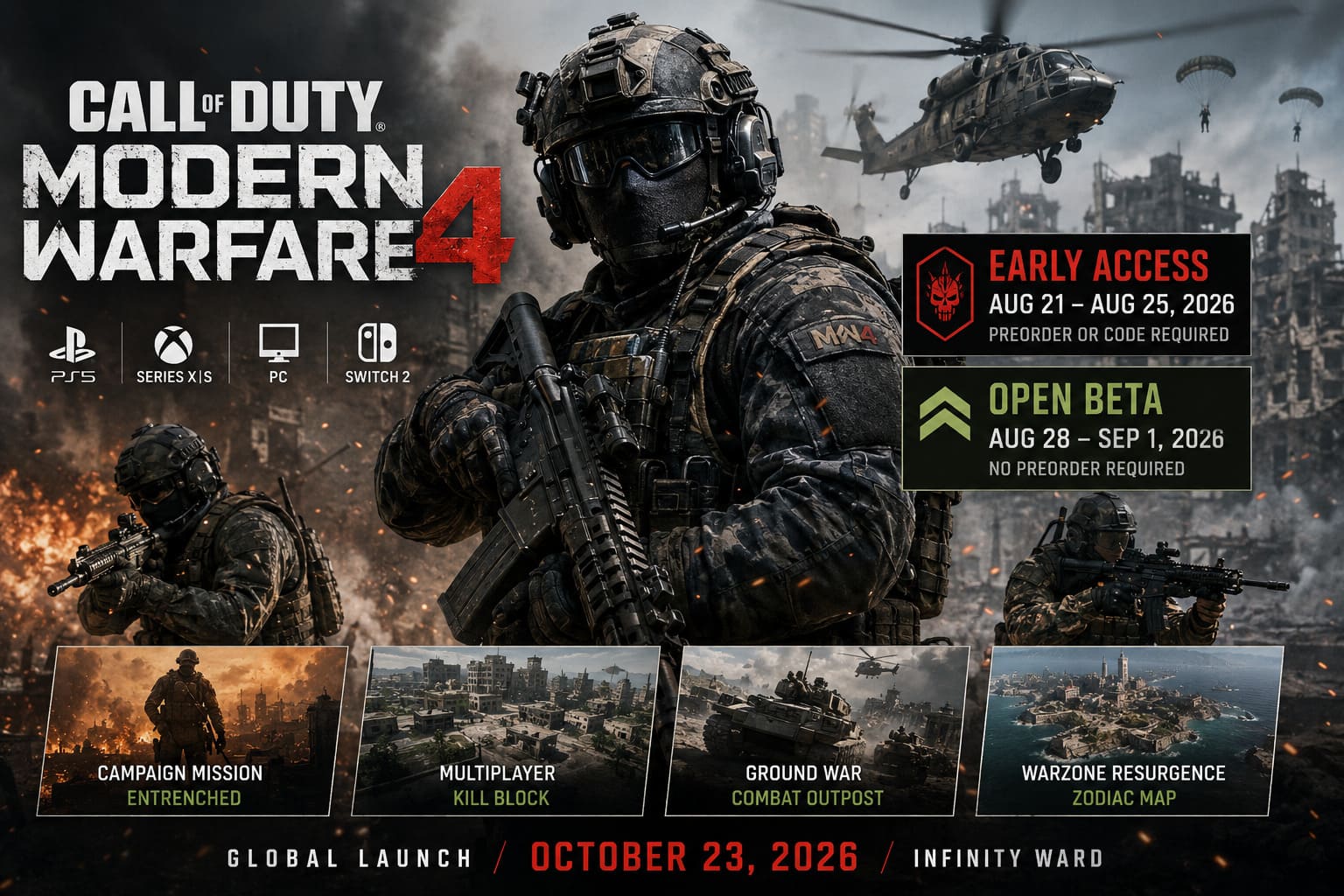
Modern Warfare 4 launches worldwide on October 23, 2026, with Infinity Ward handling development and the game arriving on PlayStation 5, Xbox Series X|S, PC, and Nintendo Switch 2. The beta is already underway, and Activision has split testing into two weekends. The first is Early Access from August 21 through August 25, while the completely open second weekend runs from August 28 through September 1.
That distinction matters. If you simply want to play MW4 without paying for a preorder, you may be better off waiting for Weekend Two rather than spending hours trying to find an Early Access token.
That said, Early Access is obviously the prize for impatient Call of Duty players. This guide breaks down the Modern Warfare 4 beta schedule, free MW4 code methods, redemption process, platform requirements, download details, and the scams you absolutely need to avoid.
Modern Warfare 4 Beta: The Two Weekends You Need to Know
The MW4 beta is built around two separate access periods. The difference between them is huge if your goal is free beta access.
| Beta Phase | Dates | Access Requirement | Platforms |
|---|---|---|---|
| Early Access | August 21–25, 2026 | Preorder or valid Early Access code | PS5, Xbox Series X|S, PC |
| Open Beta | August 28–September 1, 2026 | No preorder required | All supported platforms, including Switch 2 |
The first weekend is the one everybody is scrambling for right now. It gives preorder customers and eligible code holders an early look at Multiplayer, while the second weekend throws the doors open to everyone.
This is the biggest money-saving trick in the entire guide: if you do not care about playing five days earlier, you do not need to buy Modern Warfare 4 at all to play the Open Beta. Weekend Two requires no preorder and is available across all supported platforms, including Nintendo Switch 2.
For impatient Call of Duty players, though, Early Access is obviously the prize. Getting into the first weekend means you can test the new weapons, movement, maps, and multiplayer systems before the larger player population arrives.
What Is Actually Included in the MW4 Beta?
This is not one of those tiny Call of Duty tests where you get two maps, one mode, and a loading screen.
Modern Warfare 4 uses the beta to put several major gameplay systems through their paces. The testing program includes Multiplayer content, the new Kill Block experience, Ground War: Combat Outpost, Campaign content, and Warzone Resurgence material across the testing period.
The first weekend also features something particularly unusual for a Call of Duty beta: a playable Campaign mission called “Entrenched.” The mission is set against the game’s Korean conflict and gives players an early taste of the campaign instead of keeping the entire test focused on competitive multiplayer.
The second weekend is where things get even more interesting because Warzone Resurgence enters the beta for the first time, including the new Zodiac map. That makes Weekend Two much more than a fallback option for players who missed Early Access.
Personally, I would not sleep on the open weekend. If Infinity Ward wants useful feedback on movement, gunplay, matchmaking, and the new Warzone integration, that is where the player population is going to explode. It should also be the best opportunity to see how the game behaves when the servers are under real pressure.
So, How Can You Get a Free MW4 Beta Code?
Here is where the original idea of “free codes” needs a little cleanup.
There are legitimate promotional codes and retailer-issued Early Access codes, but Activision does not provide a magic public code generator. If a website promises unlimited MW4 codes after completing a survey, installing an extension, or entering your Activision password, close the tab.
The legitimate routes are much simpler, and most of them depend on official promotions, participating retailers, or simply waiting for the Open Beta.

1. Watch Official Call of Duty Events and Streams
Call of Duty NEXT is one of the major promotional events surrounding the MW4 beta. Activision has confirmed Twitch Drops and beta-related promotional activity around its broadcasts.
If you are already watching Call of Duty content, this is one of the safest places to keep an eye on potential promotions. Official broadcasts and verified promotional partners are far safer than grabbing a code from an anonymous account promising “100% working keys.”
The important rule is do not trust random accounts claiming to represent Activision. Follow the official Call of Duty channels and verified creators participating in the promotion.
Promotional drops can also have specific requirements, availability restrictions, or limited quantities, so seeing somebody post “FREE MW4 CODE!!!” on social media does not automatically mean there is a code waiting for you.
2. Retailer Promotions Can Provide Early Access Codes
Players who preorder through a participating physical retailer may receive a 13-character Early Access Beta code. These codes can be printed on a receipt or delivered through an online purchase email depending on the retailer and promotion.
That code is then redeemed through Activision’s official beta redemption system.
This is an important distinction: a retailer code is not the same thing as a digital preorder entitlement.
If you buy MW4 digitally through supported stores such as PlayStation Store, Microsoft Store, Battle.net, Steam, or another supported digital storefront, you are automatically registered for Early Access. You do not need to hunt down a separate code.
Codes are primarily relevant to participating retail preorder transactions and promotional distribution. That distinction can save you a lot of pointless troubleshooting.
3. Check Official Promotional Giveaways
Call of Duty creators, esports organizations, and promotional partners may distribute limited quantities of beta access codes.
This can be a perfectly legitimate way to get into Early Access without purchasing the game, but treat these giveaways as limited promotional opportunities, not a guaranteed farming method.
The safest approach is to verify that the giveaway is being run by an official partner or established creator before clicking anything. If the giveaway sends you to a strange domain asking for your Activision login, leave immediately.
4. The Completely Free Route: Wait for Weekend Two
This is the route I would recommend to most players.
From August 28 through September 1, the MW4 Open Beta becomes available to everyone on supported platforms. There is no preorder requirement and no Early Access code requirement.
So if someone is trying to sell you a $20 “guaranteed MW4 beta code” for the second weekend, they are selling you something you do not need.
That is a hard pass.
How to Redeem a Legitimate MW4 Beta Code
If you actually have a valid Early Access code, redemption is straightforward. The most important thing is to use the official Activision redemption process rather than an unofficial third-party website.
Step 1: Open the Official Activision Redemption Page
Go to callofduty.com/betaredeem.
This is the official destination specified for Early Access Beta code redemption.
Step 2: Sign Into Your Activision Account
Use the Activision account you intend to play with.
If you do not have one, Activision allows you to create a free account. Make sure the email address attached to the account is correct because your Early Access Beta token is associated with that account.
Step 3: Enter Your 13-Character Code
Retail Early Access codes use a 13-character format. Enter the characters exactly as provided.
Do not add spaces, change characters, or attempt to combine codes from different promotions. If the code refuses to validate, double-check confusing characters such as O and 0 or I and 1 before assuming the code is dead.
Step 4: Select Your Platform
Choose the platform on which you want to play.
This is not a throwaway selection. When multiple console accounts are connected to one Activision profile, the Early Access code is issued for the console selected during registration.
If you plan to play on Steam, for example, do not accidentally register the code for Xbox and then wonder why Steam is not recognizing your beta entitlement.
Step 5: Watch Your Email for the Beta Token
After successfully registering an Early Access code, the actual Early Access Beta token is sent to the email address connected to your Activision account. The token is also made available through the beta redemption page after distribution.
Check your spam or junk folder if nothing arrives.
And yes, this is one of those moments where using an email address you actually have access to is considerably smarter than creating an account with some forgotten throwaway inbox.
Downloading the Modern Warfare 4 Beta
The beta is downloaded separately through your platform’s store rather than simply appearing as another mode inside the regular Call of Duty installation.
Early Access players can begin preloading before the first testing period, while Open Beta players can preload ahead of the August 28 launch. Checking the store ahead of time is worth doing because the last thing you want is to discover a giant download waiting for you five minutes before the servers open.
The basic process is simple:
- Search your platform’s store for Call of Duty: Modern Warfare 4 Beta.
- Select the dedicated beta application.
- Choose Install or Download.
- Launch it when the appropriate beta window opens.
- Sign into the Activision account associated with your access.
On Xbox and Xbox PC, specific store-based installation instructions apply, while PC players should also make sure they are using the correct Battle.net, Steam, or Xbox PC account tied to their Activision profile.
For PC players especially, I would install the beta early. Call of Duty downloads have never been famous for being tiny, and launch-day congestion can make an already large download feel painfully slow.
MW4 Beta Platform Support
Modern Warfare 4 is moving exclusively to the current generation of consoles and PC, with Nintendo Switch 2 joining the platform lineup.
| Platform | Early Access | Open Beta |
|---|---|---|
| PlayStation 5 | Yes | Yes |
| Xbox Series X|S | Yes | Yes |
| Steam | Yes | Yes |
| Battle.net | Yes | Yes |
| Xbox PC | Yes | Yes |
| Nintendo Switch 2 | No | Yes |
The Switch 2 situation is particularly important. Nintendo’s platform does not participate in the first Early Access weekend. Switch 2 players can join the Open Beta beginning August 28, with no preorder required.
That makes Nintendo’s version a little different from the PlayStation, Xbox, and PC versions. If you are on Switch 2, there is no reason to spend time hunting for an Early Access code because the platform is not part of that first beta phase.
Do You Need a Code If You Preordered Digitally?
No.
This is probably the most useful correction for anyone currently confused by MW4 beta guides.
If you digitally preordered through PlayStation Store, Microsoft Store, Battle.net, Steam, or another supported digital storefront, your Early Access participation is automatically validated. You should not be waiting around for somebody to email you a mysterious 13-character code.
Codes are primarily relevant to participating retail preorder transactions and promotional distribution.
That distinction can save you a lot of pointless troubleshooting. Before searching for a code, check whether your digital preorder has already unlocked the beta entitlement on your platform account.
What About PC Requirements?
PC players should check the official requirements before jumping into the beta. Modern Warfare 4 has dedicated PC information covering hardware, software, preload, and performance preparation.
For a competitive shooter, I would also recommend doing the boring stuff before the servers go live: update your GPU driver, close unnecessary background applications, check your storage, and make sure Windows is fully updated.
Nobody wants to discover a driver issue while the rest of the lobby is already farming kills.
If you are chasing high refresh-rate performance, also take a few minutes to verify your monitor refresh rate, Windows display settings, GPU control-panel configuration, and in-game frame-rate limit. A beta is exactly when you want to find out whether your setup has a problem.
Beware of Fake MW4 Beta Code Generators
This part deserves its own section because Call of Duty beta periods attract scammers almost as reliably as they attract sweaty players.
There is no legitimate website that can algorithmically generate unused Activision beta codes.
A real promotional code originates from Activision, a participating retailer, or an authorized promotional partner. It is not something a browser script can magically create.
Avoid pages that ask you to:
- Complete endless “human verification” surveys.
- Install browser extensions.
- Download suspicious executables.
- Enter your Activision password.
- Provide your Steam, PlayStation, or Xbox credentials.
- Pay a small fee to “unlock” a supposedly free code.
- Connect your gaming account to an unknown website.
If a random website claims it can generate thousands of working MW4 beta keys, the only thing it is likely generating is a headache.
There is another scam worth watching for: people selling accounts that supposedly contain Early Access. Even if the account appears to work, buying or using an account obtained through questionable methods can expose you to revoked access, stolen credentials, or other account problems. Your main Activision profile is far more valuable than five days of early beta access.
Can You Play Call of Duty: Modern Warfare 4 on PS4 or Xbox One? (2026 Guide)
The Best Way to Play MW4 Beta for Free
If your priority is playing without spending money, the answer is surprisingly simple:
Wait for August 28.
Weekend Two is officially open to everyone, including players who never preordered Modern Warfare 4.
If your priority is getting into the game immediately, then legitimate Early Access codes from participating promotions or retailers are the route to watch.
The key access paths are:
| Goal | Best Route |
|---|---|
| Play Early Access immediately | Valid Early Access entitlement or code |
| Play without buying MW4 | Wait for Open Beta Weekend Two |
| Use a physical retailer preorder | Check receipt or email for code |
| Digital preorder | No separate code normally required |
| Play on Switch 2 | Join Weekend Two |
| Avoid scams | Use official Activision redemption channels |
Final Verdict
The MW4 beta is shaping up to be a much more substantial test than the usual Call of Duty weekend sampler. Campaign content, traditional Multiplayer, Kill Block, Ground War, and Warzone Resurgence give players plenty to poke at, and the second weekend is particularly interesting because the player pool expands dramatically.
If you already have a legitimate Early Access code, redeem it through Activision and get your download sorted.
If you don’t have one, don’t panic and don’t pay some random account on social media. There is an official free route. Weekend Two runs from August 28 to September 1, and no preorder is necessary.
For me, that is the real takeaway. The first weekend is for the impatient grinders who want to be first through the door. The second weekend is where everyone else gets to see whether Modern Warfare 4 actually has the gunplay, movement, matchmaking, and multiplayer foundation to make players stick around after launch.
And honestly, after spending enough time with Call of Duty betas to know how quickly the honeymoon can disappear, that is the weekend I would be watching most closely. Early access is fun, but the real test comes when the servers fill up, casual players arrive, the meta starts taking shape, and everyone begins hunting for the next broken loadout.