Pax Autocratica Console Commands List (2026): All Cheat Codes & How to Enable
Pax Autocratica is one of those games that can make you feel like a genius for ten minutes and then punish you for a decision you made half an hour ago. Its mix of authoritarian colony management, resource pressure, political control, and first-person combat creates a surprisingly stressful gameplay loop. You are not simply building a colony and watching numbers go up. You are constantly trying to keep the entire machine from falling apart.
I genuinely like that about the game. The tension is part of the appeal.
That said, there are moments when I simply don’t want to spend another evening recovering from a rebellion, waiting for construction timers, or losing an otherwise excellent combat run because I ran out of ammunition at the worst possible moment. That’s where Pax Autocratica console commands and developer cheats become interesting.
If you’re looking for the Pax Autocratica console commands list for 2026, this guide covers the commands available in the provided developer-command set, explains how the console is enabled, and shows where different cheats make the most sense.
How to Enable the Pax Autocratica Developer Console
The developer console isn’t immediately visible in the standard game interface. You first need to enable the relevant debug options through Steam launch parameters or the local configuration file.

The easiest method is through Steam.
- Close Pax Autocratica completely.
- Open your Steam Library and right-click the game.
- Select Properties.
- Stay on the General tab.
- Find the Launch Options field.
- Enter:
-console -dev_mode - Close the Properties window and launch the game.
According to the configuration method used by the game, you can also manually enable the debug overlay. Navigate to:
%AppData%/LocalLow/Multiverse/PaxAutocratica/Config/
Look for GameSettings.ini and open it with Notepad.
Find:
EnableDebugOverlay=False
Change it to:
EnableDebugOverlay=True
Save the file and restart the game.
Once the developer overlay is active, try pressing the Tilde (~) key. In some keyboard configurations, F1 can also toggle the developer interface.
A Quick Warning Before You Start
I would strongly recommend making a backup of your save before experimenting with aggressive commands.
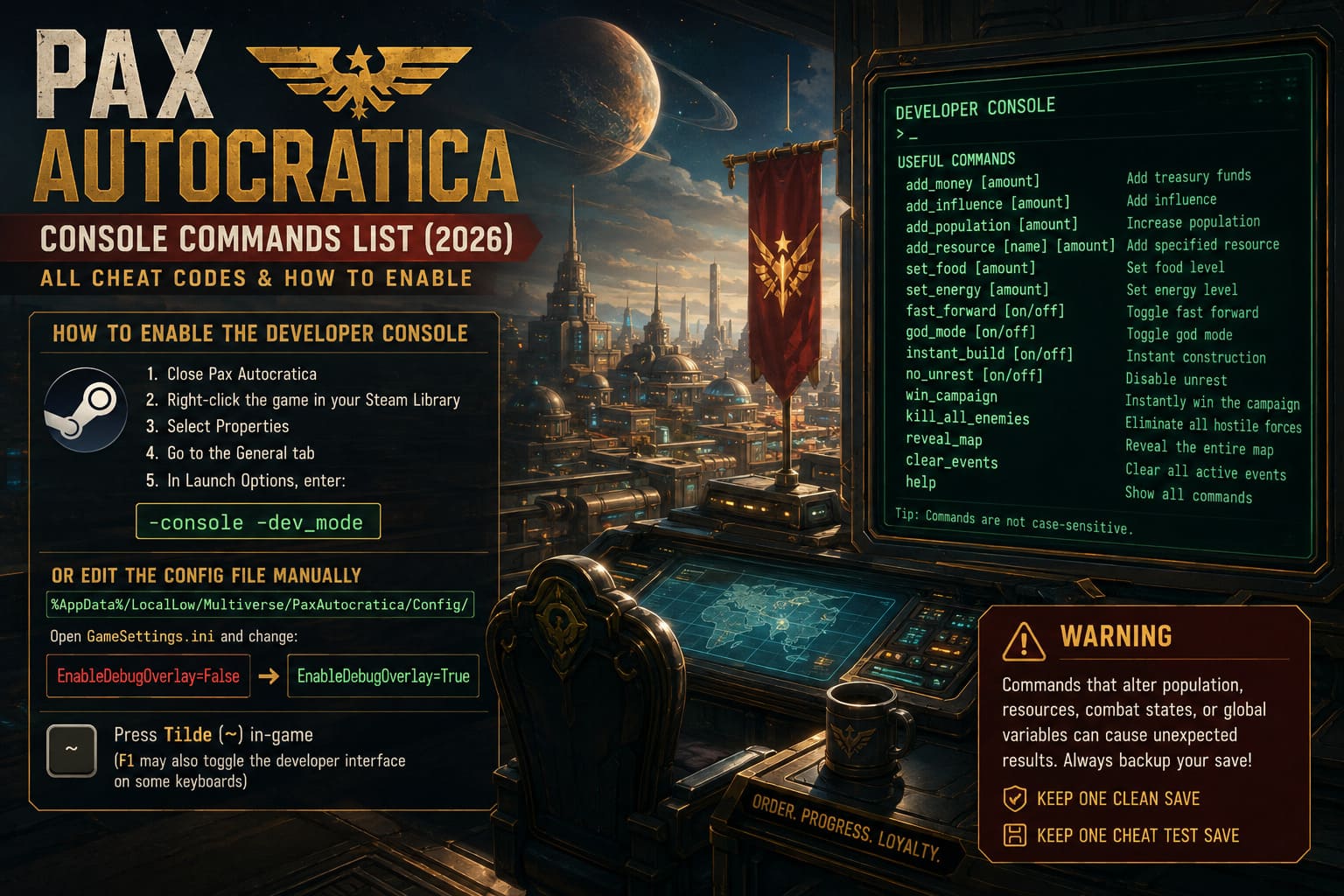
The reason isn’t just that cheats can make the game easier. Commands that directly manipulate population, resources, combat states, or other global variables can potentially create unexpected situations. A save that worked perfectly before experimenting may not behave exactly the same afterward.
For me, the safest approach is simple: keep one clean save and one cheat-testing save.
Pax Autocratica Colony Cheats and Management Commands
The colony-management side is where console commands can become incredibly powerful.
Pax Autocratica normally expects you to juggle resources, population, loyalty, fear, construction, decrees, and survival requirements. If several of those systems start collapsing simultaneously, recovering can be much more difficult than it initially appears.
Here are the main management commands from the current command set.

| Command | Function |
|---|---|
add_credits [amount] | Adds the specified amount of credits |
set_loyalty [0-100] | Changes overall citizen loyalty |
instant_decree | Removes the normal decree cooldown |
fog_off | Disables the active map fog |
build_instant | Removes construction time |
add_population [amount] | Adds population to the main settlement |
freeze_hunger | Stops hunger depletion |
fear_max | Pushes fear to its maximum level |
loyalty_max | Maximizes faction loyalty |
clear_rubble | Removes rubble and environmental blockages |
add_credits [amount]
This is probably the first command most players will experiment with.
Credits are important for maintaining your industrial machine, expanding infrastructure, and keeping production moving. Entering something like:
add_credits 50000
should add the specified amount to your available resources.
I personally prefer using this one sparingly. Giving yourself enough money to repair a struggling economy feels useful. Giving yourself millions immediately tends to remove one of the most satisfying parts of a colony builder: figuring out how to turn limited resources into sustainable growth.
set_loyalty [0-100] and loyalty_max
If rebellions are becoming a constant problem, loyalty commands can completely change the situation.
set_loyalty 100
sets the value to the maximum, while:
loyalty_max
provides the simpler all-in-one option.
This is one of those cheats I would reserve for testing. Loyalty is supposed to be a strategic problem, and completely removing it can make the political side of Pax Autocratica feel considerably flatter.
instant_decree
This removes the normal waiting period between decrees.
It’s particularly useful if you’re testing different government strategies and don’t want to spend hours waiting for cooldowns. If you’re writing a guide or experimenting with different political paths, this command can save a ridiculous amount of time.
build_instant
Few things are more tempting in a colony builder than instant construction.
With:
build_instant
factories, armories, surveillance structures, and other construction projects can be completed without the normal waiting period.
This is easily one of my favorite commands for experimentation. It lets you quickly build a complete colony layout and see whether your production chain actually works.
freeze_hunger
This command effectively turns off the hunger pressure.
freeze_hunger
can be useful when you want to focus on construction, politics, or combat without constantly worrying about ration consumption.
It’s also a good option for testing late-game infrastructure without having to maintain a complete food economy at the same time.
Pax Autocratica FPS Combat Cheats
The first-person combat portion of Pax Autocratica is a completely different experience from colony management.
When you’re outside the settlement, you are dealing with enemies, ammunition, movement, health, weapons, and potentially brutal combat encounters. This is where the developer commands become much more aggressive.
| Command | Function |
|---|---|
god | Makes the player invulnerable |
infinite_ammo | Provides effectively unlimited ammunition |
kill_radius [number] | Eliminates enemies within a selected radius |
fly | Enables free/noclip movement |
set_speed [number] | Changes movement speed |
heal | Restores health |
give_all_weapons | Adds available weapons to the inventory |
no_recoil | Removes weapon recoil |
spawn_enemy [ID] [amount] | Spawns specified enemies |
jump_high [number] | Increases jump height |
god
The classic cheat.
god
turns your character into an extremely difficult target to kill, removing much of the danger from bullets, explosions, and melee attacks.
It’s not something I’d use during a normal campaign unless I’m completely stuck. However, it is fantastic for testing weapons or exploring areas without worrying about losing a run.
infinite_ammo
If you’ve ever reached the middle of a difficult firefight and realized you’re carrying an impressive collection of empty weapons, you’ll understand the appeal.
infinite_ammo
removes much of the ammunition management pressure.
For me, this is another excellent testing command. You can compare different weapons without constantly interrupting the experiment to search for ammunition.
give_all_weapons
This command gives you access to the game’s weapon selection immediately.
give_all_weapons
is especially useful when you’re trying to figure out which firearms fit your preferred combat style.
Instead of spending hours unlocking weapons naturally, you can simply test everything and decide what you actually enjoy using.
fly
fly
is probably one of the most entertaining commands in the entire list.
It allows you to move freely through the environment and bypass many normal movement restrictions. Beyond cheating, it can actually be useful for inspecting level layouts, checking inaccessible locations, or testing whether an area has unfinished geometry.
set_speed [number] and jump_high [number]
These are perfect examples of commands that are more fun than they sound.
set_speed 2
can dramatically change the pace of movement, while:
jump_high 3
can make vertical exploration much easier.
Just don’t forget to return the values to normal afterward. Extremely high movement settings can make the game feel completely ridiculous.
Pax Autocratica Spawn Item Commands and IDs
The resource spawning system is particularly useful if you’re experimenting with progression.
The basic syntax is:
spawn_item [ID] [amount]
For example:
spawn_item Res_IronOre 100
The important part is entering the item ID correctly.
| Item ID | What It Provides |
|---|---|
Res_CoreFragment | Roguelite progression material |
Res_Biomass_Alpha | Biological research and cloning resource |
Wpn_AutoRifle_Mk1 | Basic automatic rifle |
Wpn_HeavyOrdnance | Heavy explosive weapon |
Res_IronOre | Basic industrial construction material |
Res_Titanium_Plate | Advanced construction alloy |
Item_Ration_Pack | Standard food/ration item |
Item_MedKit_Pro | Advanced healing item |
Res_DarkMatter | High-tier technology resource |
Scrap_Common | Common crafting material |
I would recommend copying IDs exactly. Console systems tend to be completely unforgiving about spelling, capitalization, underscores, and other small differences.
The Best Way to Use Cheats Without Ruining Pax Autocratica
Here’s my personal take: don’t use every command at once.
It’s incredibly easy to turn Pax Autocratica into a completely different game.
If you activate god mode, infinite ammunition, unlimited credits, instant construction, maximum loyalty, and unlimited resources simultaneously, the strategic layer disappears almost immediately. There’s no longer much reason to care about your decisions.
Instead, I like using cheats selectively.
My Preferred Approach
- For colony problems: use
add_credits,build_instant, orclear_rubble. - For testing: use
give_all_weapons,infinite_ammo, andfly. - For exploration: use
god,fly, and movement commands. - For progression experiments: use
spawn_itemwith specific resources rather than giving yourself everything. - For emergency recovery: adjust loyalty or population instead of completely rebuilding the campaign.
This way, you still have to play the game. You’re just removing the parts that are wasting your time.
Troubleshooting Pax Autocratica Console Commands
If a command doesn’t work, don’t immediately assume you’ve typed it incorrectly.
The first thing I’d check is whether the command still exists in your particular game build. Developer commands can change when developers modify internal systems.
The Console Doesn’t Open
Double-check your Steam launch options:
-console -dev_mode
Then restart the game completely.
If that doesn’t work, check the GameSettings.ini configuration and confirm that:
EnableDebugOverlay=True
is actually saved.
A Command Does Nothing
Check the syntax carefully. Commands such as:
add_credits [amount]
require an actual numerical value rather than the bracketed placeholder.
For example:
add_credits 10000
is valid command formatting, while typing the placeholder literally will not achieve the intended result.
The Game Crashes
If the game crashes after using a command, reload your backup save rather than repeatedly trying the same command.
I would especially avoid experimenting with extreme values for population, movement speed, resources, or other variables on your main save.
Commands Stop Working After an Update
This is one of the biggest things to remember with developer tools.
A patch can change internal systems, remove commands, rename variables, or alter how the debug interface works. A command that worked perfectly yesterday may simply become obsolete after an update.
Pax Autocratica Steam Deck Best Settings: How to Get Stable 60 FPS
Should You Use Pax Autocratica Cheats?
Honestly, I think Pax Autocratica is more enjoyable when cheats are treated as tools rather than shortcuts.
The game’s difficulty is a major part of its identity. Watching a colony gradually become stable after surviving shortages, political unrest, and resource problems can be genuinely satisfying. If you remove every obstacle, you also remove a lot of that satisfaction.
But there are plenty of legitimate reasons to use console commands.
Maybe you’re testing a build.
Maybe you want to explore a combat area without losing a run.
Maybe a bug destroyed your economy.
Maybe you simply want to experiment with a ridiculous colony and see what happens.
That’s where developer cheats shine.
The commands also make Pax Autocratica much more interesting as a sandbox. You can create unusual scenarios, spawn resources, test weapons, manipulate population levels, and explore systems that would normally take hours to reach.
Final Thoughts
The Pax Autocratica console commands list is less about making the game permanently easy and more about giving players another way to interact with its systems.
For normal play, I’d keep the cheats disabled and let the game’s brutal management mechanics do their thing. For experimentation, troubleshooting, and pure sandbox chaos, however, the developer console is incredibly useful.
My personal favorites are build_instant, give_all_weapons, fly, and spawn_item. They don’t necessarily destroy the game immediately, but they give you enough freedom to experiment with the systems that make Pax Autocratica interesting.
Just remember to back up your save before using developer commands, especially if you’re testing extreme values.
Sometimes the best way to understand a complicated game isn’t to follow its rules.
Sometimes it’s to break them and see what happens.