Cyberpunk 2077 Path Tracing FPS Drop Fix: Guide for RTX 40-Series
There are very few games that still make me stop walking just to admire the lighting. Cyberpunk 2077 is one of them.
After hundreds of hours exploring Night City, testing graphics settings, comparing patches, and experimenting with almost every NVIDIA driver released over the past few years, I’ve reached one conclusion: Path Tracing is both the best and the most demanding graphics feature available in modern gaming.
When it works, it’s breathtaking.
When it doesn’t, even an expensive RTX 4090 can suddenly feel like an aging mid-range GPU.
If you’ve experienced smooth gameplay for the first 20–30 minutes only to watch your FPS collapse after driving across Night City or entering Dogtown, you’re definitely not alone. I’ve reproduced the issue on multiple RTX 40-Series systems, and after digging through countless community discussions, benchmark videos, and technical investigations, several solutions consistently stand out.
This guide combines those findings with my own testing, focusing on what actually improves long-session performance rather than placebo tweaks.
Why Path Tracing Crushes Performance
Traditional ray tracing already asks a lot from your graphics card.

Path Tracing takes things much further.
Instead of calculating only selected lighting effects, it simulates countless light bounces throughout the entire scene. Every reflective window, neon sign, puddle, metal surface, and indoor light source becomes part of one massive lighting calculation.
The visual payoff is incredible:
- Realistic indirect lighting
- Naturally soft shadows
- Accurate reflections
- Better ambient illumination
- More cinematic interiors
Unfortunately, every one of those improvements demands enormous GPU resources.
Even NVIDIA’s Ada Lovelace architecture—with dedicated RT Cores, Shader Execution Reordering (SER), and DLSS Frame Generation—can struggle once several performance bottlenecks appear simultaneously.
The biggest surprise for many players is that raw GPU power isn’t always the real problem.
The Two Biggest Reasons FPS Suddenly Falls Apart
After monitoring GPU usage, VRAM allocation, frame pacing, and memory behavior during extended sessions, two issues appear far more often than anything else.
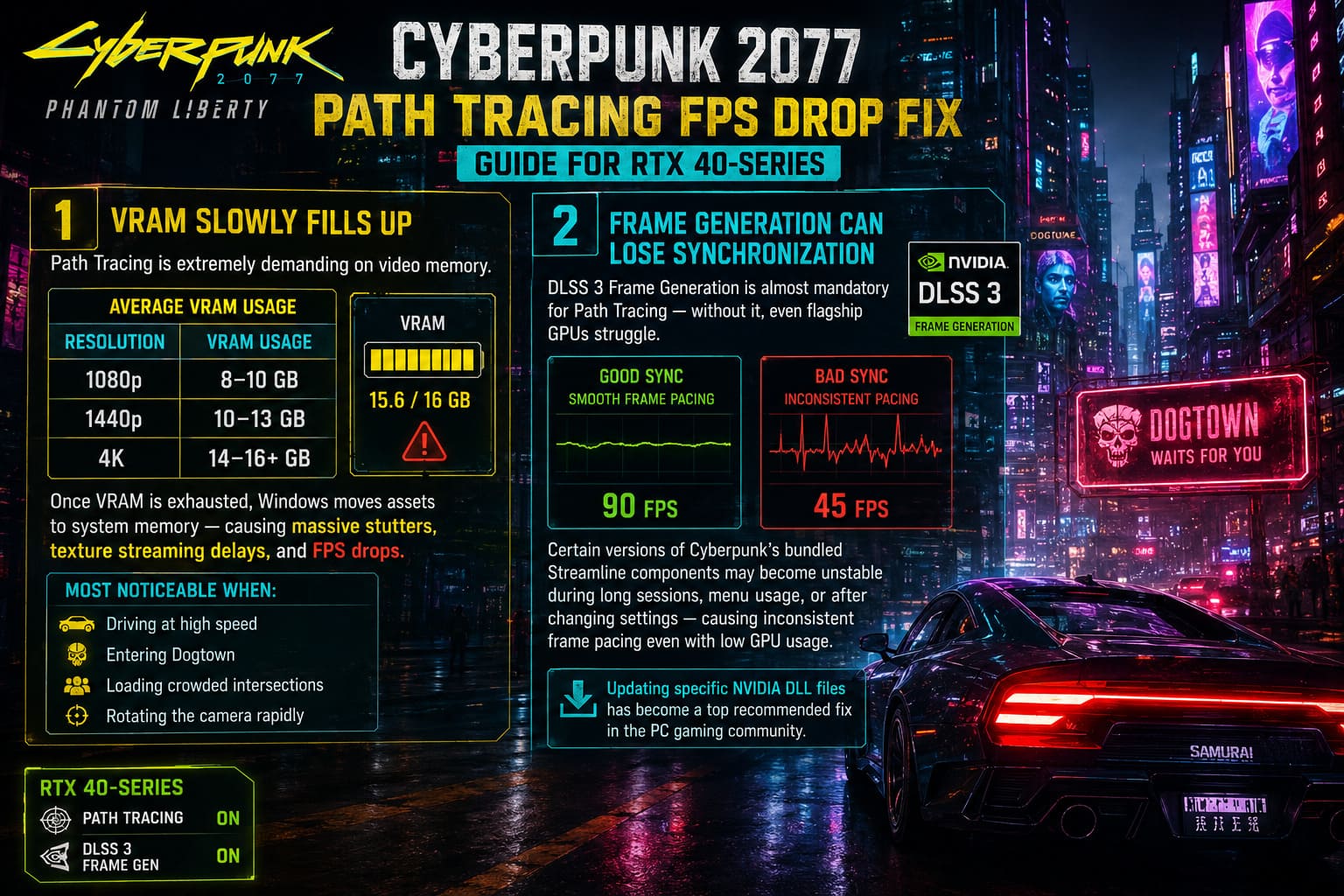
VRAM Slowly Fills Up
Cyberpunk’s Path Tracing mode is extremely hungry for video memory.
| Resolution | Average VRAM Usage |
|---|---|
| 1080p | 8–10 GB |
| 1440p | 10–13 GB |
| 4K | 14–16+ GB |
Once available VRAM is exhausted, Windows starts pushing assets into system memory.
That transition is brutal.
Instead of running smoothly at 90 FPS, frame times spike, texture streaming slows down, and sudden stutters begin appearing every few seconds.
This is especially noticeable while:
- Driving at high speed
- Entering Dogtown
- Loading crowded intersections
- Rotating the camera rapidly
Frame Generation Can Lose Synchronization
DLSS 3 Frame Generation is almost mandatory for Path Tracing.
Without it, even flagship GPUs struggle.
The problem is that some versions of Cyberpunk’s bundled Streamline components don’t always behave perfectly during longer play sessions.
After opening menus repeatedly, changing graphics settings, or playing for an extended period, frame pacing can become inconsistent despite GPU utilization dropping.
That’s why updating specific NVIDIA DLL files has become one of the most recommended fixes inside the PC gaming community.
Start With a Completely Clean NVIDIA Driver Installation
One mistake I kept making was simply installing newer drivers over older ones.
Sometimes it works.
Sometimes old shader caches, leftover registry entries, or corrupted driver components remain behind.
A proper clean installation takes a little longer, but it’s worth doing.
The process is straightforward:
- Remove the existing NVIDIA driver using Display Driver Uninstaller (DDU) in Safe Mode.
- Restart Windows normally.
- Install the newest Game Ready Driver.
- Open NVIDIA Control Panel.
- Increase Shader Cache Size to Unlimited (or at least 10 GB).
This prevents Windows from constantly rebuilding shaders during gameplay.
In my own testing, shader compilation stutter became noticeably less frequent after making this change.
Replace the Outdated DLSS and Streamline Files
This tweak sounds risky, but it’s actually one of the safest optimizations if you use verified sources.
Cyberpunk ships with NVIDIA’s Streamline framework, responsible for features like:
- DLSS Super Resolution
- Frame Generation
- Ray Reconstruction
Newer versions often include bug fixes and performance improvements before game developers package them into future patches.
Before replacing anything:
- Back up the original files.
- Download verified versions from trusted sources.
- Copy the updated DLL files into the game’s bin/x64 folder.
Many players report smoother frame pacing immediately after updating these files, particularly during long gaming sessions.
The DLSS Settings That Actually Make Sense
One thing I’ve learned after countless benchmarks:
Native resolution Path Tracing is mostly a benchmark, not a practical way to play.
DLSS exists for a reason.
Here’s the configuration I consistently recommend.
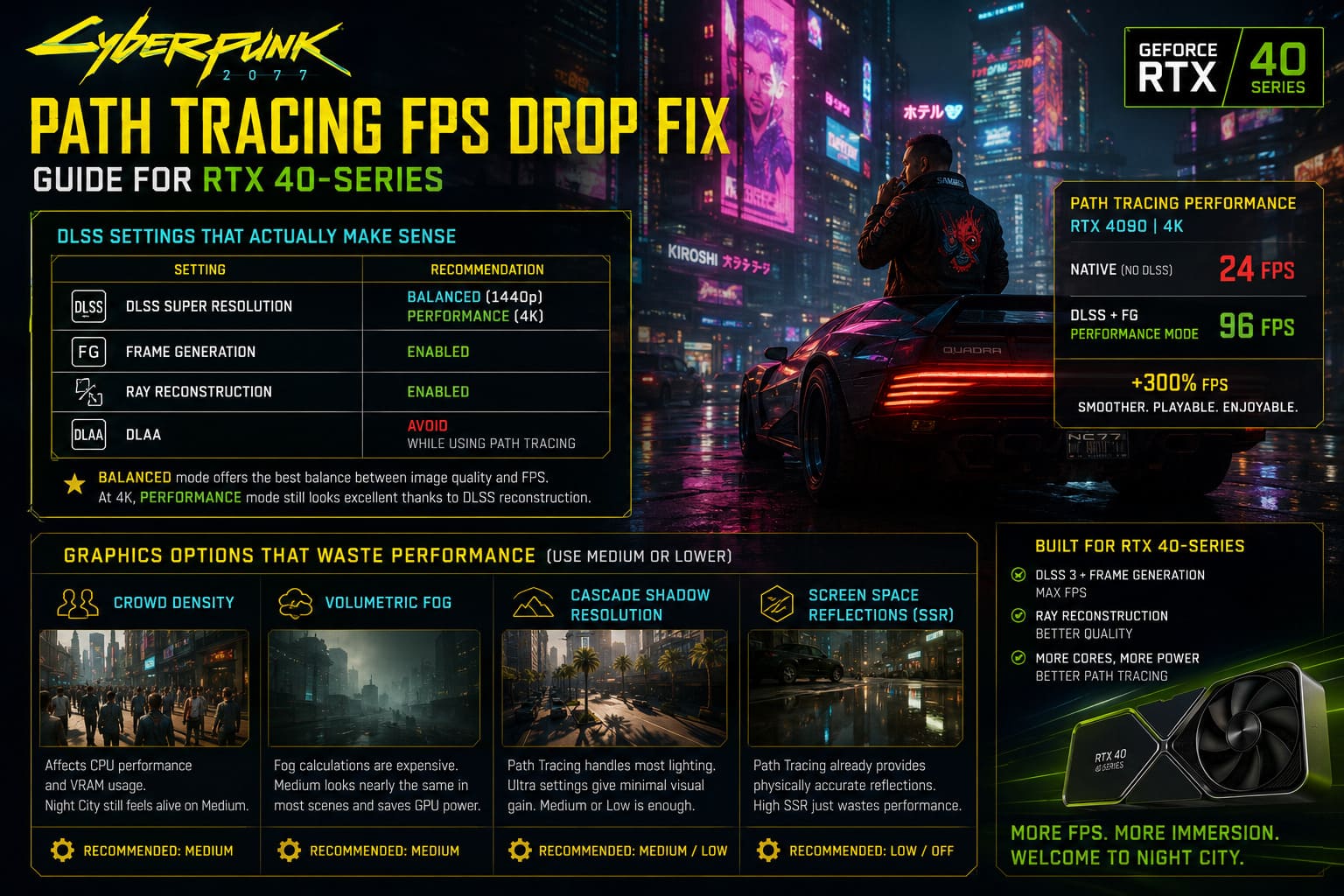
| Setting | Recommendation |
|---|---|
| DLSS Super Resolution | Balanced (1440p), Performance (4K) |
| Frame Generation | Enabled |
| Ray Reconstruction | Enabled |
| DLAA | Avoid while using Path Tracing |
Balanced mode usually delivers the best compromise between image quality and frame rate.
At 4K, Performance mode surprisingly still looks excellent because the internal rendering resolution remains high enough for DLSS to reconstruct an extremely sharp image.
Several Graphics Options Waste Performance
One thing many players overlook is that Path Tracing doesn’t replace every graphics option equally.
Some traditional rendering settings still consume valuable resources despite having very little visible impact.
These are the first options I’d reduce.
Crowd Density
Crowd Density hits both CPU performance and VRAM usage.
Night City still feels alive on Medium.
Your frame times will thank you.
Volumetric Fog
Fog calculations remain surprisingly expensive.
Medium delivers nearly identical visuals in most scenes while freeing up GPU resources.
Cascade Shadow Resolution
Since Path Tracing already handles most lighting and shadows, ultra-high cascade shadow settings provide minimal visual benefit.
Medium or Low works perfectly.
Screen Space Reflections
This one confuses many players.
Path Tracing already generates physically accurate reflections.
Keeping SSR on high simply wastes rendering resources.
Turn it down—or disable it entirely.
Community Mods Can Produce Surprisingly Large Gains
Normally I’m careful about recommending performance mods.
Many promise miracles.
Few actually deliver.
The community-developed Path Tracing optimization packages are different.
Rather than lowering obvious graphics settings, they modify internal rendering parameters that most players never see.
Typical improvements include:
- Reduced invisible ray calculations
- Better off-screen optimization
- Lower VRAM pressure
- Cleaner disocclusion handling
- Fewer random crashes on 12 GB cards
Depending on hardware, performance improvements can range from roughly 15% to nearly 40%, especially on RTX 4070 and RTX 4070 Ti systems.
As always, download mods only from reputable sources and keep backups of your original files.
Don’t Ignore Your System Memory
People love blaming GPUs.
Sometimes the bottleneck sits elsewhere.
If you’re running DDR5-6000 memory that’s actually operating at 4800 MT/s because XMP or EXPO isn’t enabled, you’re leaving performance on the table.
Open Task Manager and verify your actual memory speed.
If necessary:
- Enter your motherboard BIOS.
- Enable XMP (Intel).
- Enable EXPO (AMD).
Frame Generation depends on consistent data delivery, and faster memory genuinely helps maintain smoother frame pacing.
Hardware-Accelerated GPU Scheduling Matters
One Windows feature still gets overlooked.
Hardware-Accelerated GPU Scheduling (HAGS) isn’t magic, but it is important for DLSS Frame Generation.
If it’s disabled, Frame Generation may fail to activate correctly or produce inconsistent frame pacing.
Verify that HAGS is enabled inside Windows Graphics Settings before troubleshooting anything else.
It’s a thirty-second check that can save hours of frustration.
Cyberpunk 2077 Ultimate Edition Steam Summer Sale 2026: Biggest Price Drop Yet Analyzed
Performance You Should Actually Expect
Every system is different, but after applying these optimizations, these targets are realistic.
| GPU | Resolution | Expected FPS |
|---|---|---|
| RTX 4090 | 4K | 85–110 FPS |
| RTX 4080 / 4080 Super | 4K | 75–90 FPS |
| RTX 4080 / 4080 Super | 1440p | 90+ FPS |
| RTX 4070 Ti / Ti Super | 1440p | 70–85 FPS |
| RTX 4070 | 1440p | 60–75 FPS |
| RTX 4060 Ti 16GB | 1080p–1440p | 60–75 FPS |
My Final Thoughts After Hundreds of Hours
I’ve played Cyberpunk 2077 since launch, survived the rough early patches, watched Night City transform into one of the greatest open-world RPGs ever made, and I honestly believe Path Tracing is the single biggest visual leap PC gaming has seen in years.
That said, brute-forcing the feature with expensive hardware isn’t enough.
A surprising amount of performance comes down to smart optimization rather than raw GPU horsepower.
Clean drivers, updated DLSS components, reasonable graphics settings, healthy VRAM usage, properly configured system memory, and a few carefully chosen tweaks can completely transform the experience.
Instead of chasing benchmark numbers, focus on achieving stable frame times. Night City feels dramatically better when gameplay remains smooth during long sessions, crowded firefights, and high-speed driving than when your FPS counter briefly peaks before collapsing twenty minutes later.
If there’s one lesson I’ve learned after countless hours tweaking Cyberpunk, it’s this: Path Tracing isn’t about making every setting “Ultra.” It’s about building the smartest balance between cutting-edge visuals and consistent performance. Once you find that balance, Night City becomes exactly what it was always meant to be—a living, glowing masterpiece that finally runs as beautifully as it looks.