EA SPORTS FC 27 Clubs Guide: How to Join and Play in The Grounds
EA SPORTS FC 27 gives Clubs a very different feel this year. Instead of treating Pro Clubs like another menu buried somewhere in the game, EA has turned the mode into an actual social space called The Grounds. It is part football hub, part open-world playground, and part matchmaking area where you can meet other players, find a club, train your Virtual Pro, and jump into different types of matches.
At first, The Grounds can feel a little overwhelming. There are districts to explore, pitches to find, players running around everywhere, and plenty of interactive locations that are not immediately obvious. Once you understand how the system is laid out, though, getting from the social hub into an actual Clubs match becomes much easier.
This EA SPORTS FC 27 Clubs guide breaks down how The Grounds works, where to find the Clubhouse, how to join or create a club, how the Queue Zone system works, and which districts are worth visiting for different game modes.
What Is The Grounds in EA SPORTS FC 27?
The Grounds is the main open-world hub for Clubs in FC 27. Instead of jumping between menus every time you want to change something or find a match, your Virtual Pro actually moves through a shared football environment. Up to 100 players can occupy the same instance, giving the mode a much more social atmosphere than the traditional Pro Clubs setup.

The idea is pretty straightforward: The Grounds connects casual street football with the more serious competitive side of Clubs. You can spend a few minutes messing around in a small-sided game, meet other players, head back to your Clubhouse, or join your squad for a proper competitive match.
The entire area is built around three major districts — Parkside, Montclair, and Ziza — with The Terrace acting as the central meeting point. Think of The Terrace as your starting base. From there, you can reach the different neighborhoods, interact with other players, use facilities, and travel toward the pitches hosting the games you want to play.
| Area | Main Focus | Typical Activities |
|---|---|---|
| The Terrace | Central Hub | Social activities, player interaction, navigation |
| Parkside | Competitive Street Football | 11v11 Drop-In, Stadium Rush, small-sided games |
| Ziza | Skill-Based Football | 1v1 and 2v2 King of the Hill |
| Montclair | Experimental Modes | Club Tournaments, Mystery Ball, No Rules, Survival |
How to Enter The Grounds and Create Your Virtual Pro
Your Clubs journey starts when you select Clubs from the main EA SPORTS FC 27 menu. Rather than throwing you straight into another conventional management screen, the game introduces you to The Grounds and asks you to establish your Virtual Pro.
This is where you customize the basics of your player, including physical appearance, kit preferences, and your initial performance setup. Your player development is tied heavily to the game’s Archetype system, so this isn’t just cosmetic setup. The framework you choose helps determine how your Virtual Pro plays and develops.
After creating your player, you’ll arrive at The Terrace. This is effectively your first home inside The Grounds. Other players will be moving around the area, and you can start getting familiar with the different locations before heading toward a specific district.
Don’t worry if the hub feels busy at first. You don’t need to understand every location immediately. The important thing is learning where the Clubhouse, map, queues, and major districts are located.
Where to Find the Clubhouse
The Clubhouse is one of the most important locations in The Grounds because it replaces a lot of what used to be handled through traditional Clubs menus.
You’ll find the Clubhouse close to the main Plaza area near the center of the map. Once you’re there, you’ll notice information displays showing details about your club and which teammates are currently online in the open-world instance.
Walking into the Clubhouse takes you away from the general social area and into your team’s own headquarters. This is where you can handle important club-related tasks, including roster management, tactical changes, and customization of your team’s environment.
For anyone who played older versions of Pro Clubs, this is probably one of the biggest changes to get used to. Your club now feels like an actual place rather than a menu.
How to Join a Club in EA SPORTS FC 27
Joining an existing club combines the new open-world mechanics with the familiar invitation and recruitment systems. You can look for a specific team or browse available clubs if you’re still searching for somewhere to play.
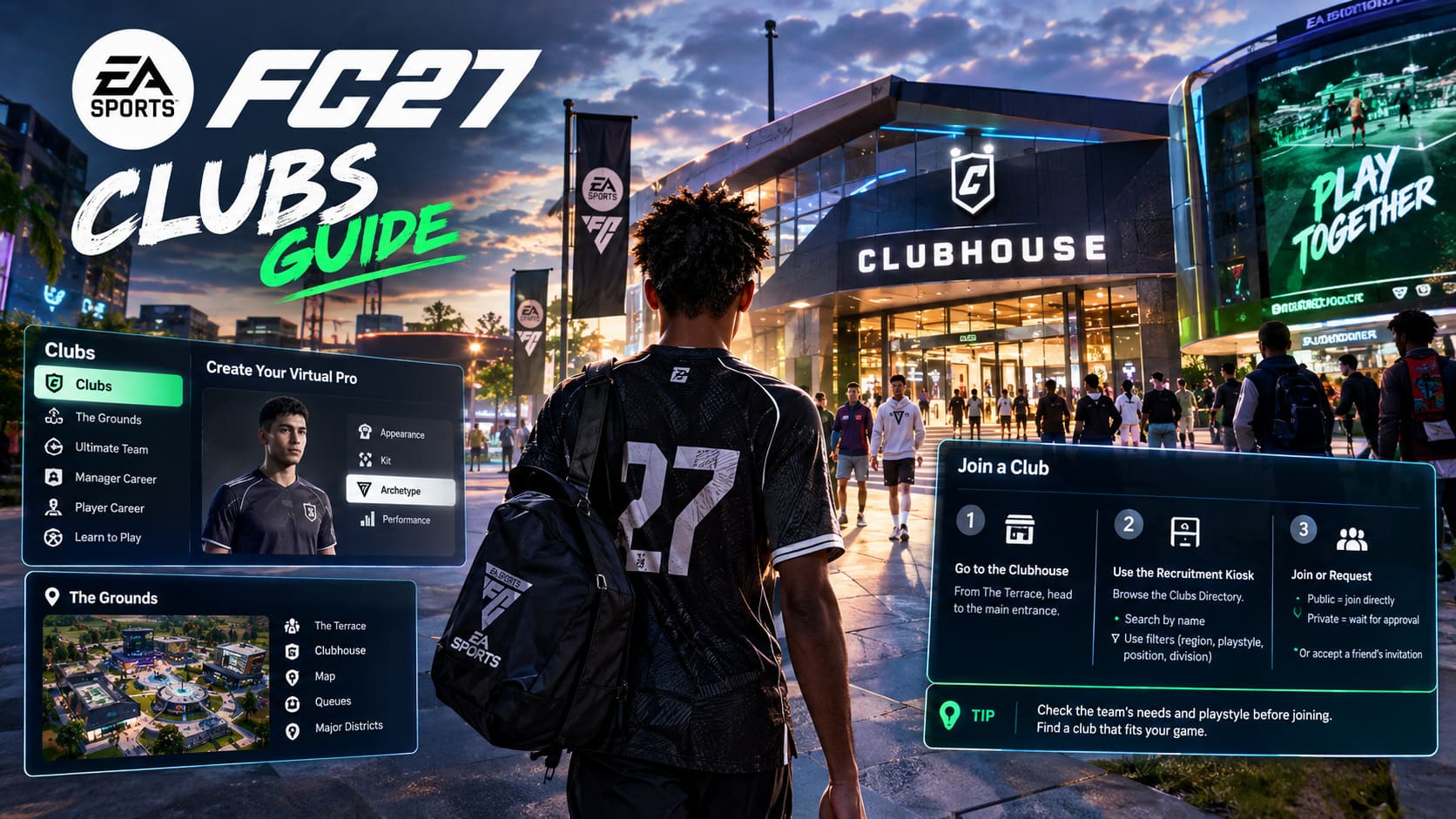
Step 1: Go to the Clubhouse Area
Start from The Terrace and make your way toward the main Clubhouse entrance. You can simply walk there or use the game’s navigation tools if you already know where you’re going.
Step 2: Find the Recruitment Kiosk
Near the Clubhouse area, you’ll find interactive kiosks that give you access to the Clubs Directory. This is the main place to search for teams.
If you already have a club name in mind, search for it directly. If you’re a free agent, you can use available filters to narrow the results based on factors such as region, tactical preferences, position requirements, and competitive division.
Step 3: Join or Request to Join
The final step depends on the club’s settings. A Public club can allow you to join directly, while a Private club requires approval from its managers.
You can also join through a direct invitation. If a friend sends you an invite, check your notifications and accept it. From there, the game can move you directly toward the relevant club area.
Tip: If you’re serious about finding a regular team, don’t just pick the first club you see. Check what positions they need and whether their preferred playstyle actually matches how you like to play.
How to Create Your Own Club
If playing for somebody else isn’t your thing, FC 27 also lets you build your own club from the ground up.
Open the map or head toward the central Plaza management area and select the option to Form a New Club. You’ll then be able to choose your club name, colors, badge, and home-ground identity.
Once the club is created, the next challenge is finding players. One of the more interesting parts of The Grounds is that you can interact with other players directly instead of relying exclusively on menus. Approach another Virtual Pro, open the player interaction wheel, and use the option to invite them to your club.
It gives the recruitment process a much more personal feel. You can actually meet players in the same environment before deciding whether they’re worth bringing into your squad.
Where to Play Different Clubs Modes
One thing that caught me off guard about The Grounds is how much the districts matter. The areas aren’t simply different-looking parts of the same map. Each one is built around different types of football.
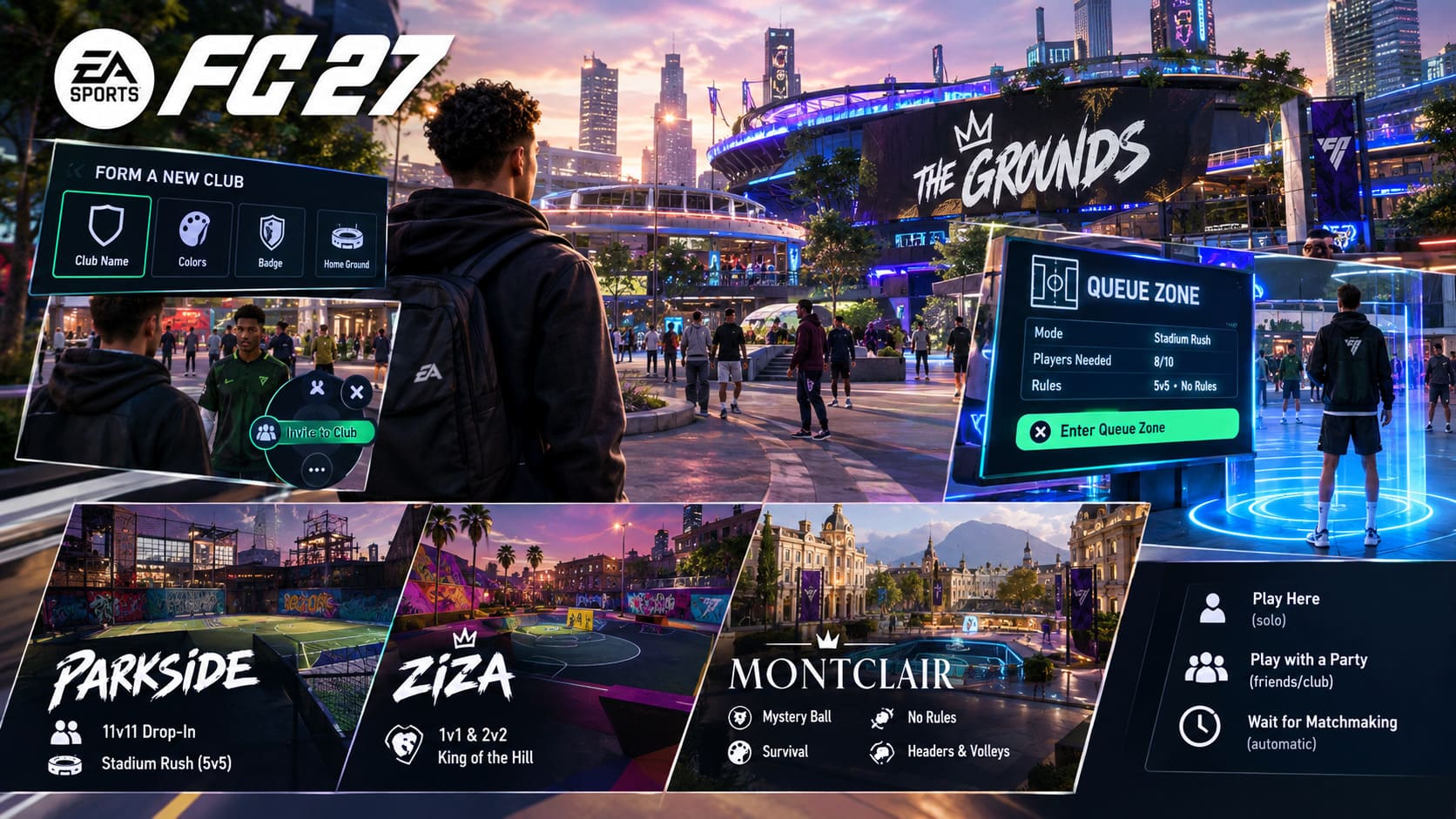
Parkside
Parkside has the rougher, industrial street-football vibe and is one of the busiest areas if you’re looking for competitive action.
This district is associated with 11v11 Drop-In matches, making it a useful destination when your normal club lineup isn’t available. You can also find Stadium Rush arenas here, including faster 5v5 matches that are designed around a more compact style of football.
If you’re a player who likes traditional team football but doesn’t always have a full squad online, Parkside is one of the first places I’d check.
Ziza
Ziza takes a completely different approach. The district is heavily focused on flair, individual skill, and smaller matches.
Its main attraction is the collection of 1v1 and 2v2 King of the Hill challenges. These matches put much more pressure on your individual ability. There isn’t a full team to hide behind, so poor dribbling, bad movement, or weak defensive timing becomes obvious pretty quickly.
Montclair
Montclair is the place to visit when you’re tired of standard football rules. The district has a more polished European atmosphere and focuses on experimental game types and rotating tournaments.
Depending on what’s active, you can run into modes such as Mystery Ball, No Rules, Survival, and Headers & Volleys. These aren’t necessarily the modes you’ll play for serious competitive progression, but they’re a nice way to break up the usual Clubs routine.
How the Queue Zone System Works
FC 27 changes the matchmaking process by making you physically enter Queue Zones around The Grounds. Instead of sitting in a conventional lobby, you walk to the pitch you want to play on and join the queue directly.
Look for the information board positioned near the pitch. It tells you what rules are currently active, how many players are needed, and whether the matchmaking process is already underway.
Once you’ve decided to play, walk your Virtual Pro into the glowing Queue Zone. You’ll then be given options such as playing solo or joining with a party.
- Play Here: Queue as an individual player.
- Play with a Party: Bring friends or club teammates into the same queue.
- Wait for Matchmaking: Stay in the queue until enough players are found.
The system then handles the rest. Once the required number of players has been assembled, the match can launch automatically.
Personally, I like the idea behind this system because it makes The Grounds feel like a real football community rather than another collection of menus. The downside is that you’ll spend a little more time learning where everything is when you’re new.
Fast Travel and Getting Around The Grounds
The open-world structure is fun until you’re on the opposite side of the map from your friends and realize you need to cross several districts. Thankfully, FC 27 includes fast-travel options to reduce unnecessary running around.
Open the full map and select a pitch, tournament location, or major landmark. You can also place a waypoint if you’d rather walk there manually. The waypoint gives you an on-screen route so you don’t have to memorize the layout.
Use fast travel when your club is already waiting for you. There’s not much point spending several minutes sightseeing while six teammates are sitting in a queue.
How AXP Progression Works in The Grounds
The Grounds isn’t just a social area. Your time there can also contribute to Virtual Pro progression through Avatar Experience Points (AXP).
Casual matches and small-sided games can earn AXP, which feeds into your character’s development. That progression can unlock additional attribute points, Masteries, and performance-related equipment known as Amps.
This gives casual football a useful purpose. If your regular 11v11 club isn’t playing at the moment, you don’t necessarily have to sit in the menus waiting for your friends. You can head to Parkside for a smaller game or visit Ziza for individual challenges and continue developing your player.
For players who enjoy experimenting with different builds, this is especially useful. You can spend your downtime working toward better attributes instead of treating casual modes as completely separate content.
How to Fix EA Sports FC 27 AntiCheat Game Security Violation Error – Full Guide
Quick Tips for Getting Started in FC 27 Clubs
- Check the Clubhouse kiosks first. They can give you useful information about your club, invitations, and recruitment.
- Learn the district layout early. Knowing where Parkside, Ziza, and Montclair are will save a lot of unnecessary travel.
- Use fast travel when your party is waiting. The Grounds is big enough that manual travel can become a time sink.
- Don’t ignore small-sided games. Casual matches can contribute to AXP and help develop your Virtual Pro.
- Use Parkside if you’re looking for players. Busy Drop-In areas are natural places to encounter other free agents.
How to Fix EA Sports FC 27 Black Screen After Stadium Intro Glitch
Final Thoughts on The Grounds
The Grounds is easily one of the biggest structural changes to Clubs in EA SPORTS FC 27. It takes the old Pro Clubs concept and turns it into something much more social, with physical locations replacing a lot of the disconnected menus players are used to.
The important thing is not to treat The Grounds as one giant map where everything is mixed together. Once you understand what each district is designed for, the whole system starts making more sense. Parkside is where you’ll generally look for competitive and Drop-In football, Ziza focuses on smaller skill-driven challenges, and Montclair gives you the stranger, more experimental modes.
For new Clubs players, I’d spend a little time exploring before immediately grinding matches. Find the Clubhouse, learn how the kiosks work, test the Queue Zones, and figure out the fast-travel system. After that, The Grounds becomes much easier to navigate.
And honestly, that’s probably the biggest adjustment coming from older versions of Pro Clubs. You’re no longer simply selecting a match from a menu. You’re actually moving through a football world, meeting players, building a club, and deciding where you want to play. Whether you prefer competitive 11v11 matches or quick street games, learning The Grounds is the first step toward getting the most out of EA SPORTS FC 27 Clubs.