R.I.P. Reincarnation Insurance Program Steam Deck Guide: Performance, Settings, and Verification Status
I’ve spent enough time with roguelites, survivor-likes, and loot-heavy ARPGs to know that a game can look perfect on paper and still feel terrible on a Steam Deck. Huge enemy crowds, hundreds of projectiles, damage numbers everywhere, and constant item calculations are exactly the kind of workload that can expose the limits of handheld hardware. That’s why R.I.P. – Reincarnation Insurance Program caught my attention. It takes the familiar bullet-heaven formula and mixes it with a surprisingly deep loot system, creating something that feels closer to Diablo dropped into a chaotic survivor-like than a simple wave-based roguelite.
Originally entering Early Access in January 2026, R.I.P. has now reached its full 1.0 release in September 2026. More importantly for handheld players, the developers have spent a considerable amount of time improving the Steam Deck experience. After playing plenty of games that technically ‘work’ on Deck but require a collection of workarounds, I appreciate when a developer actually treats the handheld version as something worth polishing rather than simply relying on Proton to do the heavy lifting.
So, how does R.I.P. – Reincarnation Insurance Program perform on Steam Deck, and is it worth adding to your portable library? There are a few things worth knowing before jumping in.
Reincarnation Insurance Program Console Port: Release Date, Rumors, and Everything We Know
R.I.P. Has a Very Different Take on the Survivor-Like Formula
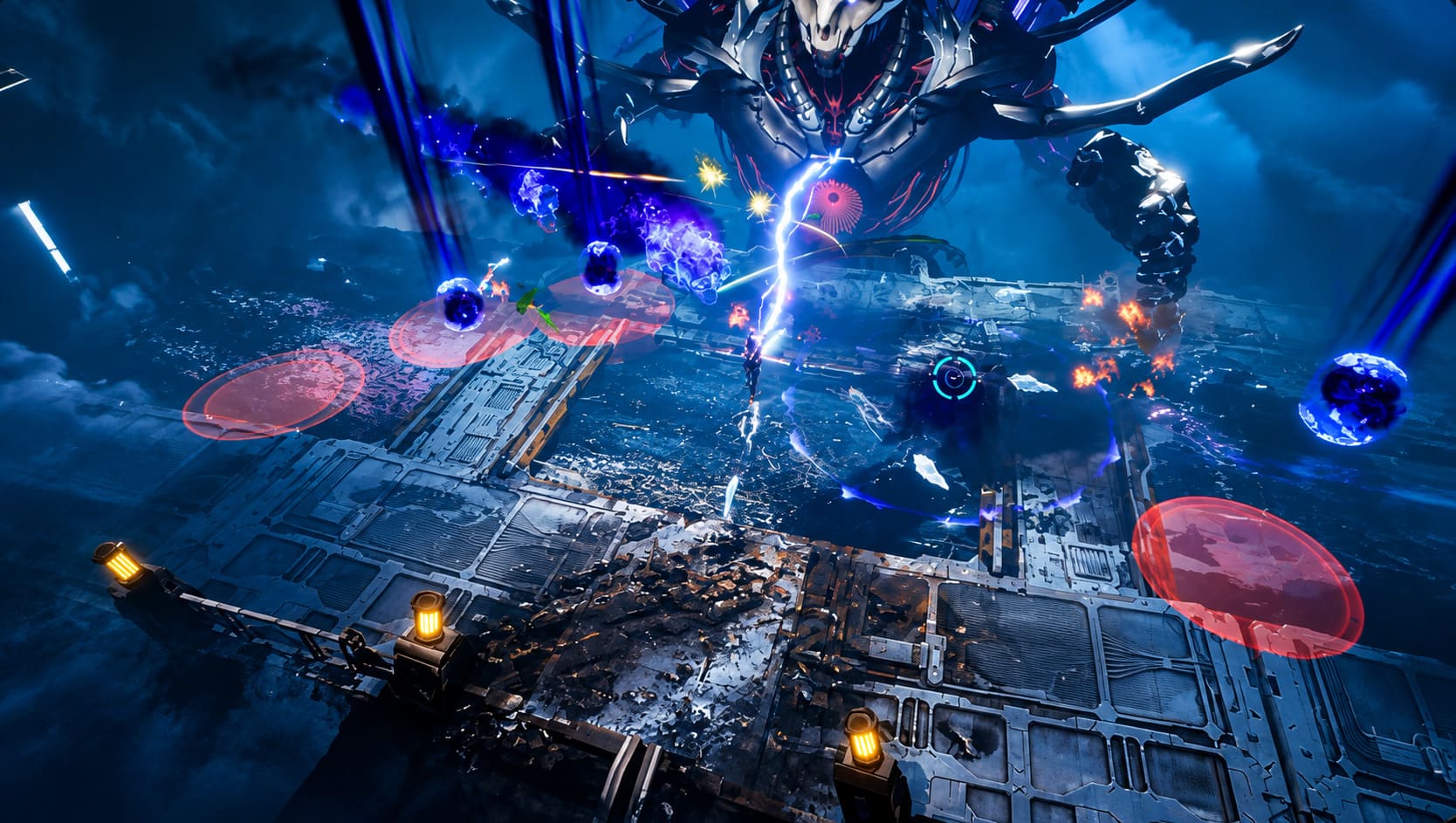
At first glance, R.I.P. looks like another member of the increasingly crowded survivor-like genre. You enter a dangerous area, enemies appear from every direction, your character automatically attacks, and the screen quickly becomes a spectacular mess of bullets, explosions, elemental effects, and monsters.
But the longer I played, the more obvious it became that the loot system is really the heart of the game.
Instead of relying almost entirely on temporary upgrades during a single run, R.I.P. puts much more emphasis on collecting permanent equipment. Powerful enemies and bosses can drop randomized gear with familiar rarity levels, eventually leading to Legendary items that can completely change how a build plays.
That distinction matters. In many survivor-likes, completing a run feels like starting from zero again afterward. Here, there is a much stronger feeling of building an actual character over time. Even when a run goes badly, there is usually something to take away from it—equipment, resources, currency, or another upgrade toward your next build.
For players who enjoy grinding for better gear, that progression loop can become dangerously addictive.

Steam Deck Verification Was a Major Turning Point
The Steam Deck experience wasn’t always this straightforward.
During the game’s earlier development period, Linux and Steam Deck players reportedly ran into several annoying problems. Some Proton configurations produced graphical issues, while cutscenes, menus, and level-up animations could occasionally fail to render correctly. Controller behavior also wasn’t always as polished as you’d expect from a game that works so naturally with a handheld layout.
For experienced Steam Deck users, the answer was often to experiment with alternative Proton versions, particularly GE-Proton builds. That’s hardly unusual for an Early Access PC game, but it did add unnecessary friction.
The situation changed considerably with the developers’ dedicated Steam Deck work. The major August 2026 adaptation update addressed several of those issues and helped the game earn its Steam Deck Verified status.
From a player’s perspective, that’s probably the most important change. You no longer need to approach R.I.P. as a technical experiment before you can simply sit down and play it.
The developers also worked on things that are easy to overlook when optimizing for handhelds:
- Better controller mappings
- Improved UI scaling
- Fixes for graphical presentation problems
- More appropriate Steam Deck configurations
- Better readability for menus and in-game information
- Improved navigation with physical controls
That last part is particularly important because R.I.P. contains considerably more menu management than its chaotic combat might initially suggest.
How R.I.P. Performs on Steam Deck
The good news is that R.I.P. is surprisingly comfortable on Steam Deck.
The game uses the familiar 1280×800 resolution on the Deck’s 16:10 display, and most normal gameplay doesn’t create serious performance problems. Early and mid-game encounters generally feel smooth, with 60 FPS being a realistic target when using sensible graphical settings.
For me, the interesting part isn’t the first few minutes of a run. Almost any reasonably optimized game can perform well when there are only a handful of enemies on screen.
The real test is what happens later.
Once the arena fills with enemies and the player starts combining multiple weapons, elemental effects, status effects, explosions, and other screen-filling abilities, the CPU and GPU have considerably more work to do. That’s when you can see performance moving into approximately the 45–55 FPS range, particularly during the most chaotic late-game encounters.
That isn’t necessarily a problem.
In fact, I would rather have a consistent 45 FPS than a game constantly bouncing between 60, 48, and 60 FPS. On Steam Deck, frame-time consistency often makes a bigger difference to how a game feels than the number displayed in the corner.
Recommended Steam Deck Settings
If you’re looking for a good balance between image quality, battery life, and consistency, I’d start with something like this:
| Setting | Recommended Approach |
|---|---|
| Resolution | 1280×800 |
| Graphics Preset | Medium–High |
| Target FPS | 60 for normal runs |
| Heavy Endgame | 45–50 FPS |
| Refresh Rate | Match FPS target |
| Battery Focus | Lower graphics and cap FPS |
| Controls | Twin-stick or assisted shooting |
For ordinary runs, I would stick with 60 FPS. Once you reach the kind of late-game chaos where the screen looks like someone dumped an entire fireworks factory onto it, switching the Deck to a 45Hz/45FPS or 50Hz/50FPS limit can make the experience feel noticeably more stable.
That’s one of my favorite little Steam Deck tricks in general. A stable lower frame rate often feels better than chasing a higher number the hardware can’t consistently maintain.
Battery Life Is Reasonable for a Game This Busy
Battery consumption is another area where R.I.P. does fairly well.
During less demanding early and mid-game sections, the game can sit in a relatively manageable power range, with roughly 11–14 watts depending on settings and the particular Steam Deck model. Actual battery life will obviously vary depending on brightness, volume, TDP configuration, background activity, and whether you’re using an LCD or OLED Deck.
The OLED model should provide more breathing room thanks to its larger battery and improved efficiency, while a more conservative FPS cap can further extend playtime.
If I’m playing something like this on the couch, I don’t necessarily need the absolute best graphics. R.I.P. is visually busy by design, so dropping a few settings isn’t going to destroy its presentation. I’d rather gain additional battery life and keep the frame rate predictable.
The UI Is Much Better Suited to Handheld Play Now
One of the things that surprised me most is how much difference the interface improvements make.
Loot-heavy games can be painful on a handheld. I’ve played plenty of PC games where the combat feels completely fine on Steam Deck, only for the inventory screen to make me reach for a monitor. Tiny item descriptions, cramped menus, and mouse-focused navigation can turn basic inventory management into a chore.
R.I.P.’s handheld improvements help avoid that problem.
Text has been enlarged in several important areas, including equipment information, mission details, notifications, and other progression screens. The developers also adjusted spacing so that longer pieces of text don’t collide with neighboring UI elements.
Right-stick scrolling is another small but extremely useful addition. Menus such as the Employee Manual and Artisan Reforge interface are much easier to navigate without constantly relying on the touchscreen or trackpads.
These sound like minor changes, but they’re exactly the kind of details that determine whether a game feels genuinely designed for Steam Deck or merely compatible with it.
Automatic Shooting or Full Twin-Stick Controls?
R.I.P. gives players some flexibility in how they approach combat.
The first option is an automated shooting style where your primary focus is movement. This is the traditional survivor-like approach: position yourself correctly, avoid incoming attacks, manipulate enemy groups, and let your weapons handle much of the offensive work.
It’s fantastic when you’re playing casually.
The alternative is a more traditional twin-stick setup, allowing you to control the direction of your attacks manually. I personally prefer having this option because it adds another layer of decision-making to combat.
There are situations where positioning isn’t enough. Being able to aim a weapon exactly where you want it can make a difference when dealing with particularly dangerous enemies or trying to exploit the behavior of certain weapons.
The nice thing is that neither approach feels like a pointless gimmick. They support slightly different play styles.
The Loot System Is Where R.I.P. Really Hooks You
The game’s progression is built around several systems that work together rather than simply giving you bigger numbers every few hours.
Artisan Reforge
The Artisan Reforge system lets you modify equipment attributes and chase better combinations. This is where the game’s ARPG influence becomes particularly obvious.
A weapon isn’t necessarily exciting simply because it has a high rarity. The interesting part is what its attributes allow you to build around.
A seemingly ordinary weapon can become much more interesting when its effects start interacting with elemental damage, explosions, chaining attacks, or other bonuses.
Divine Tech
Divine Tech provides a broader layer of permanent progression. Currency earned during gameplay can be invested into passive improvements that strengthen your character over time.
This gives unsuccessful runs a purpose. Even when you don’t find the perfect piece of equipment, you are still working toward a stronger overall account progression.
Void Spire
Then there’s Void Spire, which is essentially where the game starts asking how far you can push your favorite builds.
The mode allows players to preserve successful character setups and take them into an increasingly difficult tower environment. Enemy health and damage scale as you climb, while better rewards give you additional reasons to keep pushing.
This is the kind of endgame feature that can turn a game I expected to play for a few evenings into something I keep returning to weeks later.
Is R.I.P. – Reincarnation Insurance Program Worth Playing on Steam Deck?
After spending time with a lot of roguelites and ARPGs, I think R.I.P. works particularly well as a handheld game because its basic loop is so easy to understand while its progression systems give you plenty of reasons to continue.
The biggest selling point isn’t simply that it runs on Steam Deck. It’s that the game has enough depth to justify playing it there.
You can pick it up for a short session, complete a run, shut the Deck down, and come back later knowing there is still another piece of equipment to chase or another build to experiment with. At the same time, the Void Spire and deeper gear systems provide enough long-term progression for players who want something more substantial.
There are still performance dips when the game reaches its most ridiculous levels of visual chaos, but that’s hardly surprising for a bullet-heaven title. The important thing is that these situations can be managed with a sensible FPS cap, and the overall experience is much more polished than the early Steam Deck builds.
If you enjoy the loot progression of Diablo-style ARPGs mixed with the frantic combat of survivor-likes, R.I.P. – Reincarnation Insurance Program makes a convincing case for itself as a Steam Deck game.
For me, the biggest compliment I can give it is simple: it feels like a game I could leave installed on my Deck and keep coming back to whenever I want something fast, chaotic, and progression-heavy. The Steam Deck optimization removes much of the technical hassle that surrounded the earlier versions, while the deeper loot and endgame systems give the game considerably more staying power than its initial survivor-like appearance suggests.